































Table of Contents
- Key Points
- Generative AI in Education: An Overview
- Generative AI Tools for Educators
- Step-by-Step Guide: Creating AI-Enhanced Educational Materials
- Pricing and Accessibility of Generative AI Tools
- Pros and Cons of Generative AI in Education
- Core Features of Generative AI in Education
- Use Cases: Real-World Applications of Generative AI in Education
- FAQ
- Related Questions


Generative AI in Education: An Overview
What is Generative AI?
Generative AI refers to a class of artificial intelligence algorithms capable of generating new content, such as text, images, audio, and video. Unlike traditional AI that focuses on analysis and prediction, generative AI models learn from existing data to create entirely new outputs that resemble the data they were trained on. In the realm of education, this technology opens up unprecedented opportunities for creating personalized learning experiences and engaging educational materials.
Several key techniques drive generative AI:
- Generative Adversarial Networks (GANs): GANs involve two neural networks, a generator and a discriminator, competing against each other. The generator creates new data, while the discriminator evaluates its authenticity. This iterative process leads to highly realistic and creative outputs.
- Variational Autoencoders (VAEs): VAEs learn to encode data into a compressed latent space and then decode it to generate new samples. This method is particularly useful for creating variations of existing content while maintaining its core characteristics.
- Transformers: Transformer models excel at processing sequential data, such as text and audio. They use self-attention mechanisms to understand the context of words and phrases, enabling them to generate coherent and contextually relevant content.
The rise of generative AI is revolutionizing how educators approach content creation and delivery. By automating the generation of various educational resources, AI can free up educators' time for more strategic and personalized interactions with their students. Furthermore, the ability to create dynamic and engaging materials can lead to improved student engagement and comprehension.
The Rise of the Educreator
As Generative AI Tools become more accessible, a new breed of educator is emerging: the Educreator. These innovative teachers are not just consumers of educational content but active creators, leveraging AI to design custom learning experiences tailored to their students' unique needs and learning styles.
The Educreator embraces technology to amplify their teaching impact, fostering creativity, and personalized learning in ways never before possible. The skills needed to become a successful Educreator include:
- Prompt Engineering: Crafting effective prompts is crucial for guiding AI models to generate the desired content. Educreators need to learn how to articulate their needs clearly and experiment with different prompts to achieve optimal results.
- Multimedia Design: Understanding basic multimedia design principles enables Educreators to create visually appealing and engaging educational materials.
- Video Editing: Video content is incredibly effective for conveying complex information. Educreators can use video editing tools to create instructional videos, tutorials, and presentations.
- AI Tool Integration: Educreators need to be proficient in integrating various AI tools into their workflow, including image generators, Text-to-Speech synthesizers, and video editing platforms.
The Educreator is not meant to replace the traditional role of the teacher; rather, they augment their capabilities with the power of AI. This synergy allows for more dynamic, efficient, and personalized teaching.
Generative AI Tools for Educators
AI Image Generation Tools
AI image generation tools are transforming the way educators create visual aids and learning materials. These tools allow teachers to generate unique and engaging images from simple text prompts, saving time and resources. Here are some popular AI image generation platforms:
-
GenCraft: GenCraft is a visual generative AI Tool that allows users to create high-quality images and animations from text prompts. It's particularly useful for educators looking to create engaging visual content for their lessons.
-
DALL-E 2: Developed by OpenAI, DALL-E 2 is known for its ability to create highly detailed and imaginative images. Educators can use it to generate custom illustrations, diagrams, and visual representations of complex concepts.
-
Midjourney: Midjourney is another powerful AI Image Generator that produces stunning and artistic visuals. It's ideal for creating visually appealing materials that capture students' attention.
Crafting Effective Prompts: The key to successful AI image generation lies in crafting effective prompts. Here are some tips:
- Be Specific: Provide detailed descriptions of the desired image, including the subject, style, and composition.
- Use Keywords: Incorporate relevant keywords that will guide the AI model to generate accurate and relevant images.
- Experiment: Don't be afraid to experiment with different prompts to see what works best.
- Iterate: Refine your prompts based on the initial results to achieve the desired outcome.
For instance, an educator teaching about the water cycle could use the Prompt “Illustration of the water cycle with clouds, rain, and a clear blue sky in a cartoon style” to generate a visually engaging diagram. These images can then be incorporated into presentations, worksheets, or online learning modules.
Text-to-Speech Technologies
Text-to-Speech (TTS) technologies are invaluable tools for educators seeking to create accessible and engaging audio content. TTS allows teachers to convert written text into natural-sounding speech, making it easier to create audiobooks, podcasts, and narrated presentations. Some popular TTS platforms include:
- ElevenLabs: ElevenLabs is a leading TTS platform known for its realistic and expressive voices. Educators can use it to create high-quality audio content for their lessons.
- PlayHT: PlayHT offers a range of TTS voices and customization options, making it easy to create audio content that matches the tone and style of the lesson.
- Murf.ai: Murf.ai provides a user-friendly interface and a variety of AI voices for generating professional-sounding audio. It's ideal for creating narrated presentations, e-learning modules, and marketing materials.
Integrating TTS into Educational Materials: TTS can be integrated into various educational materials to enhance accessibility and engagement:
- Audiobooks: Convert textbooks and reading materials into audiobooks for students who prefer auditory learning or have reading difficulties.
- Narrated Presentations: Add narration to presentations to provide additional context and explanations.
- E-Learning Modules: Incorporate TTS into e-learning modules to create interactive and engaging learning experiences.
- Language Learning: Use TTS to provide pronunciation practice and listening comprehension exercises for language learners.
TTS not only caters to diverse learning preferences but also makes education more inclusive by accommodating students with visual impairments or reading challenges.
Video Editing Basics
Video editing skills are essential for creating engaging and informative video content for the classroom. With video becoming an increasingly popular medium for instruction, educators can use video editing tools to create tutorials, presentations, and interactive learning experiences. Some user-friendly video editing platforms include:
-
CapCut: CapCut is a free and intuitive video editing app that offers a wide range of features, including trimming, adding text, and applying effects. It's perfect for educators who are new to video editing.
-
iMovie: iMovie is a simple yet powerful video editing tool available on macOS and iOS devices. It offers a range of templates and effects that make it easy to create professional-looking videos.
-
Filmora: Filmora is a more advanced video editing platform that offers a wider range of features and customization options. It's ideal for educators who want to create more sophisticated video content.
Basic Video Editing Techniques: Here are some fundamental video editing techniques:
- Trimming: Remove unwanted footage to create a concise and focused video.
- Adding Text: Incorporate text overlays to provide additional information and context.
- Transitions: Use transitions to create smooth and seamless changes between scenes.
- Adding Music and Sound Effects: Enhance the video's impact by adding background Music and sound effects.
- Applying Effects: Use visual effects to add interest and engagement to the video.
With these basic video editing skills, educators can transform raw footage into polished and engaging learning materials that captivate their students' attention.
Use Cases: Real-World Applications of Generative AI in Education
Enhancing Language Learning
Generative AI can significantly enhance language learning by providing personalized pronunciation practice and listening comprehension exercises. For instance, TTS can be used to create audiobooks and narrated presentations in different languages, while AI image generators can create visual aids that illustrate vocabulary and grammar concepts.
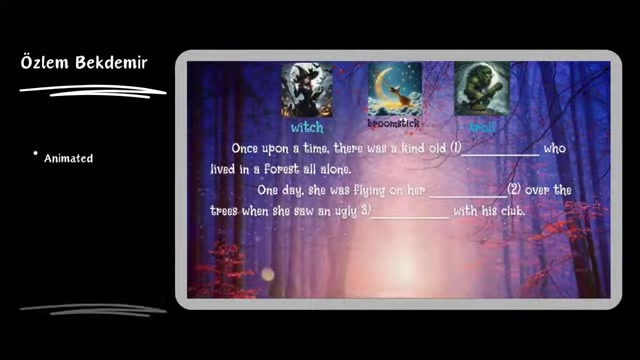
Some participants in the Course used AI to create interactive vocabulary tasks. Using the technology like the one from Özlem Bekdemir, participants could create engaging vocabulary tasks for English language learners.
Furthermore, text-to-speech tools help students improve their pronunciation. With instant feedback on their pronunciation, language learning becomes more effective and tailored to their needs.
Creating Engaging Multimedia Presentations
Educators can use AI image generators and video editing tools to create visually stunning and engaging multimedia presentations that capture students' attention and enhance learning outcomes. With AI, complex concepts can be presented in an easy-to-understand visual format.
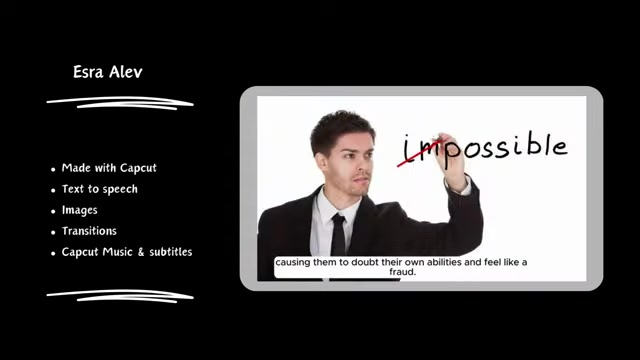
One participant, Esra Alev, used AI image generation for an Earth Day event, illustrating how AI could be used to create awareness and inspire action.
Additionally, video editing skills allow educators to create polished video content. By combining text, images, audio, and video, they can produce learning materials that suit multiple learning preferences and ensure a deeper understanding.
Developing Accessible Learning Materials
Generative AI can be used to create accessible learning materials for students with disabilities, such as visual impairments or reading difficulties. TTS can be used to convert text to speech, while AI image generators can create alt text descriptions for images.
By using these technologies, educators can create inclusive learning environments that cater to the diverse needs of all students.
Some course participants created listening comprehension materials with QR codes. Course participant, Ebrar Çalışkan, created listening comprehension material using multiple technologies.
Belgin Akçelik integrated Canva into the content, and Betül İkra Yıldırım put together a listening activity utilizing Canva and Visual AI.





Most people like
































Report
Please select a reason for reporting
- 13 Reasons to Switch from Snapchat to Text Messaging
- 7 Powerful Speech to Text Apps to Boost Productivity
- 10 Best Speech to Text Tools for Effortless Transcription
- 13 Free Tools to Easily Transcribe Audio to Text
- 15 Surprising Ways Google's Speech-to-Text Boosts Productivity
- 7 Best Free Online Audio to Text Transcription Tools
- 9 Tips to Transcribe Speech to Text Faster and Better
- 13 Best Speech to Text Software for Windows 10 in 2023
- 7 Tips for Choosing the Best Transcriber for Audio to Text
- 11 Reasons Why Dragon Speech-to-Text Apps are Game-Changers
- 6 Secrets to Enhance Your Speech to Text Transcription
- 6 Brilliant Ways to Boost Productivity with Talk-to-Text on Your MacBook
- 6 Ways Transcription Software Converts Audio to Text
- 8 Tips to Transcribe Speech to Text Like a Pro
- 6 Reasons IBM Watson Speech to Text is a Game-Changer
- 14 Powerful Ways Talk-to-Text Improves Your Workflow
- 12 Top Windows Speech-to-Text Software for Efficient Transcription
- 12 Game-Changing Benefits of Apple's Speech to Text Technology
- 9 Powerful Use Cases for AWS Speech to Text Technology
- 10 Easy Steps to Transcribe YouTube Videos to Text
- transcription audio en texte
- online audio transcription
- free audio file transcription
- free ai audio transcription
- audio transcription service
- audio transcription online free
- audio transcription free online
- audio to transcription software
- audio and transcript
- ai audio transcription free
- voice recording to text converter
- translate voice recording to text
- record voice to text
- audio recording to text converter
- voice recording and transcription
- chatgpt voice to text
- gmail voice to text
- speech to text reader
- speech to text ai free
- speech to talk
- How to Use AI Tools to Find Internal Linking Opportunities Across a Business Website
- Discover Your Perfect Haircut with AI Hairstyle Apps
- Free Reputation Calculator Tools: How They're Adapting to Score AI Visibility, Not Just Rankings
- Design Professional Flyers for Free on Your Phone
- Best Free Flyer Maker Apps for Android: Design Like a Pro
- How to Know If Your Business Is Ready for an AI Customer Service Agent
- Revolutionizing Storytelling: From Novels to Screenplays with AI
- Create Engaging Animated Explainer Videos with a Free AI Tool
- Stop Multi-Subscribing: Benchmark Top AI Visual Models in One Canvas
- Best Seedance 2.5 API Provider: Every Price on the Market, Checked at Source
- Top AI Social Media Management Tools: Automate Your Content Strategy
- Free AI Text to Video Generator: Create Stunning Videos from Text
- Discover 17 ChatGPT Alternatives: A Comprehensive Comparison
- Character.AI vs. Janitor AI: Which AI Chat Platform Reigns Supreme?
- Top Virtual Assistant Companies in 2026: Reviews, Pricing, and Plans Compared
- Unveiling FaceCheck.ID: Revolutionizing Reverse Image Searches with AI
- 11 Best AI Dialers in 2026: Features, Pricing, Pros and Cons
- How I Direct Consistent AI Clips: A Hands-On Guide to Multi-Model Generation
- A Realistic Review of the Photo Generator Image Tool
- Playwright MCP Server: Automated Web Testing with Agent Mode

Copyright ©2026 toolify