Sponsored by
PostMcpAi



AI Response Generator - Chrome Extension
4.7
35 Reviews
0 Saved
Introduction:
Chrome extension for generating quick, tailored replies across various platforms.
Updated Time
Mar 09 2026
Active Users
5.0K
Browser Extension
Freemium
AI Response GeneratorAI Email GeneratorAI Message GeneratorAI Letter Writer 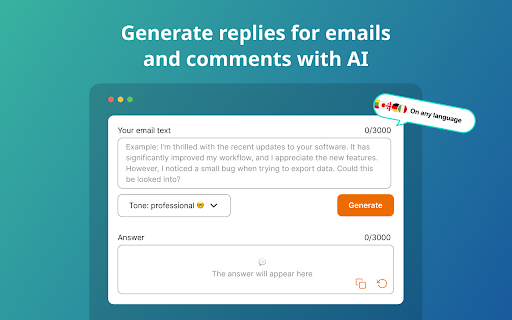

APIMart
AI API, 99.9% SLA. Your AI, Always On.

YouArt
Agentic Creative OS

Agentkit
AI agents trained on business content for support, lead capture, and automation

PostMcpAi
AI-powered social media publishing across seven networks

Tripo AI
AI-powered 3D model generator from images and text.

AI Response Generator AI Chrome Extension Information
What is AI Response Generator ai chrome extension?
The AI Response Generator is a Chrome extension designed to help users create quick, tailored replies across various platforms. It automates the process of writing responses for emails, chats, discussions, and more, enhancing productivity and saving time.
How to use AI Response Generator ai chrome extension?
1. Install the Extension: Click “Add to Chrome.” 2. Launch the Extension: Click the app icon in your browser toolbar. 3. Enter Your Text: Input the text you need a reply for. 4. Submit: Hit the submit button.
AI Response Generator ai chrome extension's Core Features
AI generated responses
Customizable tones
AI email reply
Goal setting
AI letter generator
AI Response Generator ai chrome extension's Use Cases
#1
Generate professional email responses
#2
Enhance chat interactions with quick replies
#3
Participate in online forums and discussions
#4
Manage customer support queries
#5
Respond to sales inquiries
#6
Keep up with personal messages
#7
Manage comments and direct messages for content creation
FAQ from AI Response Generator
How does it work?
How do I get the best results?
Is response AI available only in English?
Is my data secure?
Can I use it for free?
Skild Art
一站式 AI 视觉创作平台,为商业营销而生
Try Now
AD
Happy Shrimp Music
AI platform for generating complete songs from text prompts
Try Now
AD
Analytic of AI Response Generator AI Chrome Extension
AI Response Generator Active Users
Total Installed User
5.0K
Alternative of AI Response Generator AI Chrome Extension
Browser Extension
Contact for Pricing
AI Response GeneratorAI SalesAI Knowledge BaseAI Project Management
Open site
567 users
Open site
65 users