


AnyLanguage.ai
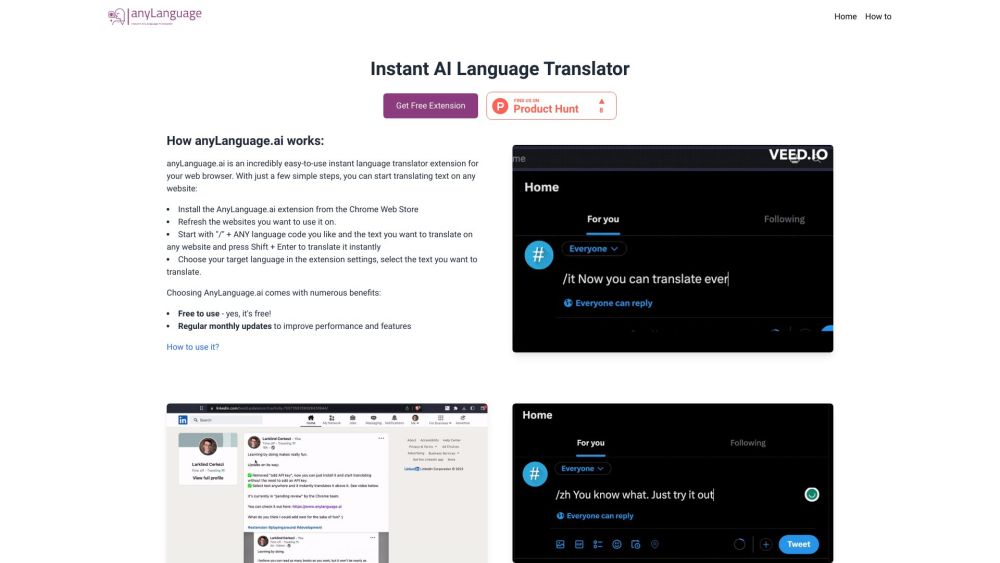


What is AnyLanguage.ai?
AnyLanguage.ai is an instant AI language translator extension for your browser. It allows you to translate text on any website by selecting the text and choosing your target language in the extension settings. You can also translate by starting with "/" + ANY language code and the text you want to translate, then pressing Shift + Enter.
How to use AnyLanguage.ai?
1. Install the AnyLanguage.ai extension from the Chrome Web Store. 2. Refresh the websites you want to use it on. 3. Translate by starting with "/" + ANY language code and the text you want to translate on any website and press Shift + Enter to translate it instantly. 4. Alternatively, choose your target language in the extension settings, select the text you want to translate.
AnyLanguage.ai's Core Features
Instant AI language translation on any website
AnyLanguage.ai's Use Cases
Translate text on any website to your target language.
FAQ from AnyLanguage.ai
How do I translate text on a website using AnyLanguage.ai?
Is AnyLanguage.ai free to use?
AnyLanguage.ai Support Email & Customer service contact & Refund contact etc.
Here is the AnyLanguage.ai support email for customer service: [email protected] .
AnyLanguage.ai Login
AnyLanguage.ai Login Link: https://www.anylanguage.ai/account
AnyLanguage.ai Reviews (0)
Analytic of AnyLanguage.ai
AnyLanguage.ai Website Traffic Analysis
AnyLanguage.ai Launch embeds
Use website badges to drive support from your community for your Toolify Launch. They're easy to embed on your homepage or footer.



More Content About AnyLanguage.ai

14 Essential Browser Extensions to Supercharge Your Web Experience
By Sebastian on May 18 2024
Unlock the Web's Potential: Discover 14 Essential Browser Extensions!
Social Listening