Sponsored by
Crazyrouter



ChatGPT Chrome Extension - Chrome Extension
2.5
4 Reviews
0 Saved
Introduction:
ChatGPT access directly from Chrome's address bar.
Updated Time
Mar 05 2023
Active Users
2.0K

Nextbrowser
Automate logins, scraping, outreach, and more — just by chatting with AI.

Clico
AI assistant that brings writing, summarization, and search to every browser text box.

Crazyrouter
The enterprise-grade, cost-effective AI API gateway that provides one API key to access 300+ AI models through OpenAI-compatible endpoints, with optimized routing for lower costs and easier integration.

APIMart
AI API, 99.9% SLA. Your AI, Always On.Most models offer cost savings of 20–60%; nanobanana pro api costs only 0.03.

Designkit Free Background Remover
Designkit offers free AI background removal for up to 100 images daily, with batch processing, custom backgrounds, and resizing.

ChatGPT Chrome Extension AI Chrome Extension Information
What is ChatGPT Chrome Extension ai chrome extension?
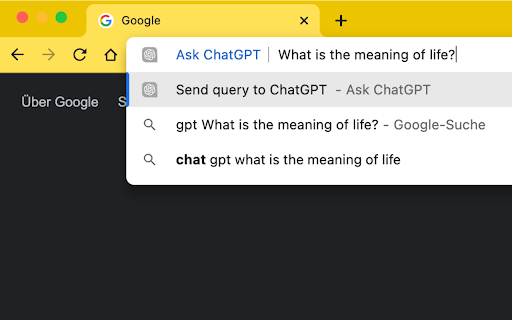
This Chrome Extension brings the power of ChatGPT right into your Chrome OmniBar! It allows you to quickly access ChatGPT by typing 'gpt' followed by a space in the address bar, then entering your query. The extension automatically redirects you to chat.openai.com, inserts your query, and submits it.
How to use ChatGPT Chrome Extension ai chrome extension?
1. Open a new Tab. 2. Type: 'gpt', followed by a space (or TAB if 'gpt' is already a shortcut). 3. Insert any query and press enter. 4. You will be redirected to chat.openai.com and your query will be submitted automatically!
ChatGPT Chrome Extension ai chrome extension's Core Features
Quick access to ChatGPT from the Chrome OmniBar
Automatic query insertion and submission
Login detection and redirection
ChatGPT Chrome Extension ai chrome extension's Use Cases
#1
Quickly ask ChatGPT questions without navigating to the website
#2
Efficiently generate text, code, or other content using ChatGPT
#3
Directly access the ChatGPT login page if not already logged in
FAQ from ChatGPT Chrome Extension
How do I use the extension?
What if I already have a shortcut called 'gpt'?
What happens if I'm not logged into ChatGPT?
Vmake Labs Video Enhancer
Vmake Labs Video Enhancer uses AI to improve video quality, restore details, reduce blur, and upscale videos to 8K.
Try Now
AD
seedrouter
One API for image, video, language, and audio AI models
Try Now
AD
Analytic of ChatGPT Chrome Extension AI Chrome Extension
ChatGPT Chrome Extension Active Users
Total Installed User
2.0K