Sponsored by
APIMart



Carol for Chrome - Chrome Extension
0
0 Reviews
0 Saved
Introduction:
Browser extension for easy ChatGPT access.
Updated Time
Nov 15 2023
Active Users
4

iMean AI Trip Planner
AI trip planner that creates personalized itineraries, finds cheap flights and hotels, and helps you plan an entire trip in one chat.

Free
Flowith 2.0
AI Creation Workspace for knowledge transformation and collaboration with AI models.

Pexo
Pexo is the AI video partner that meets you where you are.

PaioClaw
Managed, secure platform for deploying and automating OpenClaw AI assistants in 60 seconds.

iDox.ai Guardrail
Real-time AI guardrails that prevent sensitive data exposure in AI tools, copilots, and autonomous AI agents.

Carol for Chrome AI Chrome Extension Information
What is Carol for Chrome ai chrome extension?
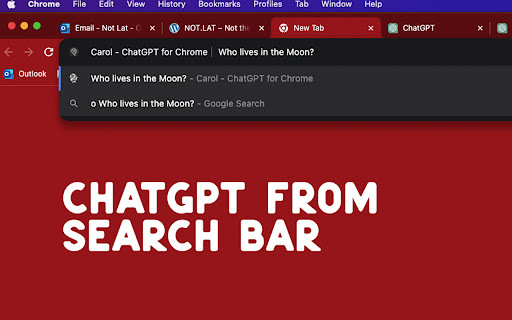
Carol for Chrome is a browser extension that provides easy access to ChatGPT. It allows users to interact with ChatGPT directly from their browser without needing to sign up. It offers quick access via the search bar, a universal shortcut, and contextual interaction through right-clicking selected text.
How to use Carol for Chrome ai chrome extension?
Use 'O' before your question in the search bar, use CTRL+SHIFT+O (Windows) or CMD+SHIFT+O (Mac) for a new tab, or right-click selected text to send it to ChatGPT.
Carol for Chrome ai chrome extension's Core Features
Quick ChatGPT access via search bar
Universal ChatGPT shortcut
Easy contextual interaction
Carol for Chrome ai chrome extension's Use Cases
#1
Quickly launch ChatGPT conversations from the search bar.
#2
Open a new ChatGPT tab from anywhere with a keyboard shortcut.
#3
Send selected text from a webpage to ChatGPT for context-specific insights.
FAQ from Carol for Chrome
Do I need to sign up to use Carol for Chrome?
How do I launch ChatGPT from the search bar?
What is the keyboard shortcut to open a new ChatGPT tab?
How do I send text from a webpage to ChatGPT?
Auditfyy
AI-powered white-label SEO audit software with Google integrations for digital agencies.
Try Now
AD
ezsub
Unbeatable Price! Get ChatGPT Plus for only $12.95 with NO credit card required. Smooth local payments for global users.
Try Now
AD
Analytic of Carol for Chrome AI Chrome Extension
Carol for Chrome Active Users
Total Installed User
4 (-1)
