


CashKaka
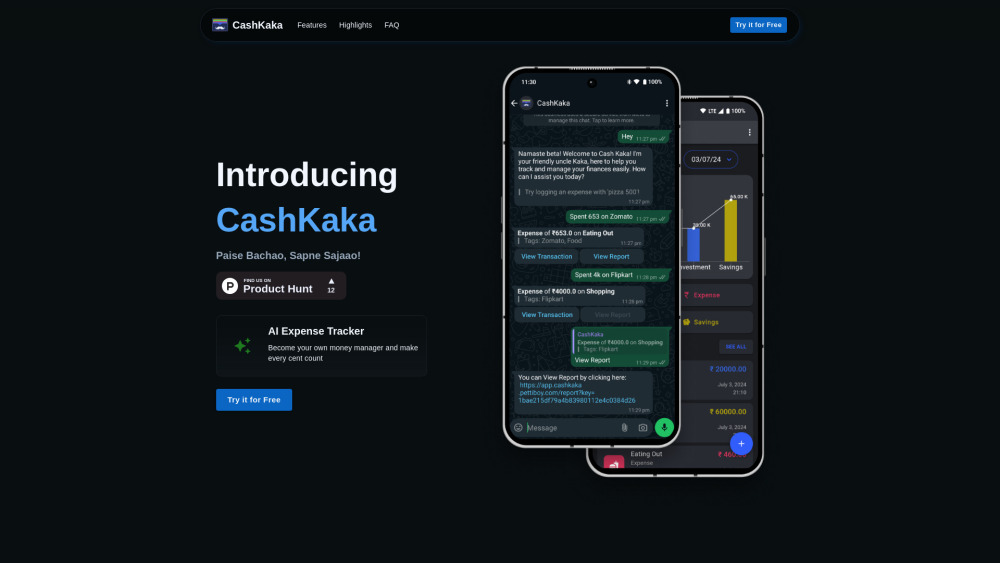


What is CashKaka?
CashKaka is an AI Expense Tracker that uses WhatsApp to seamlessly track transactions, savings, investments, and expenses. It generates detailed reports effortlessly, helping users stay on top of their finances. It simplifies expense tracking by allowing users to log expenses via WhatsApp messenger, catering to non-tech-savvy individuals.
How to use CashKaka?
To start using CashKaka, fill out the early access form. Once signed up, you'll receive instructions on how to add CashKaka to your WhatsApp contacts and start interacting. Log expenses by texting or sending an audio message with the expense details.
CashKaka's Core Features
Expense Tracking via WhatsApp
Savings and Investments Tracking
Financial Reports Generation
AI-powered Expense Understanding
CashKaka's Use Cases
Tracking daily expenses via WhatsApp
Generating monthly financial reports
Monitoring savings and investments growth
Budget management
FAQ from CashKaka
How do I start using CashKaka?
How do I log an expense?
How to generate financial report with CashKaka?
Need help?
CashKaka Support Email & Customer service contact & Refund contact etc.
Here is the CashKaka support email for customer service: [email protected] . More Contact, visit the contact us page(mailto:[email protected])
CashKaka Company
CashKaka Company name: CashKaka .
CashKaka Sign up
CashKaka Sign up Link: https://wa.me/918169955981?text=Hello%20CashKaka!
CashKaka Whatsapp
CashKaka Whatsapp Link: https://wa.me/917208332129?text=Hi%20CashKaka!
CashKaka Reviews (0)
Analytic of CashKaka
CashKaka Website Traffic Analysis
Geography
Top 1 Regions

CashKaka Launch embeds
Use website badges to drive support from your community for your Toolify Launch. They're easy to embed on your homepage or footer.



Alternative of CashKaka

 75.18%
Social Listening