Sponsored by
Vmake Labs Video Enhancer



ChatGPT Clipper - Chrome Extension
4.5
2 Reviews
0 Saved
Introduction:
Extension for copying and organizing ChatGPT conversations.
Updated Time
Apr 14 2023
Active Users
37

iMean AI Trip Planner
AI trip planner that creates personalized itineraries, finds cheap flights and hotels, and helps you plan an entire trip in one chat.

Free
Agentkit
AI agents trained on business content for support, lead capture, and automation

APIMaster
GPT up to 95% off + $20 trial. Fingerprint-verified APIs. Low-cost and stable.

PoYo.AI
High concurrency. Stable AI API. Better pricing.

Triple Whale
Agent-powered intelligence platform for ecommerce brands to drive profitable growth.

ChatGPT Clipper AI Chrome Extension Information
What is ChatGPT Clipper ai chrome extension?
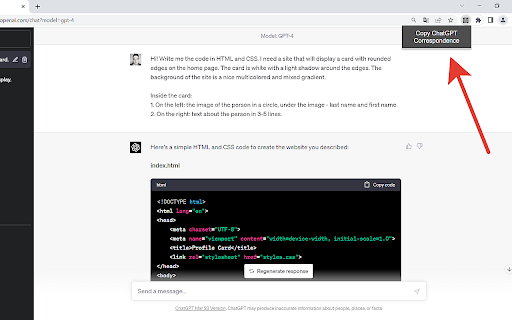
ChatGPT Clipper is a lightweight extension designed to copy entire chat conversations from ChatGPT with a single click. It intelligently separates ChatGPT-generated messages from human-generated messages, creating neat and organized transcripts. It is perfect for work, school, or personal use on OpenAI's ChatGPT platform.
How to use ChatGPT Clipper ai chrome extension?
Install the ChatGPT Clipper extension from your browser's extension store. Once installed, navigate to a ChatGPT conversation. Click the extension icon to copy the entire conversation, with messages neatly separated by origin (ChatGPT or human). Paste the copied transcript into your desired document or application.
ChatGPT Clipper ai chrome extension's Core Features
One-click copying of entire ChatGPT conversations
Intelligent separation of ChatGPT and human-generated messages
Neat and organized transcripts
ChatGPT Clipper ai chrome extension's Use Cases
#1
Creating organized records of ChatGPT conversations for work, school, or personal use.
FAQ from ChatGPT Clipper
What does ChatGPT Clipper do?
Is ChatGPT Clipper free to use?
Anna For Creators
The best AI chat bot that chats and sells on OnlyFans 24/7 for models and agencies. 0% commission.
Try Now
AD
Teammates.ai
AI-powered customer service, sales, and lead generation solutions.
Try Now
AD
Analytic of ChatGPT Clipper AI Chrome Extension
ChatGPT Clipper Active Users
Total Installed User
37
