Sponsored by
AdsCreator.com



ChatGPT Rewriter - Chrome Extension
2
2 Reviews
0 Saved
Introduction:
Chrome extension to rewrite text or ask questions using ChatGPT.
Updated Time
May 04 2023
Active Users
1000

UltraHumanizer.ai
Free AI tool for making machine-written text sound more natural

Free
ThumbnailCreator.com
AI tool for creating stunning YouTube thumbnails quickly.

APIMart
AI API, 99.9% SLA. Your AI, Always On.Most models offer cost savings of 20–60%; nanobanana pro api costs only 0.03.

Vmake Labs Video Enhancer
Vmake Labs Video Enhancer uses AI to improve video quality, restore details, reduce blur, and upscale videos to 8K.

AdsCreator.com
AI Ad Creation Tool - Just Paste your Website URL & get Professional AI Ads

ChatGPT Rewriter AI Chrome Extension Information
What is ChatGPT Rewriter ai chrome extension?
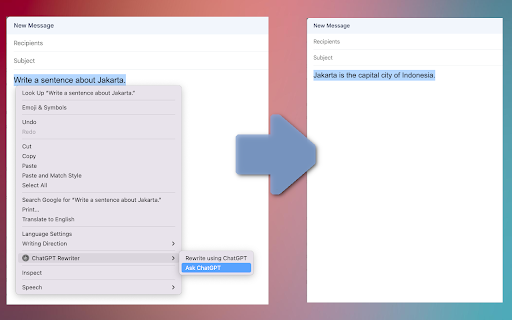
This Chrome extension enables you to enhance and refine your text using ChatGPT. It allows users to rewrite selected text or ask ChatGPT questions directly from their browser.
How to use ChatGPT Rewriter ai chrome extension?
1. Select any editable text in your browser. 2. Look for the ChatGPT Rewriter options. 3. Select "Rewrite using ChatGPT" if you want to rewrite the text. 4. Select "Ask ChatGPT" if you want to ask a question. 5. The answer will replace your text. A loading indicator will appear on the upper right-hand corner of the page while the text is being processed. To utilize this extension, you must have a chatGPT account. Once your account is established, the extension will guide you on how to generate and configure the API keys.
ChatGPT Rewriter ai chrome extension's Core Features
Rewrite selected text using ChatGPT
Ask ChatGPT questions directly from the browser
API key configuration guidance
ChatGPT Rewriter ai chrome extension's Use Cases
#1
Rewriting articles for improved clarity and style
#2
Generating answers to questions directly within a webpage
#3
Refining written content for professional communication
FAQ from ChatGPT Rewriter
Do I need a ChatGPT account to use this extension?
How do I rewrite text using the extension?
How do I ask ChatGPT a question?
Agentkit
AI agents trained on business content for support, lead capture, and automation
Try Now
AD
PostMcpAi
AI-powered social media publishing across seven networks
Try Now
AD
Analytic of ChatGPT Rewriter AI Chrome Extension
ChatGPT Rewriter Active Users
Total Installed User
1000 (5)