Sponsored by
APIMart



ChatGPT Visioner - Chrome Extension
5
4 Reviews
0 Saved
Introduction:
Chrome plugin for integrating screenshots into ChatGPT conversations for analysis and accurate responses.
Updated Time
Sep 25 2026
Active Users
254

iMean AI Trip Planner
AI trip planner that creates personalized itineraries, finds cheap flights and hotels, and helps you plan an entire trip in one chat.

Free
iDox.ai Guardrail
Real-time AI guardrails that prevent sensitive data exposure in AI tools, copilots, and autonomous AI agents.

Auditfyy
AI-powered white-label SEO audit software with Google integrations for digital agencies.

PaioClaw
Managed, secure platform for deploying and automating OpenClaw AI assistants in 60 seconds.

Flowith 2.0
AI Creation Workspace for knowledge transformation and collaboration with AI models.

ChatGPT Visioner AI Chrome Extension Information
What is ChatGPT Visioner ai chrome extension?
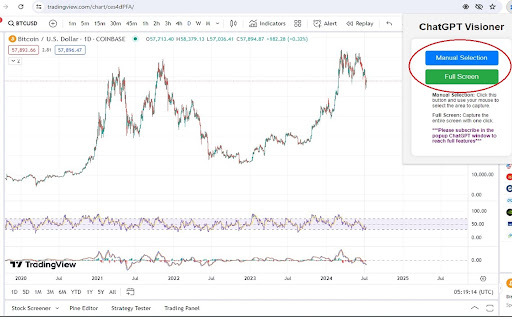
ChatGPT Visioner is a Chrome plugin that enhances browsing and productivity by capturing webpage screenshots and integrating them into ChatGPT conversations. It allows users to input prompts, which are automatically stored and retrieved, enabling ChatGPT to analyze the screenshot content and provide accurate responses. It processes both image content and text within images, making it suitable for text operations, chart analysis, and more.
How to use ChatGPT Visioner ai chrome extension?
Install the ChatGPT Visioner Chrome plugin. Capture a screenshot of the active webpage using manual selection or full-screen capture. Input a prompt, which is automatically saved. The plugin sends the screenshot and prompt to ChatGPT for analysis and response. Review and refine the response as needed.
ChatGPT Visioner ai chrome extension's Core Features
Screenshot capture and integration with ChatGPT
Prompt input and management
Automatic prompt saving and retrieval
Conversation saving to Word files
ChatGPT Visioner ai chrome extension's Use Cases
#1
Analyzing stock and cryptocurrency charts
#2
Performing extensive text operations on images
#3
Extracting information from webpage screenshots
FAQ from ChatGPT Visioner
What is ChatGPT Visioner?
Do I need a subscription to use ChatGPT Visioner?
Can ChatGPT Visioner analyze text within images?
Maxworker.ai
Max is an AI coworker for your team inside Slack. He connects to 25+ essential work tools today, with 3,000+ tools coming soon, and turns your team’s context into ready-to-review work. Fixed price, no surprise.
Try Now
AD
ezsub
Unbeatable Price! Get ChatGPT Plus for only $12.95 with NO credit card required. Smooth local payments for global users.
Try Now
AD
Analytic of ChatGPT Visioner AI Chrome Extension
ChatGPT Visioner Active Users
Total Installed User
254 (19)
Alternative of ChatGPT Visioner AI Chrome Extension
Website
Freemium
AI AssistantLarge Language Models (LLMs)AI Social MediaAI Writing AssistantsAI Cover Letter GeneratorAI Social Media Post GeneratorAI Text GeneratorAI Proofreading
Open site
--
Mail (0.00%)
GenAi (0.00%)
Direct (0.00%)
Open site
2.0K users