


GetProspect


What is GetProspect?
GetProspect is a LinkedIn email finder tool that helps users find accurate business email addresses in seconds. It offers features like email finding, bulk email finding, and CRM contact management software to help sales teams, founders, recruiters, and marketers generate leads and manage contacts effectively.
How to use GetProspect?
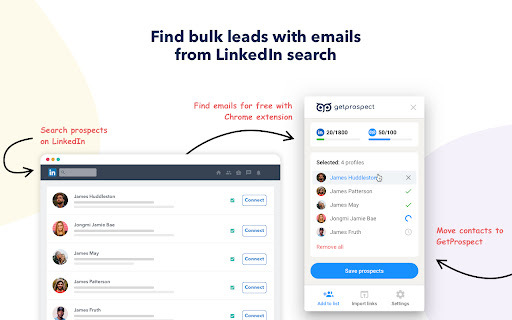
Install the GetProspect Chrome extension, go to any LinkedIn profile, and click the «Get email» button. Alternatively, search on LinkedIn or Sales Navigator, click «Select all» → «Save prospects» to get multiple leads with emails.
GetProspect's Core Features
Email Finder
Bulk Email Finder
Email Finder by Name and Domain
CRM Contact Management Software
GetProspect's Use Cases
Find email addresses of LinkedIn connections.
Save leads with emails in bulk from Sales Navigator lead lists.
Extract emails from websites.
FAQ from GetProspect
Can I use GetProspect email finder extension for free?
How to find email addresses on LinkedIn?
Can I find email address owner with GetProspect?
How can I use email extractor software for business?
Can I extract emails from websites by GetProspect?
Which payment methods can I use for GetProspect subscription?
How to cancel my email finder subscription?
GetProspect Support Email & Customer service contact & Refund contact etc.
More Contact, visit the contact us page(https://www.getprospect.com/features/support)
GetProspect Company
GetProspect Company name: .
GetProspect Company address: .
More about GetProspect, Please visit the about us page(https://www.getprospect.com/about).
GetProspect Login
GetProspect Login Link: https://app.getprospect.com/login?lang=en
GetProspect Sign up
GetProspect Sign up Link: https://www.getprospect.com/start-free
GetProspect Pricing
GetProspect Pricing Link: https://www.getprospect.com/pricing
GetProspect Facebook
GetProspect Facebook Link: https://www.facebook.com/getprospect
GetProspect Youtube
GetProspect Youtube Link: https://www.youtube.com/user/getprospect
GetProspect Linkedin
GetProspect Linkedin Link: https://www.linkedin.com/company/getprospect
GetProspect Instagram
GetProspect Instagram Link: https://www.instagram.com/getprospect
GetProspect Pinterest
GetProspect Pinterest Link: https://www.pinterest.com/getprospect
GetProspect Reviews (0)
GetProspect Pricing
Starting Price
$49/month
Pricing beginning with 49$/month
For the latest pricing, please visit this link: https://www.getprospect.com/pricing
GetProspect Launch embeds
Use website badges to drive support from your community for your Toolify Launch. They're easy to embed on your homepage or footer.



Alternative of GetProspect


 100.00%