Sponsored by
iMean AI Trip Planner



Grab 'n Tag - Chrome Extension
3.5
4 Reviews
0 Saved
Introduction:
Browser extension for batch image downloading with tag-based naming.
Updated Time
Sep 30 2016
Active Users
82

CalBye
AI-powered nutrition app for instant calorie tracking and personalized diet coaching via meal photos.

fridgesnap.AI
AI tool turning fridge photos into chef-crafted recipes to save money and reduce waste.

iMean AI Trip Planner
AI trip planner that creates personalized itineraries, finds cheap flights and hotels, and helps you plan an entire trip in one chat.

Free
APIMaster
GPT up to 95% off + $20 trial. Fingerprint-verified APIs. Low-cost and stable.

APIMart
AI API, 99.9% SLA. Your AI, Always On.

Grab 'n Tag AI Chrome Extension Information
What is Grab 'n Tag ai chrome extension?
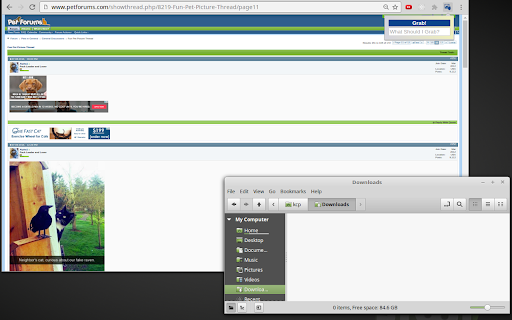
Grab 'n Tag is a browser extension that allows users to batch download images from a webpage and automatically name them based on a search tag. It utilizes an Artificial Neural Network (ANN) to analyze images and identify those that match the specified tag, making it easier to download relevant images without manual clicking and renaming.
How to use Grab 'n Tag ai chrome extension?
1. Navigate to a webpage with images. 2. Click the Grab 'n Tag icon. 3. Enter a search tag (e.g., 'dog') or leave blank for all images. 4. Click 'Grab!' or press Enter to download and name images.
Grab 'n Tag ai chrome extension's Core Features
Batch image downloading
Tag-based image naming
Image analysis using an Artificial Neural Network (ANN)
Non-intrusive interface
Grab 'n Tag ai chrome extension's Use Cases
#1
Downloading all images of a specific subject (e.g., 'cars') from a website.
#2
Downloading all images on a page without manual selection.
FAQ from Grab 'n Tag
How do I use Grab 'n Tag?
What if I want to download all images on the page?
What image recognition API does Grab 'n Tag use?
PoYo.AI
High concurrency. Stable AI API. Better pricing.
Try Now
AD
YouArt
Agentic Creative OS
Try Now
AD
Analytic of Grab 'n Tag AI Chrome Extension
Grab 'n Tag Active Users
Total Installed User
82 (-1)
Alternative of Grab 'n Tag AI Chrome Extension
Website
Freemium
Contact for Pricing
AI Image RecognitionAI Photo EditorAI PhotographyAI Productivity Tools
Open site
 57.48%
--
57.48%Direct (38.64%)
SearchOrganic (32.94%)
Referrals (9.92%)