Sponsored by
PoYo.AI



Image Prompter - Chrome Extension
4
4 Reviews
0 Saved
Introduction:
Visual prompting tool for Midjourney to generate AI image prompts easily.
Updated Time
Mar 05 2025
Active Users
1000

Music Prompt Studio
AI tool for creating structured music prompts and generating songs

APIMart
AI API, 99.9% SLA. Your AI, Always On.

APIMaster
GPT up to 95% off + $20 trial. Fingerprint-verified APIs. Low-cost and stable.

PoYo.AI
High concurrency. Stable AI API. Better pricing.

iMean AI Trip Planner
AI trip planner that creates personalized itineraries, finds cheap flights and hotels, and helps you plan an entire trip in one chat.

Free
Image Prompter AI Chrome Extension Information
What is Image Prompter ai chrome extension?
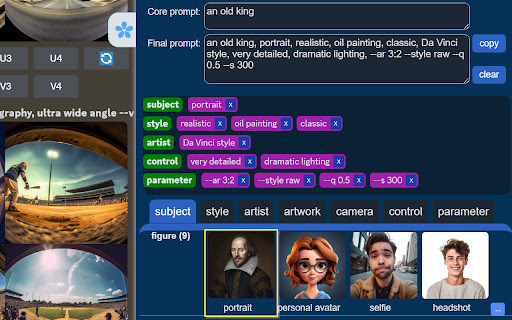
Image Prompter is a visual prompting tool designed for Midjourney, an AI image generation platform. It helps users generate prompts by clicking on categorized preset prompts, including Subject, Style, and Parameter, without needing to memorize them. This tool aims to fasten prompt engineering efficiently by providing a user-friendly interface and a wide range of commonly used prompts.
How to use Image Prompter ai chrome extension?
1. Install the Image Prompter extension. 2. Open Midjourney workspace. 3. Open Image Prompter. 4. Input a core prompt. 5. Select prompts by clicking on Subject, Style, and Parameter samples. 6. Copy the final prompt and paste it into Midjourney to generate the image.
Image Prompter ai chrome extension's Core Features
Generate prompts by clicking on sample images.
Categorized prompts for AI drawing (Subject, Style, Parameter).
100+ preset prompts for AI drawing.
Image Prompter ai chrome extension's Use Cases
#1
Quickly generate complex prompts for Midjourney without memorizing syntax.
#2
Explore different styles and parameters to refine AI-generated images.
#3
Efficiently create prompts for various subjects, styles, and rendering parameters.
FAQ from Image Prompter
What is Image Prompter?
How do I use Image Prompter?
What categories of prompts are available?
YouArt
Agentic Creative OS
Try Now
AD
PostMcpAi
AI-powered social media publishing across seven networks
Try Now
AD
Analytic of Image Prompter AI Chrome Extension
Image Prompter Active Users
Total Installed User
1000