Sponsored by
Vmake Labs Video Enhancer



Mail Composition Assist - Chrome Extension
5
5 Reviews
0 Saved
Introduction:
A tool to reduce email composition time in Gmail and Outlook using GPT-3.5.
Updated Time
Nov 18 2023
Active Users
87

Teammates.ai
AI-powered customer service, sales, and lead generation solutions.

Mailmodo AI
Complete Email Marketing Automation With AI Agents

Demi AI
Proactive AI assistant for sales professionals to automate emails, scheduling, and deal prioritization.

Raccoon AI
The AI Coworker for Apps, Research, Docs & Everything Else. Raccoon AI is a collaborative AI agent and workspace for getting real work done. You describe what you need and build it together with an AI agent that has its own computer, terminal, browser, and internet. You see every thought, every file it creates, every decision it makes. You steer when it drifts. You ship when it's right. Deploy web apps. Run deep research. Analyze data. Create pitch decks, videos, images, documents and more.

Free
APIMart
AI API, 99.9% SLA. Your AI, Always On.Most models offer cost savings of 20–60%; nanobanana pro api costs only 0.03.

Mail Composition Assist AI Chrome Extension Information
What is Mail Composition Assist ai chrome extension?
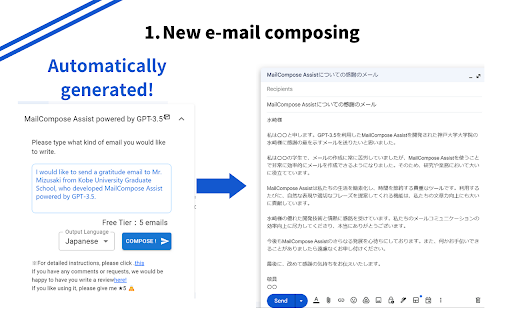
Mail Composition Assist is a tool designed to reduce the time spent composing emails in Gmail and Outlook. It helps users avoid worrying about honorific expressions and typical email expressions that vary across cultures. It offers two main functions: creating new emails and creating reply emails, both powered by GPT-3.5.
How to use Mail Composition Assist ai chrome extension?
To create a new email, click the 'Create New Email' button, fill in the desired email content in the bottom left corner, and click the button. To create a reply, drag and drop the text you want to reply to and click the 'Reply' button. See https://onl.sc/TSMG4M8 for more details.
Mail Composition Assist ai chrome extension's Core Features
Create New Mail: Automatically generates new emails based on user input.
Create Reply Mail: Generates reply messages based on selected text.
Mail Composition Assist ai chrome extension's Use Cases
#1
Quickly generate professional emails in Gmail and Outlook.
#2
Efficiently create replies to existing emails.
FAQ from Mail Composition Assist
How do I create a new email?
How do I create a reply email?
How long does it take to create an email?
AdsCreator.com
AI Ad Creation Tool - Just Paste your Website URL & get Professional AI Ads
Try Now
AD
Vmake Labs Video Enhancer
Vmake Labs Video Enhancer uses AI to improve video quality, restore details, reduce blur, and upscale videos to 8K.
Try Now
AD
Analytic of Mail Composition Assist AI Chrome Extension
Mail Composition Assist Active Users
Total Installed User
87 (-12)
Alternative of Mail Composition Assist AI Chrome Extension
Open site
13 users