Sponsored by
APIMart



QuickBox AI - Chrome Extension
5
2 Reviews
0 Saved
Introduction:
Quickly access multiple AI tools in your browser without breaking workflow.
Updated Time
Aug 27 2024
Active Users
19

Kollavo - Get Cited in AI Search | $99/mo Managed Service
To show up in the answer, you need to be in the source.

i10X
All-in-one AI platform with 500+ AI tools and top models under one subscription.

Choosely.ai
A smart operating system to find, track, and manage your AI tools stack.

Free
Vmake Labs Video Enhancer
Vmake Labs Video Enhancer uses AI to improve video quality, restore details, reduce blur, and upscale videos to 8K.

AdsCreator.com
AI Ad Creation Tool - Just Paste your Website URL & get Professional AI Ads

QuickBox AI AI Chrome Extension Information
What is QuickBox AI ai chrome extension?
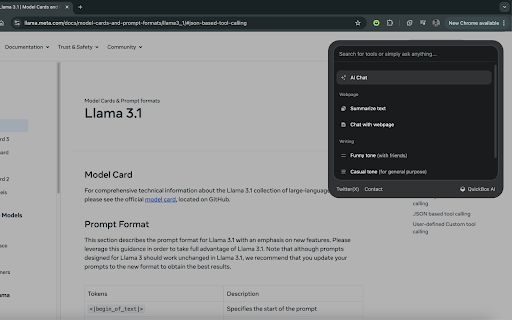
QuickBox AI helps you quickly access multiple AI tools while you are in the browser, helping users maximize their productivity or quickly use any AI tool without breaking their workflow. A small section appears on top of the current tab's content when the user presses cmd+k or ctrl+k, which can be escaped by pressing anywhere outside the tool or pressing the shortcut again.
How to use QuickBox AI ai chrome extension?
Press cmd+k or ctrl+k to activate QuickBox AI. A small section will appear on top of the current tab's content. To exit, press anywhere outside the tool or press the shortcut again.
QuickBox AI ai chrome extension's Core Features
Quick access to multiple AI tools
Browser integration
Keyboard shortcut activation (cmd+k or ctrl+k)
Non-disruptive workflow
QuickBox AI ai chrome extension's Use Cases
#1
Quickly access AI tools for writing, coding, or design without leaving the current tab.
#2
Maximize productivity by streamlining access to AI functionalities.
#3
Seamlessly integrate AI into existing workflows.
FAQ from QuickBox AI
How do I activate QuickBox AI?
How do I exit QuickBox AI?
APIMart
AI API, 99.9% SLA. Your AI, Always On.Most models offer cost savings of 20–60%; nanobanana pro api costs only 0.03.
Try Now
AD
ThumbnailCreator.com
AI tool for creating stunning YouTube thumbnails quickly.
Try Now
AD
Analytic of QuickBox AI AI Chrome Extension
QuickBox AI Active Users
Total Installed User
19 (-2)
