Sponsored by
APIMart



ChatGPT Hide Responses Extension - Chrome Extension
5
2 Reviews
0 Saved
Introduction:
Browser extension to hide/show ChatGPT responses for easier navigation in long conversations.
Updated Time
Aug 16 2025
Active Users
9

APIMaster
GPT up to 95% off + $20 trial. Fingerprint-verified APIs. Low-cost and stable.

Agentkit
AI agents trained on business content for support, lead capture, and automation

iMean AI Trip Planner
AI trip planner that creates personalized itineraries, finds cheap flights and hotels, and helps you plan an entire trip in one chat.

Free
PoYo.AI
High concurrency. Stable AI API. Better pricing.

Anathema AI
▎ Anathema is an AI chat platform built around Lexi, an assistant with personality. She is bubbly, a little aloof, gives you a straight answer, and does not hedge everything into uselessness. Alongside chat, Anathema includes a full generation Studio for images, video, music and voice, running state of the art models. An API is available for Lexi and Ana.

ChatGPT Hide Responses Extension AI Chrome Extension Information
What is ChatGPT Hide Responses Extension ai chrome extension?
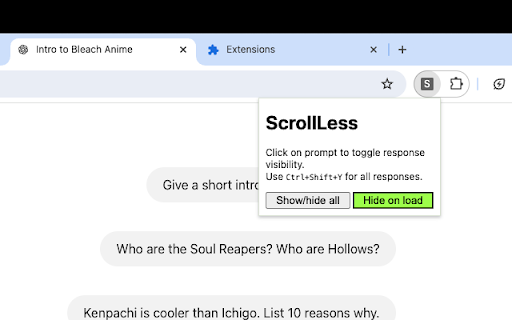
This tool is a browser extension designed to enhance the user experience when revisiting long ChatGPT conversations. It allows users to quickly hide or show all ChatGPT responses with a single shortcut, making it easier to find specific questions asked earlier in the thread. Additionally, it provides the option to toggle the visibility of individual responses by clicking on the corresponding prompt.
How to use ChatGPT Hide Responses Extension ai chrome extension?
Use the shortcut `Ctrl+Shift+Y` or `Cmd+Shift+Y` to toggle the visibility of all ChatGPT responses. Click on a prompt to toggle the visibility of the individual response associated with that prompt. You can also configure the extension to auto-hide all responses on load via the extension settings.
ChatGPT Hide Responses Extension ai chrome extension's Core Features
Toggle visibility of all ChatGPT responses with a shortcut
Toggle visibility of individual responses by clicking on the prompt
Auto-hide responses on load (configurable in settings)
ChatGPT Hide Responses Extension ai chrome extension's Use Cases
#1
Quickly find specific questions in long ChatGPT conversations
#2
Focus on prompts without being distracted by responses
#3
Review conversation history more efficiently
FAQ from ChatGPT Hide Responses Extension
How do I hide all ChatGPT responses?
How do I show all ChatGPT responses?
How do I hide/show an individual response?
Can I automatically hide all responses when ChatGPT loads?
Teammates.ai
AI-powered customer service, sales, and lead generation solutions.
Try Now
AD
Triple Whale
Agent-powered intelligence platform for ecommerce brands to drive profitable growth.
Try Now
AD
Analytic of ChatGPT Hide Responses Extension AI Chrome Extension
ChatGPT Hide Responses Extension Active Users
Total Installed User
9 (-2)
Alternative of ChatGPT Hide Responses Extension AI Chrome Extension
Website
Freemium
Free
AI ChatbotLarge Language Models (LLMs)AI Customer ServiceNo-Code&Low-CodeAI Agent
Open site
--
Mail (0.00%)
GenAi (0.00%)
Direct (0.00%)