Sponsored by
iMean AI Trip Planner



TestChimp - Chrome Extension
5
1 Reviews
0 Saved
Introduction:
No-code platform for building full-stack automation tests from manual test sessions.
Updated Time
Sep 14 2026
Active Users
183

Atoms
AI platform using specialized agents to build full-stack apps and websites without code.

Alice - Your Personal AI Assistant App
Alice is an AI assistant app for chatting with AI models and automating tasks.

APIMart
AI API, 99.9% SLA. Your AI, Always On.

iMean AI Trip Planner
AI trip planner that creates personalized itineraries, finds cheap flights and hotels, and helps you plan an entire trip in one chat.

Free
APIMaster
GPT up to 95% off + $20 trial. Fingerprint-verified APIs. Low-cost and stable.

TestChimp AI Chrome Extension Information
What is TestChimp ai chrome extension?
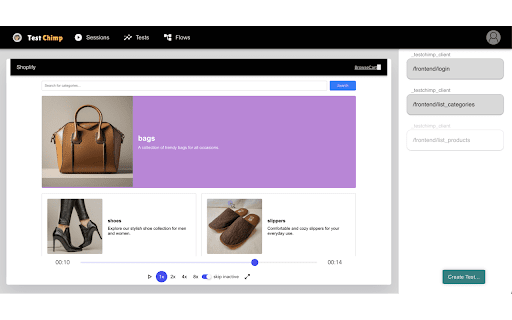
TestChimp is a no-code platform for building full-stack automation tests from manual test sessions. It captures UI and API activity during manual tests, automatically exporting them to your TestChimp account. Users can then build automation tests from these recordings and collaborate with team members. TestChimp analyzes recorded payloads to suggest assertions and variables, simplifying test creation. Users can edit, add, remove, duplicate steps, and configure dynamic test data to create exploratory test variations.
How to use TestChimp ai chrome extension?
Use the Chrome extension to capture UI and API activity during manual tests. The recordings are automatically exported to your TestChimp account, where you can build automation tests from them.
TestChimp ai chrome extension's Core Features
No-code automation test creation
UI and API activity capture
Automatic export to TestChimp account
Intelligent assertion and variable suggestions
Test step editing and duplication
Dynamic test data configuration
Collaboration features
TestChimp ai chrome extension's Use Cases
#1
Building automation tests from manual test sessions
#2
Collaborating with testers and developers on test automation
#3
Creating exploratory test variations from base recordings
#4
Scaling up test automation coverage
FAQ from TestChimp
What does TestChimp do?
How do I use TestChimp?
What are the key features of TestChimp?
PoYo.AI
High concurrency. Stable AI API. Better pricing.
Try Now
AD
YouArt
Agentic Creative OS
Try Now
AD
Analytic of TestChimp AI Chrome Extension
TestChimp Active Users
Total Installed User
183 (16)
Alternative of TestChimp AI Chrome Extension
Website
Paid
No-Code&Low-CodeAI App BuilderAI Code GeneratorAI Landing Page BuilderAI CopywritingAI Image GeneratorAI Logo Generator
Open site
--
Mail (0.00%)
GenAi (0.00%)
Direct (0.00%)