Sponsored by
APIMart



Vocha - Chrome Extension
3
4 Reviews
0 Saved
Introduction:
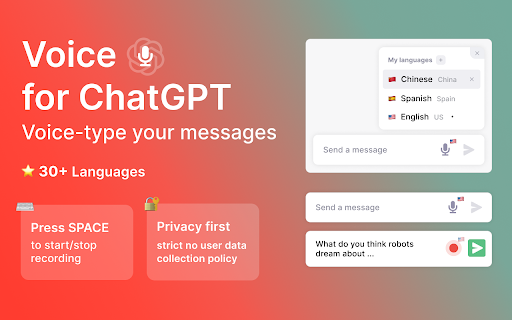
Vocha is a voice-typing extension for ChatGPT with a focus on privacy and ease of use.
Updated Time
Nov 06 2023
Active Users
101

Wondershare Filmora
AI video editor with tools for all skill levels and creative assets.

Rekam AI-Your One-Stop Voice Creation Platform
All-in-one AI voice creation platform for text-to-speech, voice clone, and speech-to-text.

Vmake AI
AI Social Video Studio: Create, enhance, and optimize social videos that sell.

Clico
AI assistant that brings writing, summarization, and search to every browser text box.

Cheetu AI
Your Lightweight Interpreter & AI Notetaker

Free
Vocha AI Chrome Extension Information
What is Vocha ai chrome extension?
Vocha is a browser extension that allows users to voice-type messages for ChatGPT. It adds a microphone button to the message field, which can be activated with the SPACE shortcut or a click. Vocha prioritizes user privacy with a strict no user data collection policy and offers a clean, minimalistic design that integrates seamlessly with the ChatGPT interface.
How to use Vocha ai chrome extension?
After installing the Vocha extension, a microphone button will appear in the ChatGPT message field. Press the SPACE shortcut or click the microphone button to start and stop recording. You can change the speech recognition language by clicking the flag icon. Remember to grant microphone access when prompted.
Vocha ai chrome extension's Core Features
Voice-typing for ChatGPT messages
SPACE shortcut for start/stop recording
Multi-language support (30+ languages)
Editable message option (send, edit, or resume recording)
Vocha ai chrome extension's Use Cases
#1
Dictating messages to ChatGPT instead of typing
#2
Communicating in multiple languages via voice
#3
Quickly creating and editing messages using voice input
FAQ from Vocha
How do I start using Vocha?
How do I change the language for speech recognition?
What if Vocha doesn't work after installation?
YouArt
Agentic Creative OS
Try Now
AD
APIMart
AI API, 99.9% SLA. Your AI, Always On.
Try Now
AD
Analytic of Vocha AI Chrome Extension
Vocha Active Users
Total Installed User
101 (1)
Alternative of Vocha AI Chrome Extension
Browser Extension
Freemium
Free Trial
Paid
AI Speech-to-TextAI TranscriberAI TranslateAudio To Text AIAI Healthcare
Open site
25 users
Website
Free Trial
Paid
AI Speech-to-TextAI Text-to-SpeechAI Text GeneratorAI TranscriptionAI Image GeneratorAI Voice TranslatorAI SummarizerAI Rewriter
Open site
--
Mail (0.00%)
GenAi (0.00%)
Direct (0.00%)
Recommend To Learn
chatgpt voice to text
voice to text transcriber
speech to text voice
voice to text messaging
voice to speech ai
voice to ai
speech to speech ai
speech to speech
to text to speech
ai speech recognition
ai voice recognition
voice to voice ai
voice transcription
voice recognition voice recognition
recognition voice
transcription ai
voice recognition
ai transcription
voz
Chat to
Text-To-Speech
Speech-To-Text
Text-to-speech
speech to text
Speech
Voice-to-Text
Text-to-video
Voice
Text To Voice
texto a voz
chat gpt