Sponsored by
AdsCreator.com



Voiceboost - Chrome Extension
3.5
2 Reviews
0 Saved
Introduction:
Chrome extension for voice-controlled ChatGPT interaction.
Updated Time
Sep 05 2024
Active Users
57

WZRD
AI workspace for creating interactive, voice-enabled documents, forms, slides, and business experiences

Cheetu AI
Your Lightweight Interpreter & AI Notetaker

Free
APIMart
AI API, 99.9% SLA. Your AI, Always On.Most models offer cost savings of 20–60%; nanobanana pro api costs only 0.03.

ThumbnailCreator.com
AI tool for creating stunning YouTube thumbnails quickly.

Vmake Labs Video Enhancer
Vmake Labs Video Enhancer uses AI to improve video quality, restore details, reduce blur, and upscale videos to 8K.

Voiceboost AI Chrome Extension Information
What is Voiceboost ai chrome extension?
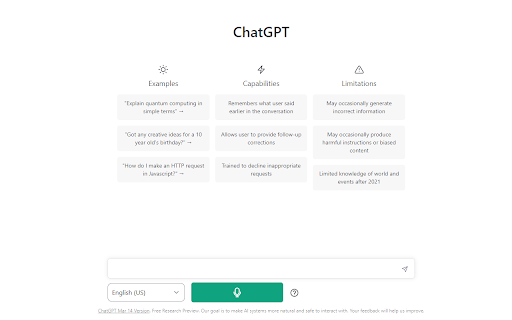
Voiceboost is a Chrome extension that allows users to interact with ChatGPT using voice control. It adds a button under the input area that, when clicked, captures the user's spoken question and sends it to ChatGPT for a response. This provides a hands-free alternative to typing.
How to use Voiceboost ai chrome extension?
Click the button added by the extension under the input area to record your voice input. Alternatively, use the keyboard shortcuts: Ctrl+Shift+S (Windows) or Command+Shift+S (Mac) to start recording, and Ctrl+Shift+E (Windows) or Command+Shift+E (Mac) to stop and submit. Ensure microphone permissions are granted when prompted.
Voiceboost ai chrome extension's Core Features
Voice input for ChatGPT
Keyboard shortcuts for voice capture and submission
Voiceboost ai chrome extension's Use Cases
#1
Hands-free interaction with ChatGPT
#2
Dictating questions and prompts to ChatGPT
FAQ from Voiceboost
How do I start recording my voice?
How do I stop recording and submit my voice input?
Do I need to grant microphone permissions?
AdsCreator.com
AI Ad Creation Tool - Just Paste your Website URL & get Professional AI Ads
Try Now
AD
iMean AI Trip Planner
AI trip planner that creates personalized itineraries, finds cheap flights and hotels, and helps you plan an entire trip in one chat.
Try Now
Analytic of Voiceboost AI Chrome Extension
Voiceboost Active Users
Total Installed User
57
Alternative of Voiceboost AI Chrome Extension
Website
Contact for Pricing
AI Voice AssistantsAI TestingAI AgentLarge Language Models (LLMs)AI Prompt Generator
Open site
 46.78%
26.1K
46.78%Direct (56.91%)
SearchOrganic (31.96%)
Referrals (4.37%)