































Table of Contents
- Key Points
- Crafting Compelling Animations with AI
- Leonardo AI Pros and Cons
- Frequently Asked Questions
- Related Questions


Crafting Compelling Animations with AI
The Foundation: Storytelling with AI

The cornerstone of any great animation is a powerful and engaging story. Fortunately, AI can significantly assist in this process. Tools like ChatGPT, Gemini, and Claude can help you develop compelling narratives that captivate your audience. These AI storytellers use provided templates and guidelines to craft personalized, impactful stories for your animations. By providing detailed inputs, including character descriptions, you can tailor the generated story to your specific vision. For instance, a well-defined character Prompt ensures the AI understands the personality and role the character plays in the overall narrative.
Key AI Tools for Story Generation:
- ChatGPT: A versatile language model capable of generating creative and coherent stories.
- Gemini: Another powerful AI that can assist in crafting engaging and detailed narratives.
- Claude: An AI designed to create personalized stories based on your inputs and preferences.
With the help of these tools, narrating a powerful and engaging story becomes much easier, allowing you to focus on the visual elements of your animation. These tools ensure that the story aligns with your specific needs and vision, creating a more impactful narrative for your audience. The AI assistance helps streamline the creation process, making it efficient and effective. These ai writing assistants can also be leveraged for generating the narration that will be included in your video.
Visualizing Your Story: AI Image Generation
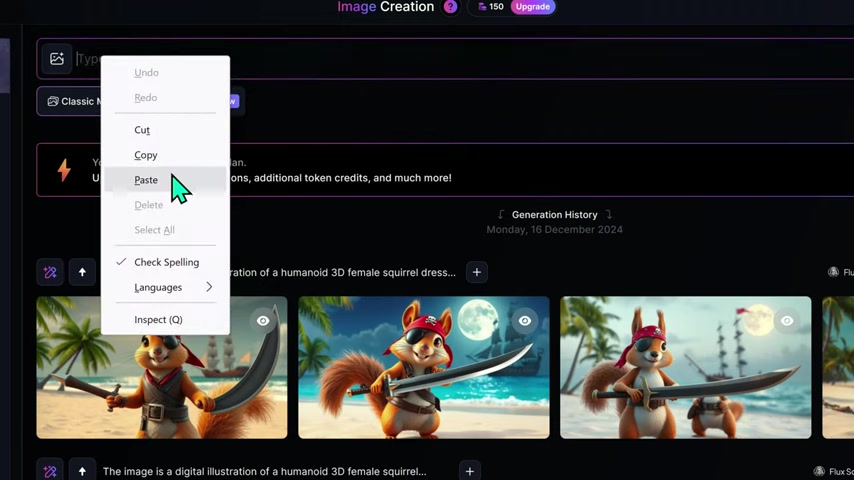
With your story in place, it’s time to bring it to life visually. AI image generators provide a powerful means to create stunning visuals directly from text prompts. Tools like Leonardo AI, DZine, Midjourney, and Pikلمان empower you to Translate your narrative descriptions into captivating imagery. For example, if your story features a character waking up in a cozy room, you can input this as a prompt and the AI will generate an image to match.
Here’s a closer look at some leading AI image generators:
- Leonardo AI: Stands out with its generous free credits and robust image generation capabilities, making it a favorite among animators.
- Midjourney: Known for creating surreal and visually striking images.
- DZine: Can generate a wide range of image styles, from realistic to artistic.
- Pikلمان: another good options for generating great animation assets.
Using AI image generators streamlines the animation process, allowing you to focus on the visual storytelling and ensure that each scene matches your narrative vision. This step dramatically reduces the time and resources required for creating high-quality animated content. The AI is capable of adapting to a variety of artistic styles, making it versatile for different animation projects. In this workflow, Leonardo AI is a great choice, and will be detailed later in this guide.
Step-by-Step Guide: Generating Images with Leonardo AI
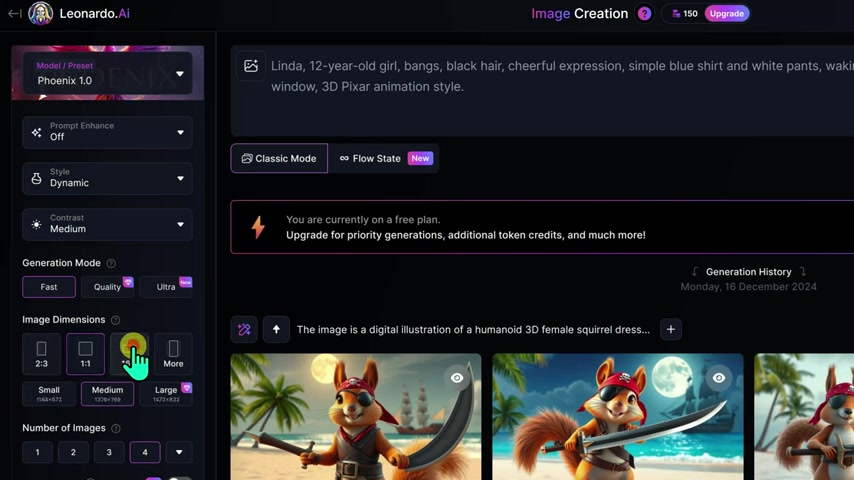
Let's dive into creating visuals using Leonardo AI. This AI Image Generator stands out due to its accessible free credits and powerful image creation engine. Here's a step-by-step guide:
- Visit the Leonardo AI Website:
- Navigate to the Leonardo AI website.
- Sign up for a free account and log in.
- Access Image Creation:
- On the left-hand menu, click on the Image Creation option.
- Input Your Prompt:
- In the Leonardo dashboard, find the prompt box at the top of the page.
- Right-click and paste the image prompt you copied from ChatGPT into the prompt box. This prompt describes the scene you want to visualize.
- Configure Settings:
- Preset Dropdown: In the preset dropdown menu on the left panel, select the Phoenix 1.0 model.
- Prompt Enhance: In the prompt enhance dropdown, choose Off to have greater control over the output. This prevents the AI from altering your prompt.
- Style: Under the preset style section, select Dynamic for a vibrant and engaging look.
- Generation Mode: Set the generation mode to Fast for quicker results.
- Image Dimensions: Choose a 16:9 ratio for a horizontal format suitable for YouTube videos.
- Image Size: Select Medium for image size to balance quality and speed.
- Number of Images: Set the number of images generated to 4 for variety in each step.
- Generate Images:
- Once all settings are configured, click Generate.
- Your request will be queued, and within moments, four thumbnails will appear.
- Click on a thumbnail to review the generated images.
- Refine and Regenerate:
- If the results aren’t as expected, tweak the settings and regenerate until you achieve the desired outcome.
- Maintaining Consistency:
- Copy Seed: Click on the three dots icon at the top right corner of the selected image. Choose the 'Copy Seed' button.
- Advanced settings Go to advanced settings in the side menu. Enable the ‘Use Fixed Seed’ option and paste the copied seed number into the corresponding box.
Animating Your Visuals with HaiLuo AI (Minimax AI)
With a series of AI-generated images in hand, the next step is to bring them to life through animation. HaiLuo AI (Minimax AI) provides a user-friendly platform for turning static images into dynamic videos. To begin animating your visuals, follow these steps:
-
Visit HaiLuo AI:
- Navigate to the HaiLuo AI video creation platform.
- Create a free account.
-
Create an Image to Video Project:
- Click on the Create button in the left menu.
- Select Image to Video option.
-
Upload Your Images:
- To start your project, upload your prepared images
-
Enter your prompts and preferences:
- Then enter you prompt in the text box
- Pick whether to enable optimization on the model
- Finalized model preference and select the create button.
-
Generate Images:
- Once all settings are configured, click Generate.
It will only take a couple minutes and your image will be transformed into a video.
Adding Narration with AI-Generated Voices
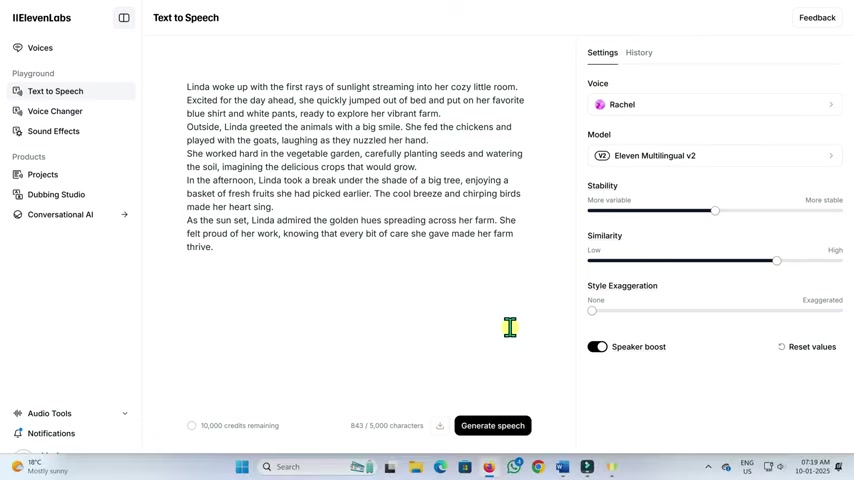
No animation is complete without a compelling voice over. For high-quality AI narration, use tools like Eleven Labs. Here’s how:
- Visit Eleven Labs:
- Navigate to the Eleven Labs AI website.
- Create a free account.
- Access text to speech:
- Copy all the story's voice-over sections into eleven Labs AI
- Select Your Preferences:
- Choose Voice From the right panel in the drop-down list voice, you can change the narrator’s voice. Listen to various voices and choose the one most suitable for your story. Then click on the generate speech button, and the work is done
- Download the File next to the generate button, there is a download button to get the narrator’s audio file.
This combination of AI tools simplifies the animation process, allowing both novice and experienced animators to create compelling visual stories with ease and efficiency. The use of a good ai Text-to-Speech generator and AI writing tools are a great addition for improving your workflow.








Most people like































Report
Please select a reason for reporting
- 13 Reasons to Switch from Snapchat to Text Messaging
- 7 Powerful Speech to Text Apps to Boost Productivity
- 10 Best Speech to Text Tools for Effortless Transcription
- 13 Free Tools to Easily Transcribe Audio to Text
- 15 Surprising Ways Google's Speech-to-Text Boosts Productivity
- 7 Best Free Online Audio to Text Transcription Tools
- 9 Tips to Transcribe Speech to Text Faster and Better
- 13 Best Speech to Text Software for Windows 10 in 2023
- 7 Tips for Choosing the Best Transcriber for Audio to Text
- 11 Reasons Why Dragon Speech-to-Text Apps are Game-Changers
- 6 Secrets to Enhance Your Speech to Text Transcription
- 6 Brilliant Ways to Boost Productivity with Talk-to-Text on Your MacBook
- 6 Ways Transcription Software Converts Audio to Text
- 8 Tips to Transcribe Speech to Text Like a Pro
- 6 Reasons IBM Watson Speech to Text is a Game-Changer
- 14 Powerful Ways Talk-to-Text Improves Your Workflow
- 12 Top Windows Speech-to-Text Software for Efficient Transcription
- 12 Game-Changing Benefits of Apple's Speech to Text Technology
- 9 Powerful Use Cases for AWS Speech to Text Technology
- 10 Easy Steps to Transcribe YouTube Videos to Text
- transcription audio en texte
- online audio transcription
- free audio file transcription
- free ai audio transcription
- audio transcription service
- audio transcription online free
- audio transcription free online
- audio to transcription software
- audio and transcript
- ai audio transcription free
- voice recording to text converter
- translate voice recording to text
- record voice to text
- audio recording to text converter
- voice recording and transcription
- chatgpt voice to text
- gmail voice to text
- speech to text reader
- speech to text ai free
- speech to talk
- How to Use AI Tools to Find Internal Linking Opportunities Across a Business Website
- Discover Your Perfect Haircut with AI Hairstyle Apps
- Free Reputation Calculator Tools: How They're Adapting to Score AI Visibility, Not Just Rankings
- Design Professional Flyers for Free on Your Phone
- Best Free Flyer Maker Apps for Android: Design Like a Pro
- How to Know If Your Business Is Ready for an AI Customer Service Agent
- Revolutionizing Storytelling: From Novels to Screenplays with AI
- Create Engaging Animated Explainer Videos with a Free AI Tool
- Stop Multi-Subscribing: Benchmark Top AI Visual Models in One Canvas
- Best Seedance 2.5 API Provider: Every Price on the Market, Checked at Source
- Top AI Social Media Management Tools: Automate Your Content Strategy
- Free AI Text to Video Generator: Create Stunning Videos from Text
- Discover 17 ChatGPT Alternatives: A Comprehensive Comparison
- Character.AI vs. Janitor AI: Which AI Chat Platform Reigns Supreme?
- Top Virtual Assistant Companies in 2026: Reviews, Pricing, and Plans Compared
- Unveiling FaceCheck.ID: Revolutionizing Reverse Image Searches with AI
- 11 Best AI Dialers in 2026: Features, Pricing, Pros and Cons
- How I Direct Consistent AI Clips: A Hands-On Guide to Multi-Model Generation
- A Realistic Review of the Photo Generator Image Tool
- Playwright MCP Server: Automated Web Testing with Agent Mode

Copyright ©2026 toolify