































Table of Contents
- Key Points
- Unleashing Your Inner Comic Creator with AI: A Step-by-Step Guide
- The Power of AI in Comic Creation
- Step-by-Step Guide: Crafting Your AI Comic
- Cost of AI Comic Creation
- ChatGPT & Canva: Pros and Cons
- Core features of AI-Powered Comic Tools
- AI Image Generation and its Comic Applications
- Frequently Asked Questions
- Related Questions


Unleashing Your Inner Comic Creator with AI: A Step-by-Step Guide
Why AI for Comics?
AI Tools offer comic creators an unprecedented range of options. ChatGPT excels at developing storylines, character dialogue, and generating creative prompts. AI image generation models can then bring those ideas to life visually. Whether you are a seasoned artist or a beginner, AI streamlines the creation process, opening new avenues for comic design and storytelling. This can allow even the newest creators the ability to come up with something special. The goal is to use these technologies to expand your own creativity.
Step 1: Character Generation with ChatGPT and AI Image Generation
The initial step involves creating your comic's characters with consistency. This is where ChatGPT shines. Use it to define character backstories, personalities, and dialogue styles. This information provides a solid foundation for generating consistent visuals across each comic panel. Provide ChatGPT with example images to guide the model.
Prompting ChatGPT for character ideas is a quick way to refine your approach and come up with something new. By providing example imagery and requesting something new, you will come up with the best possible product. For this particular project, you must generate your characters.
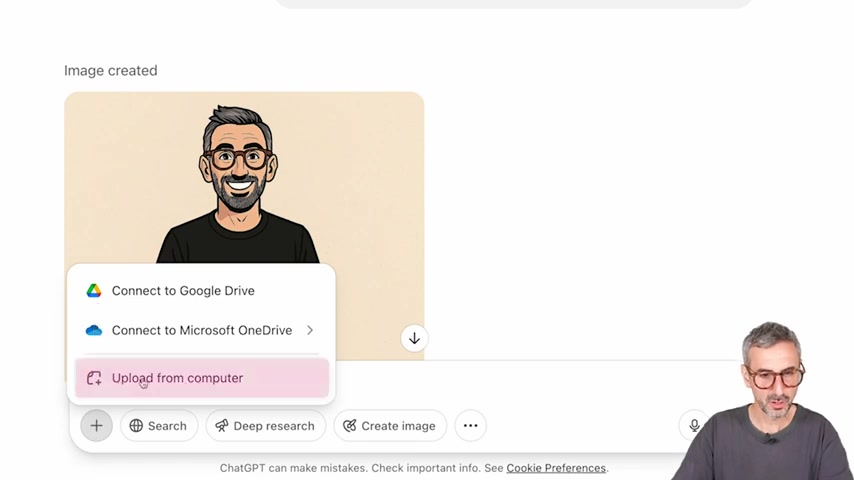
Keywords to use when creating characters:
- body portrait
- tortoise glasses
- salt and pepper hair
- modern comics
In this way, you will guide the AI with relevant information and receive a quality artstyle. By providing information about yourself and your collaborators, you will come up with personalized images.
Step 2: Storyboard Creation with ChatGPT
Now, develop your comic's narrative structure by creating a storyboard. A storyboard will ensure a clear, well-paced story. ChatGPT can help to plan out your narrative arc. Input your concept or idea into ChatGPT and request a storyboard layout consisting of your number of pages. You will guide ChatGPT to refine the responses, but it will come up with the details. It will reduce the amount of content to help the audience follow the story.
Step 3: Panel Creation with Sora AI and ChatGPT
The next step is to use Sora AI to create the visual elements, and begin the true process of comic creation. Sora AI is used for both videos and images.
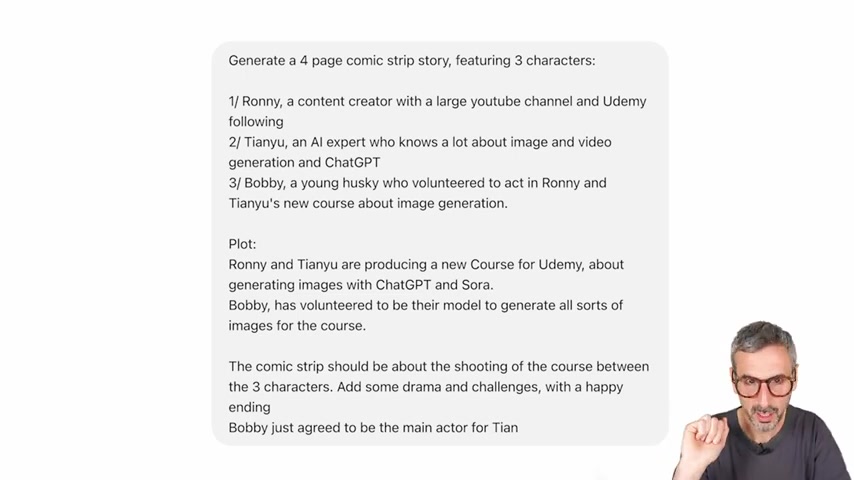
For the best images, make sure that the prompts follow these guidelines:
- Use proper keywords
- Describe everything that needs to be made
You can also add to the AI generated images with text! Simply change around a couple prompts, and make sure to do the necessary edits to make this something special.
Step 4: Utilizing Canva for Layout and Polishing
After you have generated all of the necessary images for your comic strip, it is time to move onto Canva. Canva offers the best tools to combine everything together. Canva has templates, text generation, and everything you need for your first comic strip.
The Power of AI in Comic Creation
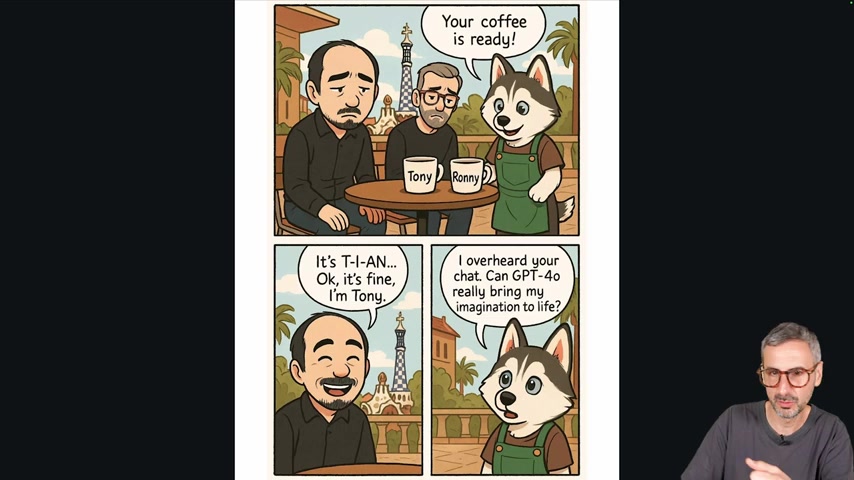
The importance of using your own ideas with AI
AI is a tool, not a replacement for creativity. The best comics combine AI-generated art with your own ideas. Refine AI outputs with unique dialogue, add personal touches to character designs, and shape the narrative with your own story. Infuse the AI images with your own ideas to take your work above and beyond. By doing so, you will also learn how to mix things up and provide your own value. This helps to make the creation process enjoyable and fun. For this part, you need:
- Original Story
- Personal Refinement
- Unique Touches
If you incorporate these ideas, you can make something great that is original and true to yourself.
Understanding Model Selection in ChatGPT for Consistent Results
When generating the visual elements for your comic book, understand the specific models of ChatGPT and AI. You need to understand how to work within those limitations to get the most out of your comic strips. You want to keep the content as consistent as possible to make sure that there are no errors.
It is important to realize that this does not work in ChatGPT with a free account. You will not get as many images as a premium account, somewhere in the range of 3-7 images. To come up with a comic like the example, it may be necessary to move up to ChatGPT plus. This will come at a price tag of $9.99. Remember, your mileage may vary.
| Feature | Free ChatGPT | ChatGPT Plus/Pro |
|---|---|---|
| Model Access | GPT-4o | GPT-4o, GPT-3, Custom GPTS |
| Image Generation | Limited | Unlimited |
| Content Generation | Basic | Advance |
Cost of AI Comic Creation
How Much Does it Cost to Get Started?
This specific Tutorial can be accessed and purchased through Udemy. To access the ChatGPT Image Generation Master Course, it costs $9.99.
But keep in mind, this particular offer is only valid for the next 5 days. By accessing ChatGPT and other tools, you can make original work.








Most people like






























Report
Please select a reason for reporting
- 13 Reasons to Switch from Snapchat to Text Messaging
- 7 Powerful Speech to Text Apps to Boost Productivity
- 10 Best Speech to Text Tools for Effortless Transcription
- 13 Free Tools to Easily Transcribe Audio to Text
- 15 Surprising Ways Google's Speech-to-Text Boosts Productivity
- 7 Best Free Online Audio to Text Transcription Tools
- 9 Tips to Transcribe Speech to Text Faster and Better
- 13 Best Speech to Text Software for Windows 10 in 2023
- 7 Tips for Choosing the Best Transcriber for Audio to Text
- 11 Reasons Why Dragon Speech-to-Text Apps are Game-Changers
- 6 Secrets to Enhance Your Speech to Text Transcription
- 6 Brilliant Ways to Boost Productivity with Talk-to-Text on Your MacBook
- 6 Ways Transcription Software Converts Audio to Text
- 8 Tips to Transcribe Speech to Text Like a Pro
- 6 Reasons IBM Watson Speech to Text is a Game-Changer
- 14 Powerful Ways Talk-to-Text Improves Your Workflow
- 12 Top Windows Speech-to-Text Software for Efficient Transcription
- 12 Game-Changing Benefits of Apple's Speech to Text Technology
- 9 Powerful Use Cases for AWS Speech to Text Technology
- 10 Easy Steps to Transcribe YouTube Videos to Text
- transcription audio en texte
- online audio transcription
- free audio file transcription
- free ai audio transcription
- audio transcription service
- audio transcription online free
- audio transcription free online
- audio to transcription software
- audio and transcript
- ai audio transcription free
- voice recording to text converter
- translate voice recording to text
- record voice to text
- audio recording to text converter
- voice recording and transcription
- chatgpt voice to text
- gmail voice to text
- speech to text reader
- speech to text ai free
- speech to talk
- How to Use AI Tools to Find Internal Linking Opportunities Across a Business Website
- Discover Your Perfect Haircut with AI Hairstyle Apps
- Free Reputation Calculator Tools: How They're Adapting to Score AI Visibility, Not Just Rankings
- Design Professional Flyers for Free on Your Phone
- Best Free Flyer Maker Apps for Android: Design Like a Pro
- How to Know If Your Business Is Ready for an AI Customer Service Agent
- Revolutionizing Storytelling: From Novels to Screenplays with AI
- Create Engaging Animated Explainer Videos with a Free AI Tool
- Stop Multi-Subscribing: Benchmark Top AI Visual Models in One Canvas
- Best Seedance 2.5 API Provider: Every Price on the Market, Checked at Source
- Top AI Social Media Management Tools: Automate Your Content Strategy
- Free AI Text to Video Generator: Create Stunning Videos from Text
- Discover 17 ChatGPT Alternatives: A Comprehensive Comparison
- Character.AI vs. Janitor AI: Which AI Chat Platform Reigns Supreme?
- Top Virtual Assistant Companies in 2026: Reviews, Pricing, and Plans Compared
- Unveiling FaceCheck.ID: Revolutionizing Reverse Image Searches with AI
- 11 Best AI Dialers in 2026: Features, Pricing, Pros and Cons
- How I Direct Consistent AI Clips: A Hands-On Guide to Multi-Model Generation
- A Realistic Review of the Photo Generator Image Tool
- Playwright MCP Server: Automated Web Testing with Agent Mode

Copyright ©2026 toolify