































Table of Contents
- Key Points
- The Need for Efficient Diagramming in Software Development
- AI-Powered Diagramming with Eraser AI
- Using Eraser AI: A Step-by-Step Guide
- Eraser AI Pricing Plans
- Pros and Cons
- Core Features of Eraser AI
- Ideal Use Cases for AI Diagramming
- FAQ
- Related Questions



The Need for Efficient Diagramming in Software Development
The Role of Diagrams
In the software development world, diagrams are essential for visualizing and communicating complex systems.

They provide a clear and concise way to represent various aspects of a software application, including its architecture, data models, and process flows. Whether it's for documentation, presentations, or internal discussions, diagrams help teams understand and Align on the overall design and functionality of a project.
Creating various types of diagrams is a routine task, encompassing everything from cloud architecture diagrams to deployment diagrams, sequence diagrams, and user flow diagrams.
- Cloud Architecture Diagrams: Visualizing the deployment of applications across different cloud services, clearly outlining how components interact on platforms like AWS, Azure, and GCP is what architecture diagrams are used for.
- Deployment Diagrams: Showing the deployment strategy, including servers, regions, and environments.
- Sequence Diagrams: Illustrating the interaction between different components over time, helpful in understanding the flow of data and control in a system.
- User Flow Diagrams: Visualizing the steps users take to accomplish specific tasks within an application.
While these diagrams are undeniably beneficial, manually creating them can be a tedious and time-intensive process. Developers often have to spend hours arranging shapes, drawing connections, and labeling elements, taking away valuable time from actual coding. That's where AI steps in.
The Tedious Nature of Manual Diagram Creation
Manually creating diagrams can be extremely tedious. It takes time to add the right components and all the proper relationships between the different components. As well as having all of the knowledge of which components are required. It involves a lot of time to create these diagrams manually and tedious for developers to draw them manually.
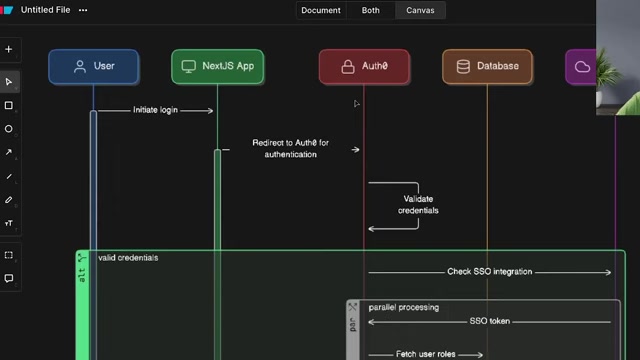
A typical software project may require multiple diagrams, each depicting a different aspect of the system. This can quickly add up to a significant amount of time spent on diagramming, rather than coding and development.
Moreover, manual Diagram creation is prone to errors and inconsistencies. As systems evolve and requirements change, it can be challenging to keep diagrams up-to-date. This can lead to outdated or inaccurate documentation, which can hinder communication and decision-making.
Furthermore, if an organization is working with cloud components like AWS, Azure, and GCP, AI can create deployment diagrams and architecture diagrams and identify the connections. It makes the entire process much easier to build than manually doing it.
Drawing these different types of diagrams is really very tedious to draw them manually. Let's look at a different approach.
AI-Powered Diagramming with Eraser AI
An AI-Driven Solution
AI-powered diagramming tools like Eraser AI are designed to address the challenges of manual diagram creation. Eraser AI leverages the power of artificial intelligence to automate and streamline the diagramming process, saving developers time and effort. The aim is to see how we can use AI and take help from the AI to build these kinds of diagrams and make our lives very easy.
It focuses on allowing people to get their ideas out of their heads and on to the screen and then making the process of collaboration that much more easy. Today we are in 2025 and AI is kind of everywhere. This is one of the many ways that we see AI being used in a way to make diagrams quickly by writing the Outline.

These tools enable users to generate complex diagrams with just a few clicks, using natural language prompts or code snippets. By analyzing the input, the AI engine can automatically identify the Relevant components, arrange them in a logical manner, and draw connections between them.
There are different AI Tools available in the market, such as ChatGPT or Google Gemini, but is there any tool to draw these kinds of diagrams by writing the outline? This is where Eraser AI comes into the mix. I will be showing Eraser AI to build architecture diagrams either with cloud deployment architecture or a simple high-level architecture diagram. So let’s take a look.
Key Features of Eraser AI
Eraser AI comes with a range of features that aim to simplify and accelerate the diagramming process:
- AI-Powered Diagram Generation:

Generate diagrams from natural language prompts or code snippets. Simply describe the system you want to Visualize, and Eraser AI will automatically create the diagram for you.
- Automated Layout and Connections: The AI engine automatically arranges components and draws connections between them, ensuring a clear and logical representation.
- Support for Various Diagram Types: Eraser AI supports a wide range of diagram types, including system architecture diagrams, entity-relationship diagrams (ERDs), sequence diagrams, and flowcharts.
- Customization Options: Fine-tune the generated diagrams to meet your specific needs. Customize the appearance, add annotations, and modify the layout as desired.
- Cloud Component Libraries: Access a library of cloud components (AWS, Azure, GCP) to build accurate and visually appealing cloud architecture diagrams.
- Code-Based Diagramming: Generate diagrams from code snippets. Eraser AI can analyze code and automatically create diagrams that reflect the underlying structure and relationships.
- Collaboration Features: Collaborate with your team in real-time. Share diagrams, provide feedback, and co-edit together.
- Integration with Development Tools: Seamlessly integrate Eraser AI with your existing development tools, such as IDEs and version control systems.
- Database Diagram Generation: Generate entity relationship diagrams to show database structure and how data relationships are setup.
Using Eraser AI: A Step-by-Step Guide
Generating a Diagram with Eraser AI
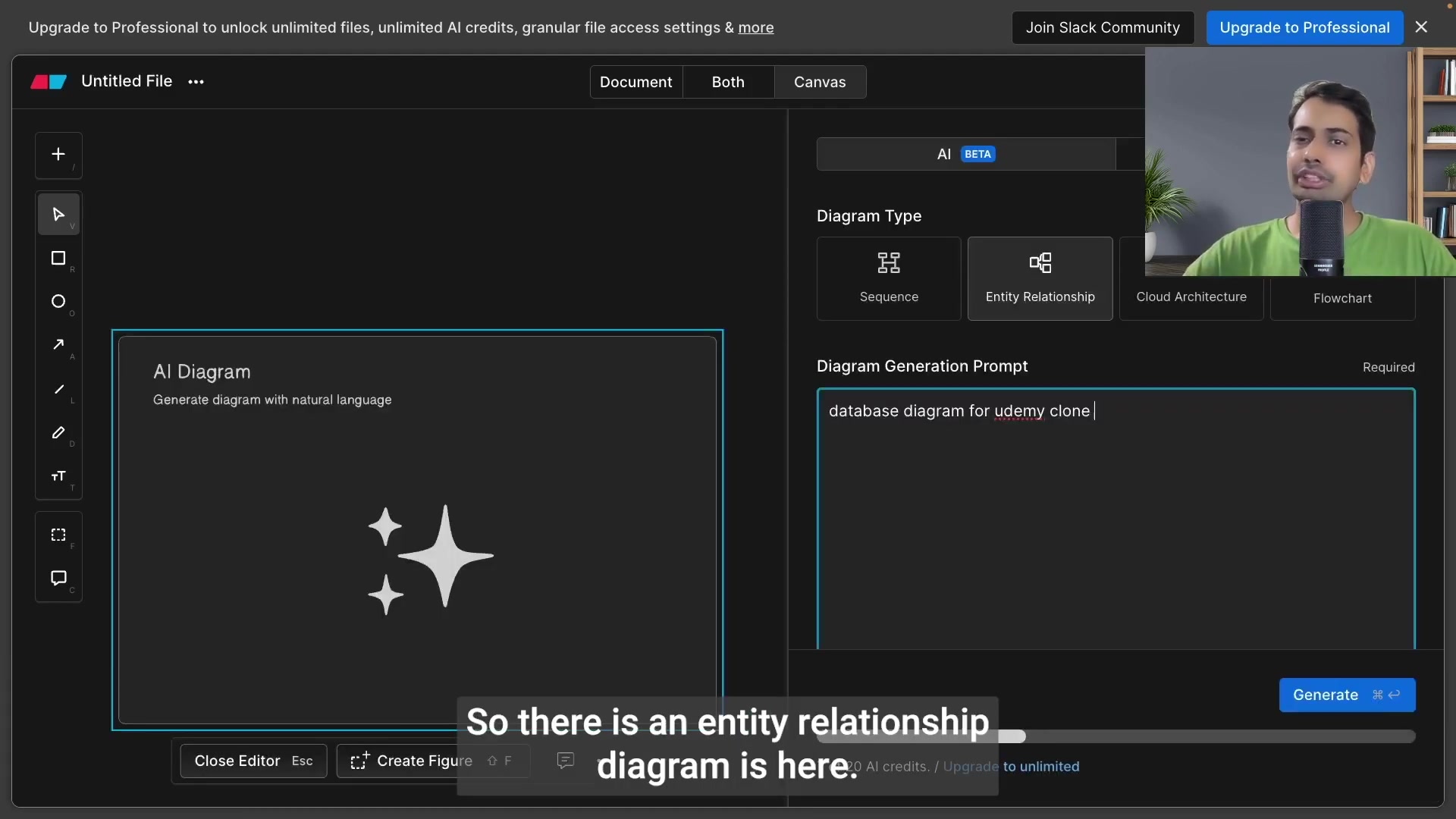
To generate an architectural diagram, you will create a prompt, including all the items that you wish to be shown in your diagram. For example, the Prompt may include the name of the application to be cloned, as well as the cloud provider that the application is running on.
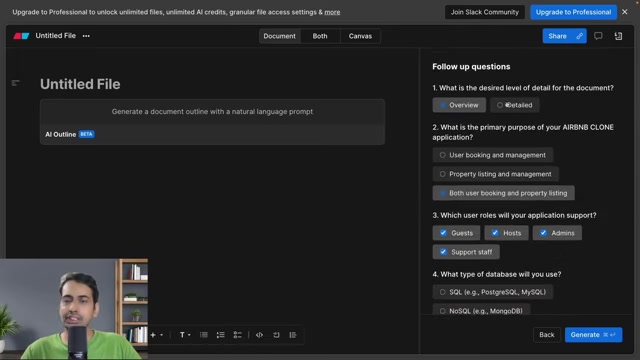
Eraser has several options for diagramming, which include:
- Cloud Architecture
- Entity Relationship
- Sequence
- Flowchart
For each diagram type, there will be different prompts and follow-up questions. Follow-up questions may include things such as:
- What is the desired level of detail for the document?
- What is the primary purpose of your application?
- Which user roles will the application support?
- What kind of database will you use?
- Which front-end framework will you use?
- What back-end framework will you use?
- What third-party services will you integrate?
- What are your key non-functional requirements?
Once those questions have been answered, the diagram is automatically generated!
Example diagrams
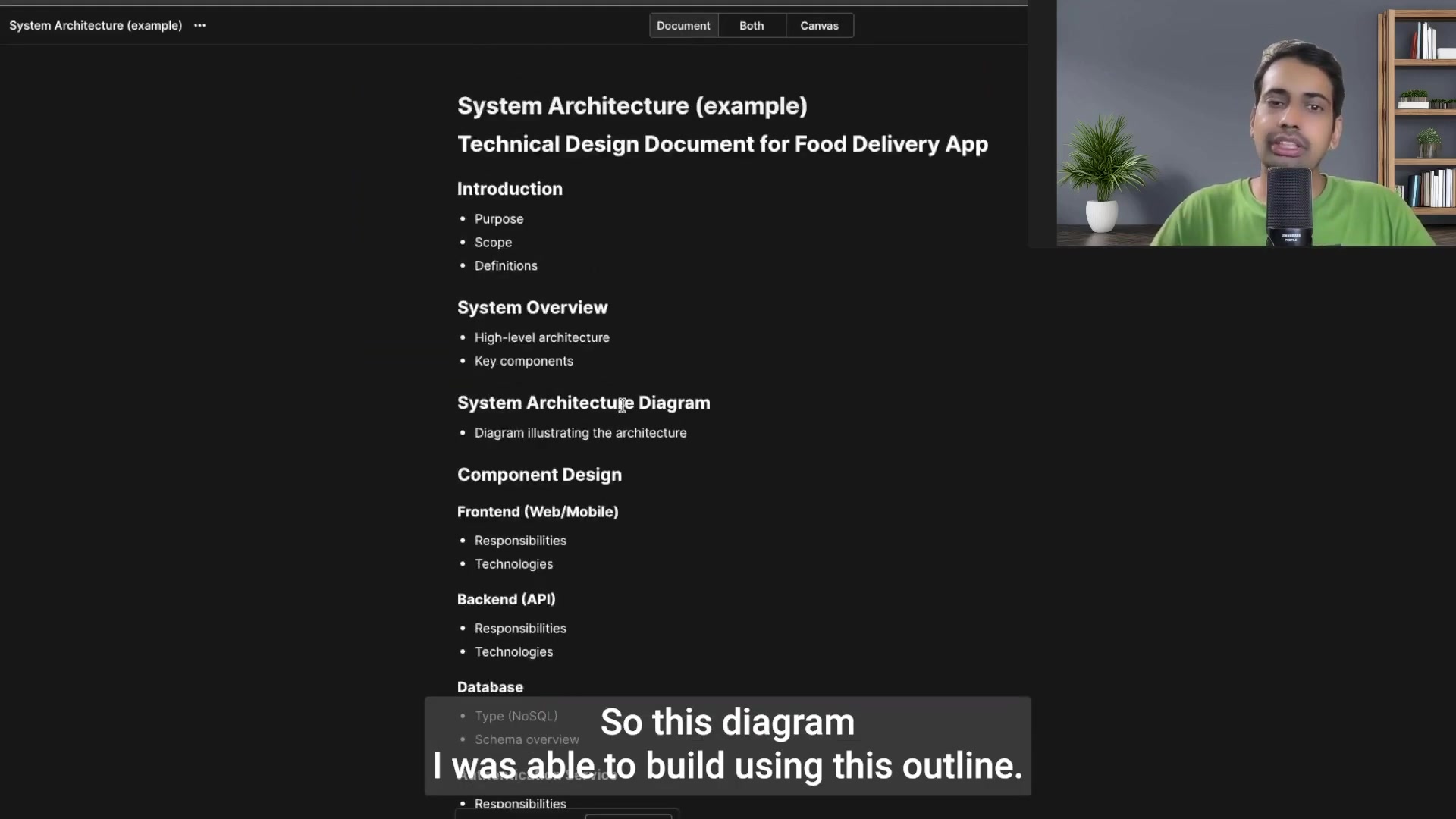
As seen in the video, here are some other diagrams that can be generated automatically from Eraser AI:
-
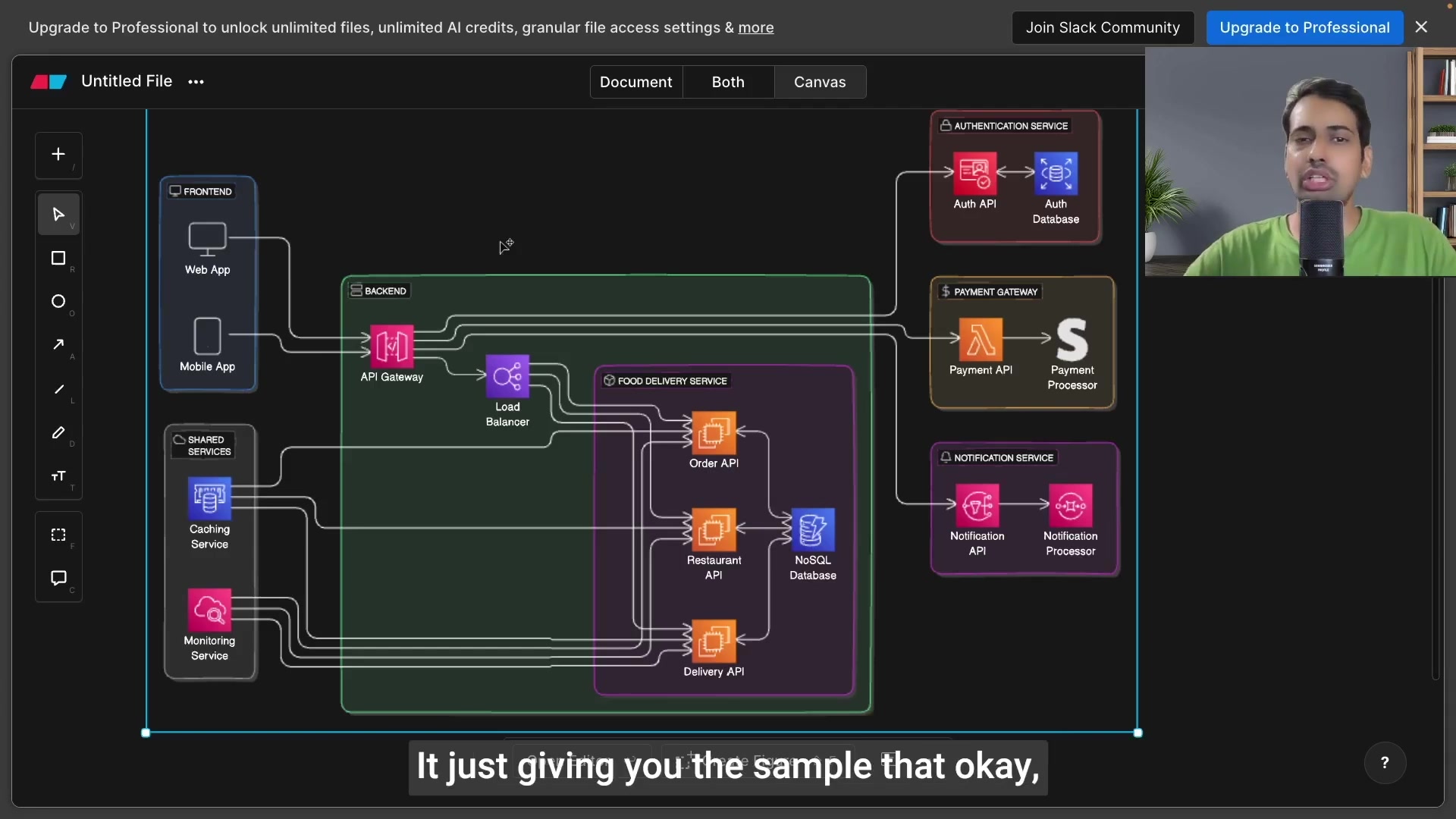
Food Delivery App Architecture: A simple, high-level architecture diagram of the Food Delivery App.
-
Udamy Clone Architecture: Cloud Architecture Diagram For Udamy Clone App.
-
Twitter Clone with Lambda APIs: Build Twitter Clone App using AWS Serverless with Lambda API.
Eraser AI Pricing Plans
Cost Structure for the AI-Driven Diagramming Tool
Eraser AI operates with a credit-based pricing structure, granting users a limited number of credits at the Outset. In the demonstration, the system provided 20 credits, affording a taste of its capabilities. To fully leverage Eraser AI's potential, users can explore the option to upgrade to a Professional plan, thereby unlocking unlimited files, a granular file access setting, and a generous allowance of AI credits.
Core Features of Eraser AI
Attributes of the AI-Integrated Platform
Eraser AI enhances Team Collaboration and workflow efficiency for software development. The tool facilitates the seamless creation and deployment of architectural and ER diagrams.
Some of its core features include:
- API Gateway
- Load Balancer
- Caching
- Database Structure Support (1:1, many-to-many)
Ideal Use Cases for AI Diagramming
AI’s Use Cases for Diagramming
AI in the form of these tools brings lots of value to documentation.
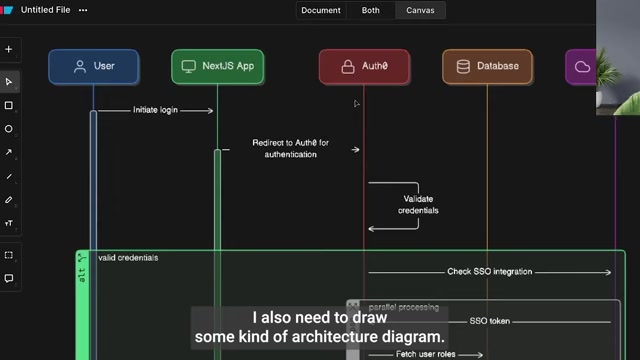
- Software Architecture Diagramming: Quickly generate high-level architecture diagrams to visualize the overall structure of your application.
- Entity-Relationship Diagramming: Create ERDs to model the data structure of your database.
- Process Flow Diagramming: Visualize process flows and workflows to identify bottlenecks and improve efficiency.
- Cloud Architecture Design: Design and document your cloud infrastructure with ease, using a library of cloud components.
- Code Documentation: Generate diagrams from code to automatically document your codebase.
- Project Onboarding: Use diagrams to onboard new team members and quickly get them up to speed on the system design.





Most people like






































Report
Please select a reason for reporting
- 13 Reasons to Switch from Snapchat to Text Messaging
- 7 Powerful Speech to Text Apps to Boost Productivity
- 10 Best Speech to Text Tools for Effortless Transcription
- 13 Free Tools to Easily Transcribe Audio to Text
- 15 Surprising Ways Google's Speech-to-Text Boosts Productivity
- 7 Best Free Online Audio to Text Transcription Tools
- 9 Tips to Transcribe Speech to Text Faster and Better
- 13 Best Speech to Text Software for Windows 10 in 2023
- 7 Tips for Choosing the Best Transcriber for Audio to Text
- 11 Reasons Why Dragon Speech-to-Text Apps are Game-Changers
- 6 Secrets to Enhance Your Speech to Text Transcription
- 6 Brilliant Ways to Boost Productivity with Talk-to-Text on Your MacBook
- 6 Ways Transcription Software Converts Audio to Text
- 8 Tips to Transcribe Speech to Text Like a Pro
- 6 Reasons IBM Watson Speech to Text is a Game-Changer
- 14 Powerful Ways Talk-to-Text Improves Your Workflow
- 12 Top Windows Speech-to-Text Software for Efficient Transcription
- 12 Game-Changing Benefits of Apple's Speech to Text Technology
- 9 Powerful Use Cases for AWS Speech to Text Technology
- 10 Easy Steps to Transcribe YouTube Videos to Text
- transcription audio en texte
- online audio transcription
- free audio file transcription
- free ai audio transcription
- audio transcription service
- audio transcription online free
- audio transcription free online
- audio to transcription software
- audio and transcript
- ai audio transcription free
- voice recording to text converter
- translate voice recording to text
- record voice to text
- audio recording to text converter
- voice recording and transcription
- chatgpt voice to text
- gmail voice to text
- speech to text reader
- speech to text ai free
- speech to talk
- Meshy AI: How to Create 3D Models from Text and Images
- How SEO and Marketing Dashboards Empower Agencies to Drive Results
- How to Use AI Tools to Find Internal Linking Opportunities Across a Business Website
- Discover Your Perfect Haircut with AI Hairstyle Apps
- Free Reputation Calculator Tools: How They're Adapting to Score AI Visibility, Not Just Rankings
- Design Professional Flyers for Free on Your Phone
- Best Free Flyer Maker Apps for Android: Design Like a Pro
- How to Know If Your Business Is Ready for an AI Customer Service Agent
- Revolutionizing Storytelling: From Novels to Screenplays with AI
- Create Engaging Animated Explainer Videos with a Free AI Tool
- Revolutionize Learning: Discover Quizzes AI for Engaging Interactive Quizzes
- Revolutionizing Email Marketing Agency with AI
- Breaking the Character Drift Dilemma: A Practical Test of Smart Shot
- Meshy AI: How to Create 3D Models from Text and Images
- ASOMobile Helps Teams Benchmark App Store Screenshots Against Competitors
- How to Match LMS Software With Your Organization's Training Plan
- How to Convert BTC to HNT
- Unleashing the Power of AI: Cognizant's Roadmap for Transformation
- Frame to Video Review: A Practical Look at Turning Two Still Frames Into Motion
- NVIDIA NIM: Revolutionizing Supply Chain Data Analysis with AI

Copyright ©2026 toolify