































Table of Contents
- Key Points
- Creating an AI Competitor Ad Spy Tool
- Customizing the Look of IntelliForm with Customizations
- Advantages and Disadvantages of Using AskSpot's AI Competitor Analysis Tool
- Frequently Asked Questions
- Related Questions


Creating an AI Competitor Ad Spy Tool
Setting Up the AskSpot Environment
The initial step involves logging into your AskSpot account and preparing the environment for creating the AI competitor analysis tool. This setup is essential for integrating the AI functionality into a user-friendly interface.
First, navigate to your AskSpot account. Ensure you have access to the businesses section within the AskSpot platform.
- Log in to your AskSpot account.
- Access the Businesses section. This sets the stage for building the intelligence tool focused on AI, ensuring a smooth integration process and efficient workflow.
Creating a New IntelliForm
To begin, you will create a new IntelliForm, which will serve as the foundation for your AI competitor analysis tool. This form will capture the necessary input for the AI to analyze.
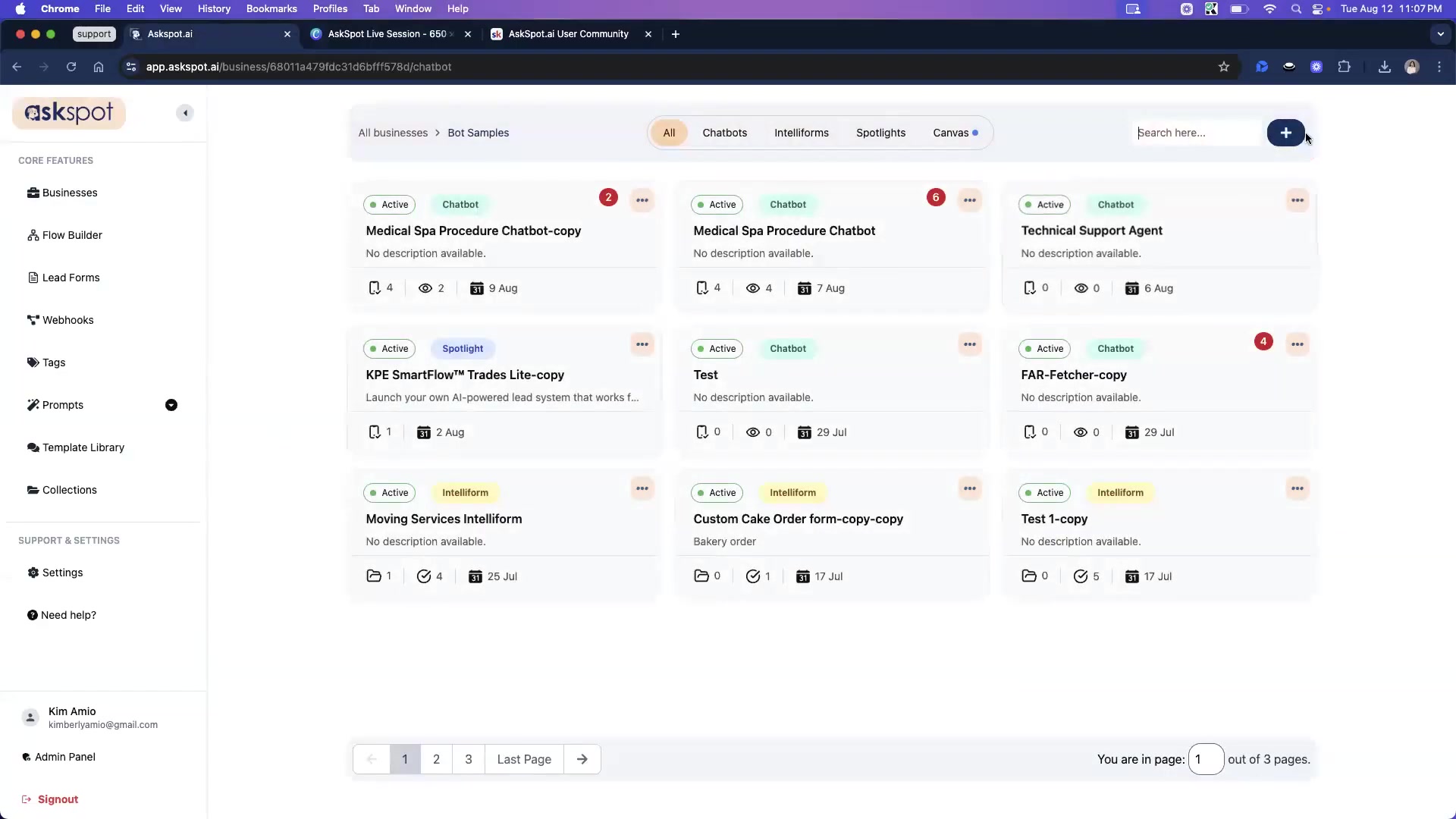
- Click the 'Create' button within the Businesses section.
- Select 'IntelliForm' from the options.
- Name the IntelliForm 'AI Competitor Ad Spy'.
- Provide a brief description for the form to provide context for users. This name clearly defines the tool's purpose, making it easily identifiable within the AskSpot environment. By following these steps, you lay the groundwork for a user-friendly tool with a clear purpose.
Adding Essential Form Fields
Next, add the necessary form fields to collect the competitor's website URL and any specific areas you want the AI to focus on. These fields are crucial for gathering the data the AI needs to generate relevant insights.
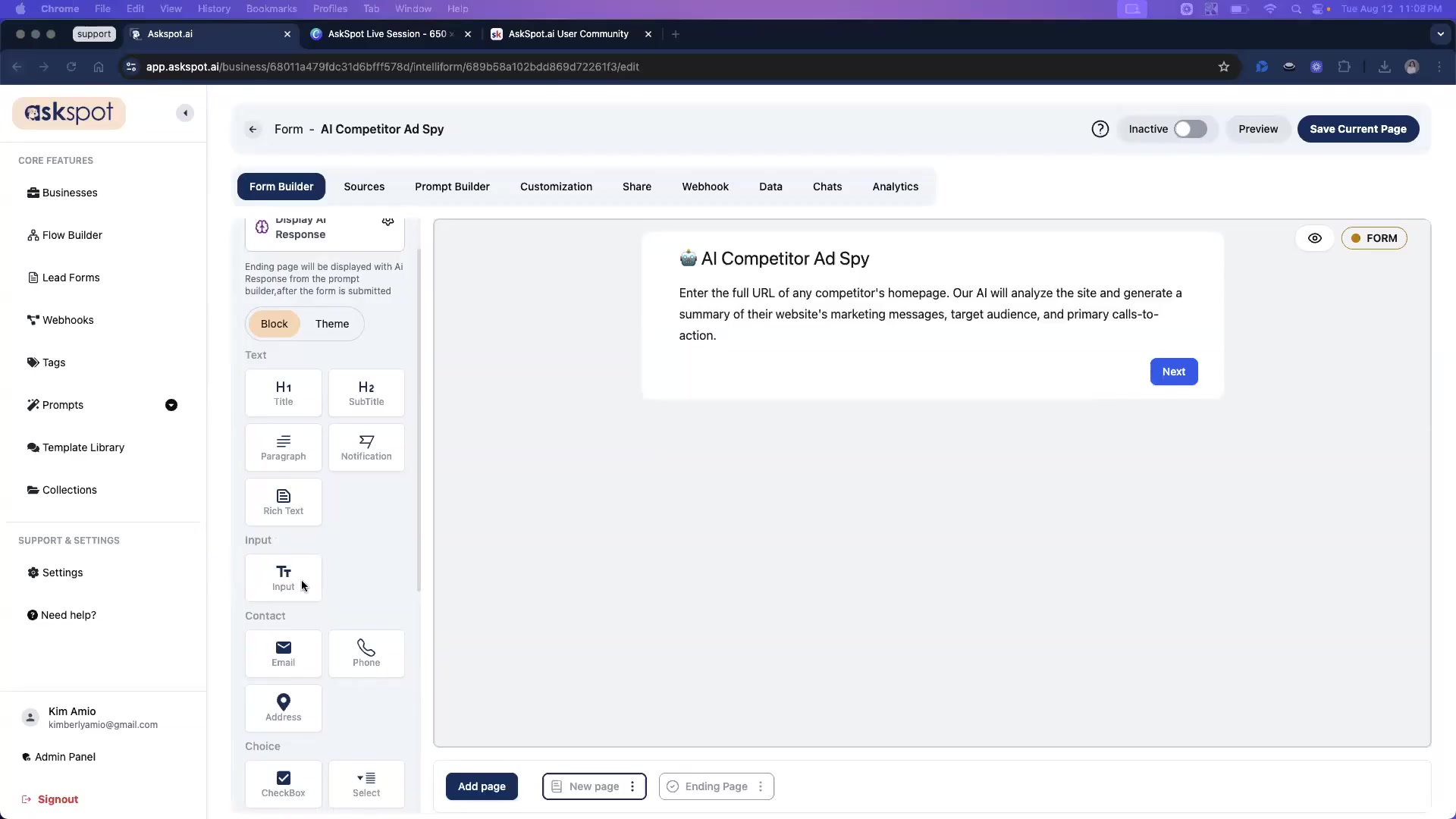
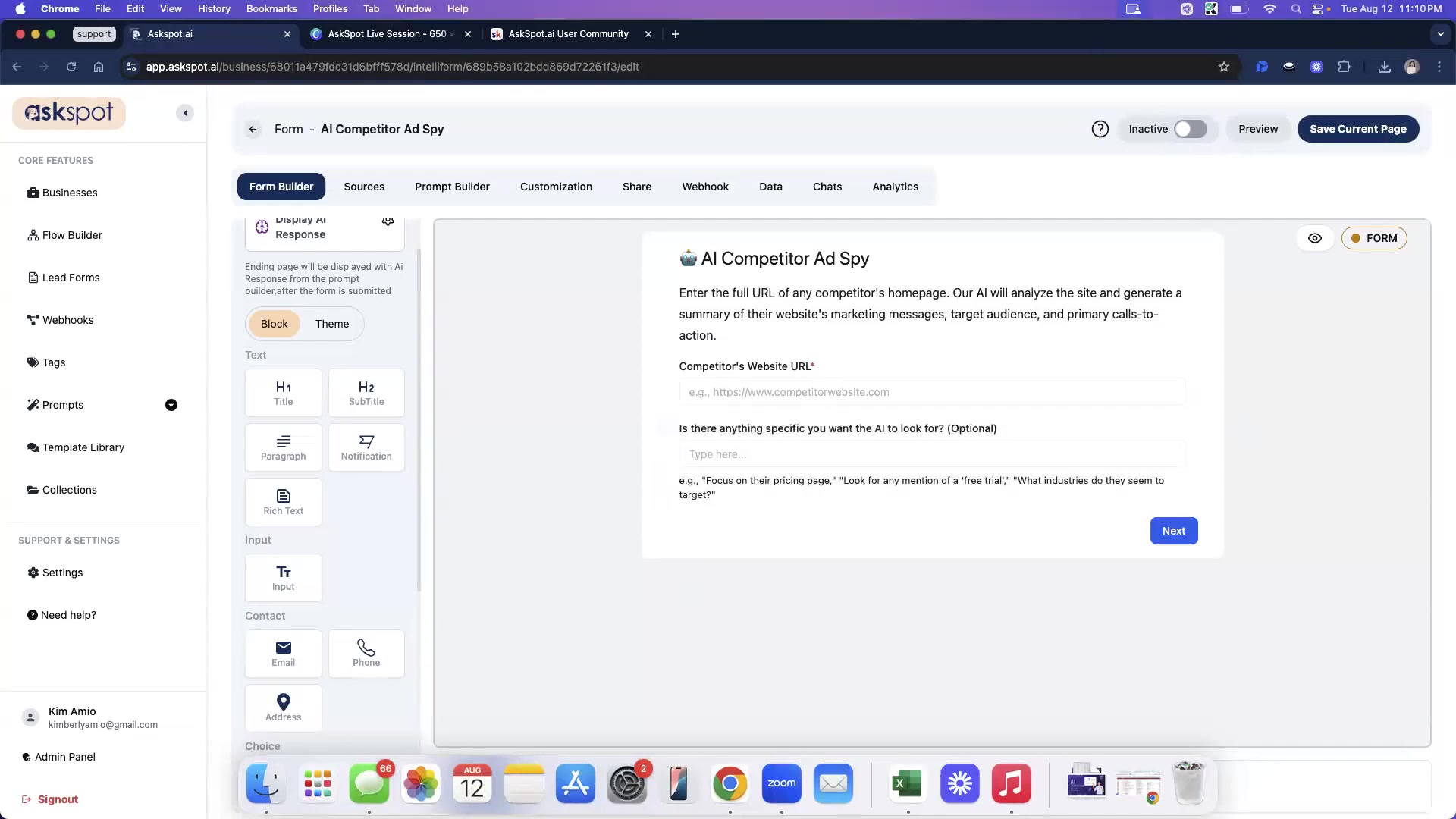
- Drag and drop a 'Title' field onto the form.
- Add a 'Rich Text' field below the title to describe the form’s purpose, including information about the role of AI and summarization of their website’s marketing messages and primary calls to action. Make sure you add the following description in the Rich Text Box: Enter the full URL of any competitor's homepage. Our AI will analyze the site and generate a summary of their website's marketing messages, target audience, and primary calls-to-action.
- Include an 'Input' field, setting it as a required field to ensure users provide the competitor's website URL. It needs to be identified as competitor_url.
- Add another optional 'Input' field for users to specify what the AI should look for, identified as specific_focus.
- Edit the submit button text to read “Analyze Competitor Now.”
By incorporating these fields, you create a structured input mechanism, enhancing the AI's ability to provide accurate and targeted analysis.
Configuring the AI Prompt
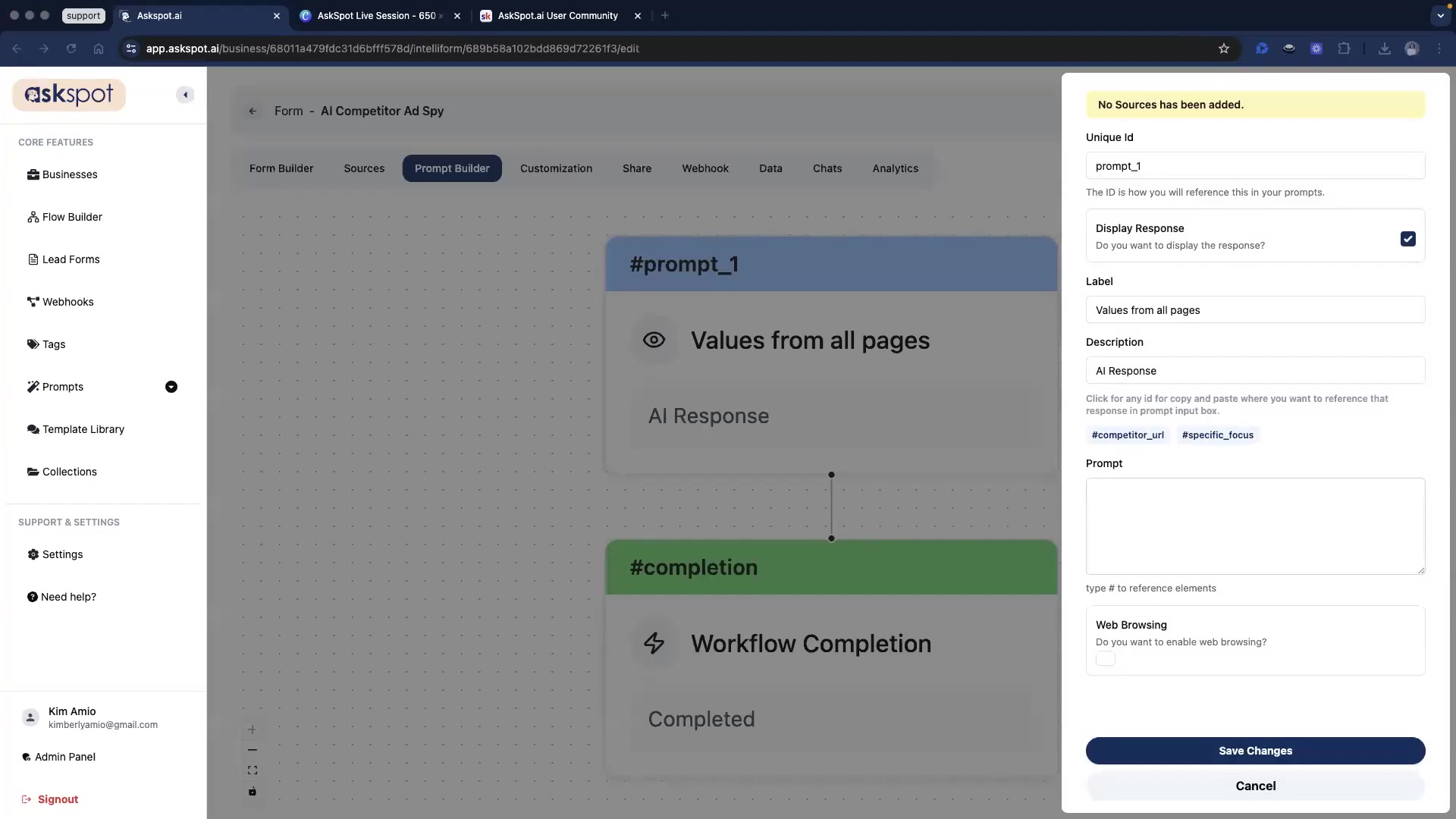
The core of the AI competitor analysis tool lies in its Prompt configuration. This involves setting up specific instructions that guide the AI's analysis and dictate the format of the output.
- Enable web browsing to allow the AI to analyze the competitor’s website.
- Select the prompt_1 to access the prompt configurations.
- Use an expert marketing strategist and conversion copywriter persona in the prompt.
- Then make sure you add the following instructions, making sure you included the question IDs:
CRITICAL INSTRUCTIONS
- Thoroughly visit and analyze the content, layout, and messaging on the homepage and key sub-pages (like Pricing, Services, About Us) of the following URL: #competitor_url.
- If the user provided a specific focus, pay special attention to it: #specific_focus.
- Present your findings in the structured “Competitor Teardown” format below.
COMPETITOR TEARDOWN
Website Analyzed: #competitor_url
-
Core Marketing Message (The “Hook”) Analyze the main headline and sub-headline on the homepage. In one or two sentences, summarize the primary promise or value proposition they are making to their visitors. What problem do they claim to solve?
-
Perceived Target Audience Based on the language, imagery, and case studies/testimonials on the site, describe the type of customer they are trying to attract. Are they targeting small businesses, enterprise companies, individual consumers, a specific industry, etc.?
-
Primary Calls-to-Action (CTAs) Identify the most prominent buttons and links on the homepage. List up to 3 primary CTAs. What do they want the visitor to do?
- CTA 1: (e.g., “Book a Demo”)
- CTA 2: (e.g., “Start a Free Trial”)
- CTA 3: (e.g., “View Pricing”)
-
Key “Trust Signals” Used Scan the page for elements designed to build trust and credibility. List any you find, such as:
- Customer logos (e.g., “as seen on…”)
- Direct quotes from testimonials
- Star ratings or review scores
- Security badges or money-back guarantees
-
Strategic Insight & Opportunity Provide one high-level insight based on your analysis. What is their core strategy? Is there an obvious weakness or an opportunity for our business to compete?
This setup provides the AI with a clear roadmap, enabling it to deliver insightful competitor analysis with consistent formatting.
Customizing the Look of IntelliForm with Customizations
Customization and Share
The look and style of IntelliForm are optimized using custom themes. These steps help in presenting a visually appealing interface that aligns with your brand identity and makes the tool more engaging for users.
Go to theme button, and choose your theme. I suggest picking one with blue and white colors for the intelligence tool.After completing all configurations, it is important to generate the duplicate link and give it to the user so they can integrate and share the analysis tool.





Most people like




































Report
Please select a reason for reporting
- 13 Reasons to Switch from Snapchat to Text Messaging
- 7 Powerful Speech to Text Apps to Boost Productivity
- 10 Best Speech to Text Tools for Effortless Transcription
- 13 Free Tools to Easily Transcribe Audio to Text
- 15 Surprising Ways Google's Speech-to-Text Boosts Productivity
- 7 Best Free Online Audio to Text Transcription Tools
- 9 Tips to Transcribe Speech to Text Faster and Better
- 13 Best Speech to Text Software for Windows 10 in 2023
- 7 Tips for Choosing the Best Transcriber for Audio to Text
- 11 Reasons Why Dragon Speech-to-Text Apps are Game-Changers
- 6 Secrets to Enhance Your Speech to Text Transcription
- 6 Brilliant Ways to Boost Productivity with Talk-to-Text on Your MacBook
- 6 Ways Transcription Software Converts Audio to Text
- 8 Tips to Transcribe Speech to Text Like a Pro
- 6 Reasons IBM Watson Speech to Text is a Game-Changer
- 14 Powerful Ways Talk-to-Text Improves Your Workflow
- 12 Top Windows Speech-to-Text Software for Efficient Transcription
- 12 Game-Changing Benefits of Apple's Speech to Text Technology
- 9 Powerful Use Cases for AWS Speech to Text Technology
- 10 Easy Steps to Transcribe YouTube Videos to Text
- transcription audio en texte
- online audio transcription
- free audio file transcription
- free ai audio transcription
- audio transcription service
- audio transcription online free
- audio transcription free online
- audio to transcription software
- audio and transcript
- ai audio transcription free
- voice recording to text converter
- translate voice recording to text
- record voice to text
- audio recording to text converter
- voice recording and transcription
- chatgpt voice to text
- gmail voice to text
- speech to text reader
- speech to text ai free
- speech to talk
- How to Use AI Tools to Find Internal Linking Opportunities Across a Business Website
- Discover Your Perfect Haircut with AI Hairstyle Apps
- Free Reputation Calculator Tools: How They're Adapting to Score AI Visibility, Not Just Rankings
- Design Professional Flyers for Free on Your Phone
- Best Free Flyer Maker Apps for Android: Design Like a Pro
- How to Know If Your Business Is Ready for an AI Customer Service Agent
- Revolutionizing Storytelling: From Novels to Screenplays with AI
- Create Engaging Animated Explainer Videos with a Free AI Tool
- Stop Multi-Subscribing: Benchmark Top AI Visual Models in One Canvas
- Best Seedance 2.5 API Provider: Every Price on the Market, Checked at Source
- Top AI Social Media Management Tools: Automate Your Content Strategy
- Free AI Text to Video Generator: Create Stunning Videos from Text
- Discover 17 ChatGPT Alternatives: A Comprehensive Comparison
- Character.AI vs. Janitor AI: Which AI Chat Platform Reigns Supreme?
- Top Virtual Assistant Companies in 2026: Reviews, Pricing, and Plans Compared
- Unveiling FaceCheck.ID: Revolutionizing Reverse Image Searches with AI
- 11 Best AI Dialers in 2026: Features, Pricing, Pros and Cons
- How I Direct Consistent AI Clips: A Hands-On Guide to Multi-Model Generation
- A Realistic Review of the Photo Generator Image Tool
- Playwright MCP Server: Automated Web Testing with Agent Mode

Copyright ©2026 toolify