































Table of Contents
- Key Points
- Enhancing .NET Development with GitHub Copilot
- Customizing GitHub Copilot for Team Standards
- How To Use GitHub Copilot
- GitHub Copilot: Weighing the Benefits and Drawbacks
- FAQ
- Related Questions


Enhancing .NET Development with GitHub Copilot
The Power of AI-Assisted Coding
GitHub COPILOT is revolutionizing software development by integrating artificial intelligence directly into the coding environment. For .NET developers, this means intelligent code suggestions, automatic code completion, and even the generation of entire code blocks based on natural language prompts. This AI assistance drastically reduces the time spent on repetitive tasks, allowing developers to focus on more complex problem-solving and architectural design.
By analyzing code context and project structure, Copilot offers Relevant and accurate suggestions that Align with the project's coding style and best practices. This ensures consistency and reduces the likelihood of errors, ultimately leading to higher-quality code.
For instance, imagine you're implementing a common design pattern or algorithm. Instead of manually typing out the code, Copilot can suggest the entire implementation based on a simple comment or method signature. This is especially helpful for complex tasks, like Retrieval-Augmented Generation (RAG) techniques

, where understanding the underlying code flow is crucial.
Streamlining Commits with AI-Generated Messages
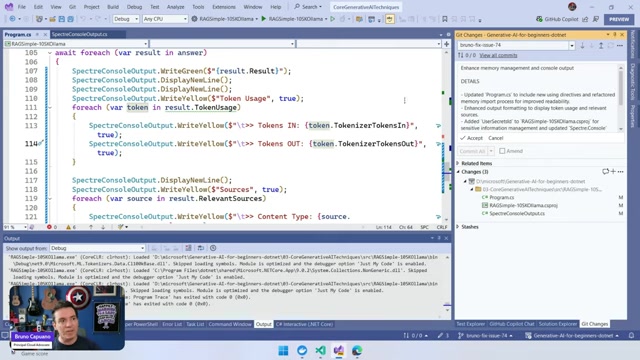
The commit process, a fundamental aspect of version control, often involves writing detailed messages explaining the changes made. GitHub Copilot can assist in this area by automatically generating commit messages based on the code modifications. This not only saves time but also ensures that commit messages are descriptive and informative.
Copilot analyzes the code diff and identifies the key changes, then formulates a commit message that accurately summarizes the updates. This can be particularly useful for large commits involving multiple files and modifications. Using copilot ensures that all commits have some sort of uniform message.
Consider a Scenario where you've refactored a large section of code. Copilot can generate a commit message like 'Refactor: Improve memory management and console output in Program.cs,' providing a clear overview of the changes
.
Creating Clear and Concise Pull Requests
Pull requests are the primary mechanism for code review and collaboration in GitHub. GitHub Copilot aids in creating effective pull requests by suggesting informative titles and descriptions. By analyzing the code changes, Copilot can propose a pull request title that accurately reflects the purpose of the request and a description that outlines the key modifications.
Moreover, Copilot can help you highlight the benefits of the changes, such as improved performance, enhanced security, or bug fixes. This allows reviewers to quickly understand the impact of the proposed changes and make informed decisions.
For example, if you've fixed an issue related to Retrieval-Augmented Generation (RAG), Copilot can suggest a pull request title like 'Fix: Resolve RAG sample issue'
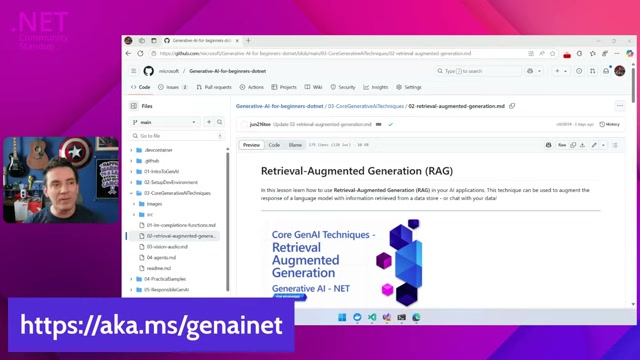
, accompanied by a description detailing the specific changes made to address the problem.
Enhancing Code Review Efficiency
Code reviews are crucial for maintaining code quality and ensuring adherence to coding standards. GitHub Copilot can significantly enhance the efficiency of code reviews by identifying potential issues and suggesting improvements
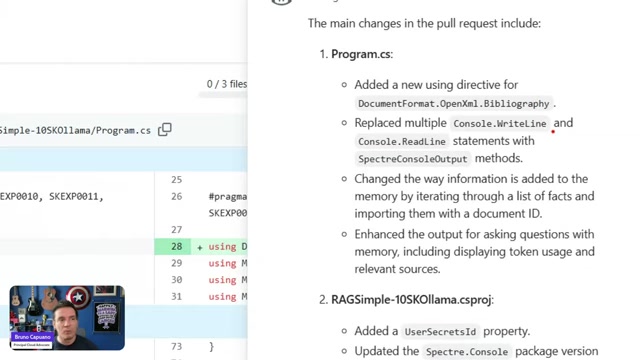
.
Copilot analyzes the code for common errors, security vulnerabilities, and performance bottlenecks, providing reviewers with actionable insights. This allows reviewers to focus on more strategic aspects of the code, such as architectural design and overall functionality.
Additionally, Copilot can suggest alternative code implementations or best practices that might have been overlooked. This promotes knowledge sharing and helps developers learn from each other's expertise.
By identifying the potential areas that need revision, developers that rely on copilot are more effective with their time.
Customizing GitHub Copilot for Team Standards
Tailoring AI to Your Project's Needs
GitHub Copilot allows for customization to tailor its suggestions to your team's specific coding standards and project requirements. By providing custom instructions, you can guide Copilot to generate code that aligns with your project's architectural Patterns, naming conventions, and code formatting rules.
This customization ensures consistency across the codebase and reduces the need for manual adjustments during code reviews. Custom instructions are crucial in ensuring that all team members have uniformity. This also ensures less potential friction if another developer needs to assist on current features.
For instance, you can instruct Copilot to use specific naming conventions for variables, methods, and classes
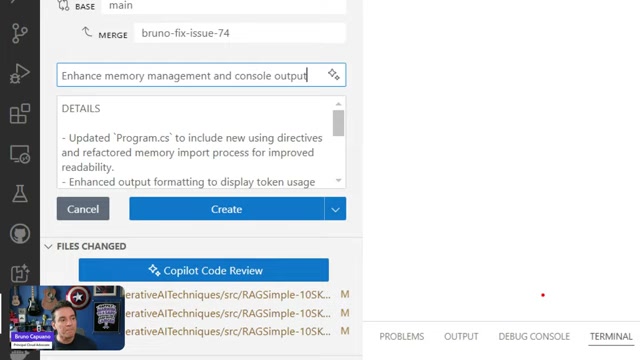
. You can also specify the preferred code formatting style or require the use of certain design patterns.
To further tailor Copilot's behavior, you can leverage configurations within Visual Studio 2022 and Visual Studio Code. These configurations enable you to define rules for code completion, code generation, and code review, ensuring that Copilot adheres to your project's unique coding guidelines.
How To Use GitHub Copilot
Commit Message Custom Instructions Guide
Here is the process to create commit messages
-
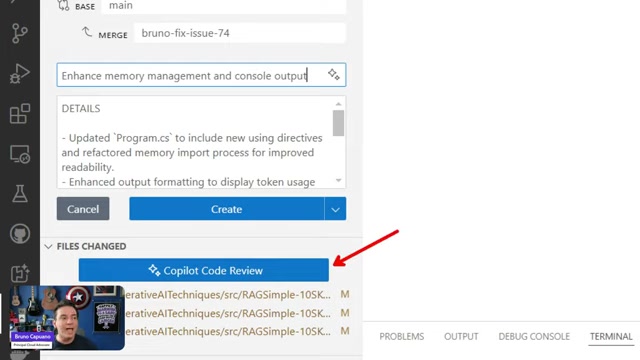
The first line should be a single line summary with no more than 50 characters.
- The Second line should be blank.
- The third line should be the title DETAILS
- The fourth line should be blank
- Start the full summary on the fifth line.





Most people like



































Report
Please select a reason for reporting
- 13 Reasons to Switch from Snapchat to Text Messaging
- 7 Powerful Speech to Text Apps to Boost Productivity
- 10 Best Speech to Text Tools for Effortless Transcription
- 13 Free Tools to Easily Transcribe Audio to Text
- 15 Surprising Ways Google's Speech-to-Text Boosts Productivity
- 7 Best Free Online Audio to Text Transcription Tools
- 9 Tips to Transcribe Speech to Text Faster and Better
- 13 Best Speech to Text Software for Windows 10 in 2023
- 7 Tips for Choosing the Best Transcriber for Audio to Text
- 11 Reasons Why Dragon Speech-to-Text Apps are Game-Changers
- 6 Secrets to Enhance Your Speech to Text Transcription
- 6 Brilliant Ways to Boost Productivity with Talk-to-Text on Your MacBook
- 6 Ways Transcription Software Converts Audio to Text
- 8 Tips to Transcribe Speech to Text Like a Pro
- 6 Reasons IBM Watson Speech to Text is a Game-Changer
- 14 Powerful Ways Talk-to-Text Improves Your Workflow
- 12 Top Windows Speech-to-Text Software for Efficient Transcription
- 12 Game-Changing Benefits of Apple's Speech to Text Technology
- 9 Powerful Use Cases for AWS Speech to Text Technology
- 10 Easy Steps to Transcribe YouTube Videos to Text
- transcription audio en texte
- online audio transcription
- free audio file transcription
- free ai audio transcription
- audio transcription service
- audio transcription online free
- audio transcription free online
- audio to transcription software
- audio and transcript
- ai audio transcription free
- voice recording to text converter
- translate voice recording to text
- record voice to text
- audio recording to text converter
- voice recording and transcription
- chatgpt voice to text
- gmail voice to text
- speech to text reader
- speech to text ai free
- speech to talk
- How to Use AI Tools to Find Internal Linking Opportunities Across a Business Website
- Discover Your Perfect Haircut with AI Hairstyle Apps
- Free Reputation Calculator Tools: How They're Adapting to Score AI Visibility, Not Just Rankings
- Design Professional Flyers for Free on Your Phone
- Best Free Flyer Maker Apps for Android: Design Like a Pro
- How to Know If Your Business Is Ready for an AI Customer Service Agent
- Revolutionizing Storytelling: From Novels to Screenplays with AI
- Create Engaging Animated Explainer Videos with a Free AI Tool
- Stop Multi-Subscribing: Benchmark Top AI Visual Models in One Canvas
- Best Seedance 2.5 API Provider: Every Price on the Market, Checked at Source
- Top AI Social Media Management Tools: Automate Your Content Strategy
- Free AI Text to Video Generator: Create Stunning Videos from Text
- Discover 17 ChatGPT Alternatives: A Comprehensive Comparison
- Character.AI vs. Janitor AI: Which AI Chat Platform Reigns Supreme?
- Top Virtual Assistant Companies in 2026: Reviews, Pricing, and Plans Compared
- Unveiling FaceCheck.ID: Revolutionizing Reverse Image Searches with AI
- 11 Best AI Dialers in 2026: Features, Pricing, Pros and Cons
- How I Direct Consistent AI Clips: A Hands-On Guide to Multi-Model Generation
- A Realistic Review of the Photo Generator Image Tool
- Playwright MCP Server: Automated Web Testing with Agent Mode

Copyright ©2026 toolify