































Table of Contents
- Key Points
- Step-by-Step Tutorial: Building a Python Code Solver AI
- Advanced Techniques for Optimization
- Detailed Usage Guide
- Pricing
- Advantages and Disadvantages
- Core Features of Python Code Solver AI
- Use Cases for Python Code Solver AI
- FAQ
- Related Questions


Step-by-Step Tutorial: Building a Python Code Solver AI
What is a Python Code Solver AI?
A Python Code Solver AI is an intelligent system designed to generate Python code snippets based on natural language problem statements. It combines natural language processing (NLP) and machine learning (ML) to understand the problem description and produce corresponding Python code. This can significantly reduce the time and effort required for coding, making it a valuable tool for developers. By automating code generation, developers can focus on more complex aspects of software development, improving efficiency and productivity. The Python code solver AI leverages advanced algorithms to ensure that generated code is accurate and functional.
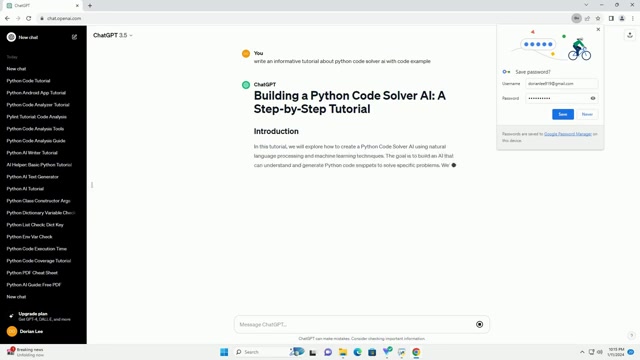
The core components of the Python code solver AI include:
- Natural Language Processing (NLP): This component is responsible for understanding the natural language input, extracting relevant information, and converting it into a format that the AI can process.
- Machine Learning (ML): The ML component uses pre-trained models like GPT-3.5 to generate Python code based on the processed input. It learns from vast amounts of code data to ensure accuracy and relevance.
-
Python Interpreter: This component validates and executes the generated code to ensure that it functions correctly and meets the specified requirements.
Building such an AI system requires a solid understanding of Python, NLP, and ML. This Tutorial aims to provide a comprehensive guide to building your own Python code solver AI.
Prerequisites for Building the Python Code Solver AI
Before you start building your Python Code Solver AI, ensure you have the following prerequisites:
- Basic Knowledge of Python Programming: You should be familiar with Python syntax, data structures, and basic programming concepts.
- An OpenAI GPT-3.5 API Key: You will need an API key from OpenAI to access the GPT-3.5 language model. You can obtain this key from the OpenAI website.
- Python Installed on Your Machine: Ensure that you have Python installed on your machine. You can download it from python.org.
These prerequisites will set you up for successfully creating your own Python code solver AI. Understanding Python and obtaining the necessary API key are crucial for the tutorial. Make sure that your Python environment is correctly configured for AI development.
Step 1: Set Up Your Environment
Setting up your environment is the first step in building your Python code solver AI. Follow these instructions to set up your environment:
- Install Python: Ensure that Python is installed on your machine. You can download it from python.org. Python is essential for running the code.
-
Install the OpenAI Library: Use pip to install the OpenAI library. Open your terminal and run the following command:
pip install openaiThis command will install the OpenAI library, which is required for interacting with the GPT-3.5 model.
-
Verify Installation: After installation, verify that the library is installed correctly by importing it in a Python script:
import openai
print("OpenAI library installed successfully!")
If you see the message "OpenAI library installed successfully!", your environment is set up correctly.
Setting up your environment is critical for the subsequent steps in building your Python code solver AI. Make sure everything is installed correctly to avoid issues later on.
Step 2: Obtain an OpenAI API Key
To use the GPT-3.5 model, you need an API key from OpenAI. Follow these steps to obtain your API key:
- Visit the OpenAI Website: Go to the OpenAI website (openai.com) and create an account.
- Navigate to API Keys: Once you have created an account and logged in, navigate to the API Keys section.
- Create a New API Key: Click on the button to create a new API key. Give your key a descriptive name to help you remember its purpose.
- Copy Your API Key: Copy the API key and store it securely. You will need this key to authenticate your requests to the GPT-3.5 model.
Obtaining an OpenAI API key is essential for utilizing the GPT-3.5 model in your Python code solver AI. Ensure that you keep your API key secure and do not share it with anyone.
Step 3: Initialize OpenAI GPT-3.5
Now, let's write Python code to initialize the OpenAI GPT-3.5 API. Replace "YOUR_API_KEY" with your actual API key. Here’s the code:
import openai

openai.api_key = "YOUR_API_KEY"
This code snippet imports the OpenAI library and sets your API key. Make sure to replace "YOUR_API_KEY" with the API key you obtained in the previous step. Initializing the OpenAI API is crucial for the Python code solver AI to communicate with the GPT-3.5 model. Securing your API key is a critical best practice.
Step 4: Create a Python Code Solver Function
Now, we will define a function that takes a problem statement as input and returns a Python code snippet as output. This function will use the GPT-3.5 model to generate code. Here’s the code:
def solve_problem(statement):
    prompt = f"Solve the following Python problem:
{statement}
"
    response = openai.Completion.create(
        engine="text-davinci-003",
        prompt=prompt,
        max_tokens=100,
        stop=None,
        temperature=0.7,
    )
    return response.choices[0].text.strip()
This function takes a statement as input, which is the problem description in natural language. It then constructs a Prompt that includes the problem statement. The openai.Completion.create function is called to generate the Python code using the text-davinci-003 engine. The max_tokens parameter limits the length of the generated code, and the stop parameter can be used to specify when the AI should stop generating code.
This function is the heart of the Python code solver AI. It converts natural language problem statements into functional Python code, making it a powerful tool for developers.
Step 5: Test the Code Solver Function
Let's test the solve_problem function with a sample problem statement. Here’s how to test the code:
problem_statement = "Write a Python function to calculate the factorial of a number."
solution = solve_problem(problem_statement)
print("Generated Python Code:
", solution)
This code defines a problem_statement that asks the AI to write a Python function to calculate the factorial of a number. It then calls the solve_problem function with this statement and prints the generated Python code. Replace the problem_statement with your own problem statement to see the AI-generated code.
Testing the Python code solver AI is crucial to ensure it generates accurate and functional code. Experiment with different problem statements to assess its capabilities and identify areas for improvement. With thorough testing, developers can have confidence in the AI's generated code.






Most people like





























Report
Please select a reason for reporting
- 13 Reasons to Switch from Snapchat to Text Messaging
- 7 Powerful Speech to Text Apps to Boost Productivity
- 10 Best Speech to Text Tools for Effortless Transcription
- 13 Free Tools to Easily Transcribe Audio to Text
- 15 Surprising Ways Google's Speech-to-Text Boosts Productivity
- 7 Best Free Online Audio to Text Transcription Tools
- 9 Tips to Transcribe Speech to Text Faster and Better
- 13 Best Speech to Text Software for Windows 10 in 2023
- 7 Tips for Choosing the Best Transcriber for Audio to Text
- 11 Reasons Why Dragon Speech-to-Text Apps are Game-Changers
- 6 Secrets to Enhance Your Speech to Text Transcription
- 6 Brilliant Ways to Boost Productivity with Talk-to-Text on Your MacBook
- 6 Ways Transcription Software Converts Audio to Text
- 8 Tips to Transcribe Speech to Text Like a Pro
- 6 Reasons IBM Watson Speech to Text is a Game-Changer
- 14 Powerful Ways Talk-to-Text Improves Your Workflow
- 12 Top Windows Speech-to-Text Software for Efficient Transcription
- 12 Game-Changing Benefits of Apple's Speech to Text Technology
- 9 Powerful Use Cases for AWS Speech to Text Technology
- 10 Easy Steps to Transcribe YouTube Videos to Text
- transcription audio en texte
- online audio transcription
- free audio file transcription
- free ai audio transcription
- audio transcription service
- audio transcription online free
- audio transcription free online
- audio to transcription software
- audio and transcript
- ai audio transcription free
- voice recording to text converter
- translate voice recording to text
- record voice to text
- audio recording to text converter
- voice recording and transcription
- chatgpt voice to text
- gmail voice to text
- speech to text reader
- speech to text ai free
- speech to talk
- How to Use AI Tools to Find Internal Linking Opportunities Across a Business Website
- Discover Your Perfect Haircut with AI Hairstyle Apps
- Free Reputation Calculator Tools: How They're Adapting to Score AI Visibility, Not Just Rankings
- Design Professional Flyers for Free on Your Phone
- Best Free Flyer Maker Apps for Android: Design Like a Pro
- How to Know If Your Business Is Ready for an AI Customer Service Agent
- Revolutionizing Storytelling: From Novels to Screenplays with AI
- Create Engaging Animated Explainer Videos with a Free AI Tool
- Stop Multi-Subscribing: Benchmark Top AI Visual Models in One Canvas
- Best Seedance 2.5 API Provider: Every Price on the Market, Checked at Source
- Top AI Social Media Management Tools: Automate Your Content Strategy
- Free AI Text to Video Generator: Create Stunning Videos from Text
- Discover 17 ChatGPT Alternatives: A Comprehensive Comparison
- Character.AI vs. Janitor AI: Which AI Chat Platform Reigns Supreme?
- Top Virtual Assistant Companies in 2026: Reviews, Pricing, and Plans Compared
- Unveiling FaceCheck.ID: Revolutionizing Reverse Image Searches with AI
- 11 Best AI Dialers in 2026: Features, Pricing, Pros and Cons
- How I Direct Consistent AI Clips: A Hands-On Guide to Multi-Model Generation
- A Realistic Review of the Photo Generator Image Tool
- Playwright MCP Server: Automated Web Testing with Agent Mode

Copyright ©2026 toolify