































Table of Contents
- Key Points
- Integrating Claude Code and GitHub: A Workflow Revolution
- Diving Deep: Creating Issues and Interacting with GitHub
- Step-by-Step Guide: Implementing the Workflow
- Navigating Claude Code Pricing
- Weighing the Options: Pros and Cons of this GitHub Workflow
- Core Technologies Used in This Framework
- Unlocking Use Cases: Where This Workflow Shines
- Frequently Asked Questions
- Related Questions


Integrating Claude Code and GitHub: A Workflow Revolution
Unlocking Coding Superpowers with AI and Collaboration
The combination of AI coding assistants and collaborative platforms like GitHub has opened up exciting possibilities for developers. By integrating these tools effectively, developers can streamline their workflow, reduce manual effort, and focus on higher-level problem-solving and creative aspects of software development. This integrated workflow is especially transformative for solo developers or small teams who need to maximize their productivity and maintain code quality. It allows them to manage projects more efficiently, test changes thoroughly, and deploy updates seamlessly, all while leveraging the power of AI to accelerate the coding process.

This workflow isn't merely about writing code; it's about managing the entire software development lifecycle, from planning to deployment, in a cohesive and efficient manner.
The High-Level Workflow: A Bird's-Eye View
The essence of this workflow revolves around using GitHub issues to define and manage development tasks. Claude Code, equipped with custom slash commands, then assists in generating, testing, and reviewing code based on these issues. The entire process adheres to the GitHub Flow, a well-established branching model designed for collaborative software development. Let’s break down the steps:

- GitHub Issue Creation: Define the work to be done as a GitHub issue, including details, acceptance criteria, and any relevant context.
- Claude Code Integration: Use Claude Code with customized slash commands to address the issue, including generating code, running tests, and reviewing the solution.
- Automated Testing: Implement GitHub Actions to automatically run tests upon code commits, ensuring code quality.
- Pull Request and Review: Commit the changes to GitHub and open a pull request for review, either by yourself or by Claude Code itself.
- Deployment: Upon approval, merge the pull request to the main branch, automatically deploying the updated application.
Why Embrace This Workflow? The Core Benefits
While AI coding assistants are powerful, they are most effective when integrated into a structured workflow. A structured Claude Code and GitHub development process offers numerous advantages, particularly for small teams and individual developers. The advantages includes:
- Enhanced Code Quality: The combination of automated testing, code review, and detailed specifications leads to more robust and maintainable code.
- Accelerated Development Cycles: AI-driven code generation and automated testing significantly reduce development time.
- Improved Collaboration: The GitHub Flow model and code reviews facilitate seamless collaboration within teams.
- Reduced Cognitive Load: AI assistance handles repetitive tasks, freeing up developers to focus on more complex challenges.
- Increased Productivity: The workflow boosts overall development productivity, enabling faster feature releases and quicker response to user needs.
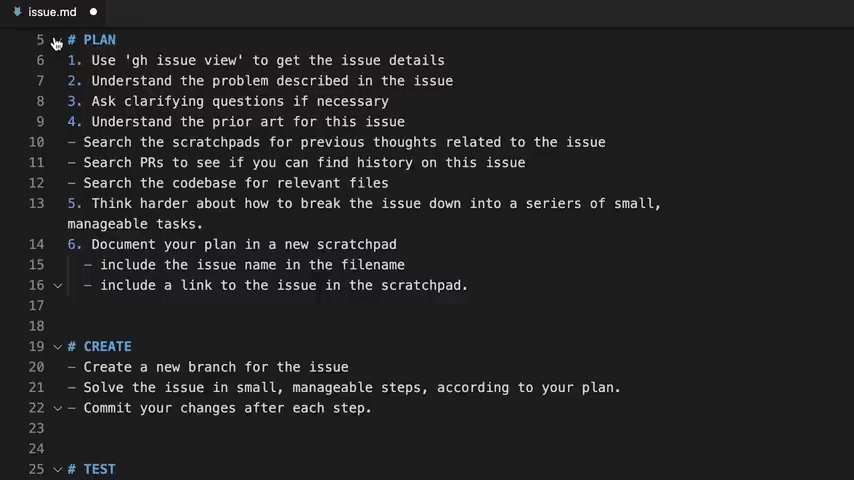
Even with the advanced capabilities of AI coding agents, processes and systems are crucial to effectively manage complex software to ensure quality and reduce risk.
Deconstructing the Four Pillars: Plan, Create, Test, Deploy
This workflow fundamentally mirrors the four phases of the software development lifecycle: Plan, Create, Test, and Deploy. Understanding these phases within the context of Claude Code and GitHub will help you create a new strategy:
- Plan: This phase involves defining the scope and objectives of each development task. GitHub issues serve as the central hub for this planning, outlining the problem, acceptance criteria, and context for the work. This is achieved by:
- Use ‘gh issue view’ to get the issue details
- Understand the problem described in the issue
- Ask clarifying question is necessary
- Understand the prior art for this issue
- Search the scratchpads for previous thoughts related to the issue
- Search PRs to see if you can find history on this issue
- Search the codebase for relevant files
- Think harder about how to break the issue down into a series of small, manageable tasks
- Document your plan in a new scratchpad
- Create: In this part, developer, with the assistance of Claude Code, generates a code necessary to address an issue. Create a new branch for the issue, solving the issue in small and manageable steps as defined by your plan while commiting to your changes after each step
- Test: This is where you ensure that the code you created works as expected. Use Puppeteer to evaluate via MCP to test the changes, write rspec tests to describe the expected behavior of your code and ensure that all tests are passing before moving on to the next step.
- Deploy: Once all tests pass, it is time to put the application in motion. Start by opening a PR, request and review to begin your work.

Remember, you may use GitHub CLI for the majority of GitHub realted tasks.
Diving Deep: Creating Issues and Interacting with GitHub
Creating Granular GitHub Issues for Enhanced Control
The quality of your GitHub issues directly impacts the effectiveness of the workflow. Well-defined, atomic issues allow Claude Code to generate more accurate and targeted code.
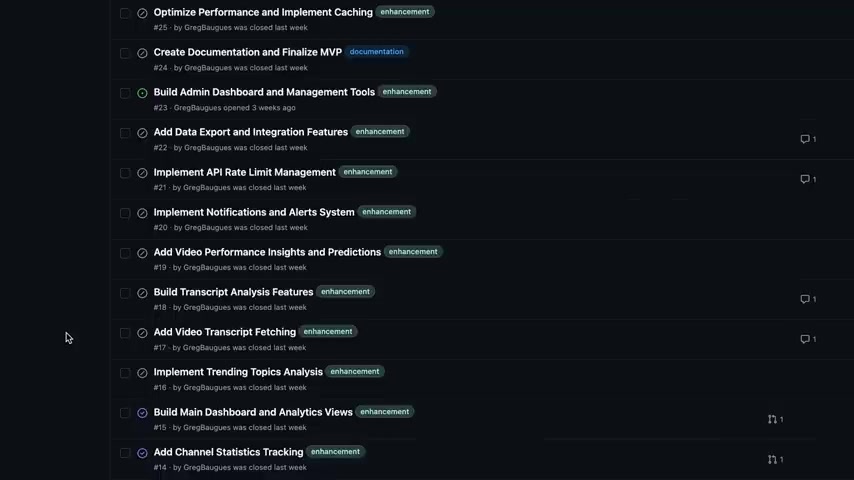
A vague or overly complex issue can lead to inefficient code generation and require significant human intervention. The key is to break down large tasks into smaller, manageable units that can be easily understood and addressed by the AI coding assistant.
Consider these best practices for creating GitHub issues:
- Clear and Concise Title: Use a descriptive title that clearly identifies the purpose of the issue.
- Detailed Description: Provide a comprehensive explanation of the problem, including context, requirements, and acceptance criteria.
- Specific Steps: Outline the specific steps that need to be taken to resolve the issue.
- Relevant Links: Include links to relevant documentation, code files, or prior art.
- Focus: Keep the scope of each issue focused and atomic, addressing a single, well-defined problem. By investing time in crafting well-defined issues, you set the stage for successful AI-assisted coding and a smoother development process.
Integrating Claude Code with GitHub: The Essential GH CLI
For Claude Code to seamlessly interact with GitHub, you need the GitHub CLI.

This tool allows Claude Code to execute Git commands via Bash, enabling it to create issues, open pull requests, and perform other GitHub-related tasks.
- Installation: The Anthropic recommended method of doing so is to install the GitHub CLI and lets Claude Code to run gh via Bash to interact with GitHub
- API Key Configuration: Set up the GitHub API to make sure that it has the proper authentications This process helps automate a lot of the workflow and reduces the need for manual interventions with GitHub. Remember, some functions may require an installed MCP server but the use of the CLI is still preferred in general.
Step-by-Step Guide: Implementing the Workflow
Step 1: Setting Up the Testing Framework and CI Pipeline
The test suite and continuous integration implementation is one of the first issues that this framework recommends. Most of Greg's work is based in Python, a language highly recommended as a way to set up testing and continuous integration. As the engineer in charge, you should be specific about what should be accomplished while being sure that its goals are atomic to avoid confusion. The integration should be done early on in the process so that the framework has the proper tests to ensure the maintenance of all features.

Step 2: From Dictation to Requirements
From the beginning, make sure that Superwhisper has taken a diction and turned that into a requirement. Now work with Claude to make that a requirements document, and follow those steps while implementing the Github issues. This way you can build the Rails app piece by piece with each individual step that has to occur.
Step 3: Committing and Code Review
This is a important step where code generated by Claude has to be implemented, which involves review. The steps for code writing, review and Commits are:
- Before making any modifications, make sure to review code
- Leave comments on any changes, whether they are simple fixes or something that requires to be re-written in general
- Code should be tested before commit This step makes sure that you or the AI is able to review the pull requests and to keep the development clean.





Most people like































Report
Please select a reason for reporting
- 13 Reasons to Switch from Snapchat to Text Messaging
- 7 Powerful Speech to Text Apps to Boost Productivity
- 10 Best Speech to Text Tools for Effortless Transcription
- 13 Free Tools to Easily Transcribe Audio to Text
- 15 Surprising Ways Google's Speech-to-Text Boosts Productivity
- 7 Best Free Online Audio to Text Transcription Tools
- 9 Tips to Transcribe Speech to Text Faster and Better
- 13 Best Speech to Text Software for Windows 10 in 2023
- 7 Tips for Choosing the Best Transcriber for Audio to Text
- 11 Reasons Why Dragon Speech-to-Text Apps are Game-Changers
- 6 Secrets to Enhance Your Speech to Text Transcription
- 6 Brilliant Ways to Boost Productivity with Talk-to-Text on Your MacBook
- 6 Ways Transcription Software Converts Audio to Text
- 8 Tips to Transcribe Speech to Text Like a Pro
- 6 Reasons IBM Watson Speech to Text is a Game-Changer
- 14 Powerful Ways Talk-to-Text Improves Your Workflow
- 12 Top Windows Speech-to-Text Software for Efficient Transcription
- 12 Game-Changing Benefits of Apple's Speech to Text Technology
- 9 Powerful Use Cases for AWS Speech to Text Technology
- 10 Easy Steps to Transcribe YouTube Videos to Text
- transcription audio en texte
- online audio transcription
- free audio file transcription
- free ai audio transcription
- audio transcription service
- audio transcription online free
- audio transcription free online
- audio to transcription software
- audio and transcript
- ai audio transcription free
- voice recording to text converter
- translate voice recording to text
- record voice to text
- audio recording to text converter
- voice recording and transcription
- chatgpt voice to text
- gmail voice to text
- speech to text reader
- speech to text ai free
- speech to talk
- How to Use AI Tools to Find Internal Linking Opportunities Across a Business Website
- Discover Your Perfect Haircut with AI Hairstyle Apps
- Free Reputation Calculator Tools: How They're Adapting to Score AI Visibility, Not Just Rankings
- Design Professional Flyers for Free on Your Phone
- Best Free Flyer Maker Apps for Android: Design Like a Pro
- How to Know If Your Business Is Ready for an AI Customer Service Agent
- Revolutionizing Storytelling: From Novels to Screenplays with AI
- Create Engaging Animated Explainer Videos with a Free AI Tool
- Stop Multi-Subscribing: Benchmark Top AI Visual Models in One Canvas
- Best Seedance 2.5 API Provider: Every Price on the Market, Checked at Source
- Top AI Social Media Management Tools: Automate Your Content Strategy
- Free AI Text to Video Generator: Create Stunning Videos from Text
- Discover 17 ChatGPT Alternatives: A Comprehensive Comparison
- Character.AI vs. Janitor AI: Which AI Chat Platform Reigns Supreme?
- Top Virtual Assistant Companies in 2026: Reviews, Pricing, and Plans Compared
- Unveiling FaceCheck.ID: Revolutionizing Reverse Image Searches with AI
- 11 Best AI Dialers in 2026: Features, Pricing, Pros and Cons
- How I Direct Consistent AI Clips: A Hands-On Guide to Multi-Model Generation
- A Realistic Review of the Photo Generator Image Tool
- Playwright MCP Server: Automated Web Testing with Agent Mode

Copyright ©2026 toolify