































Table of Contents
- Key Points
- Understanding the Viral Potential of Motion Graphics
- Step-by-Step Tutorial: Creating Viral Motion Graphics
- Pricing of AI Motion Graphics Tools
- AI Motion Graphics Tools: Pros and Cons
- Unlocking Opportunities: Diverse Use Cases for AI Motion Graphics
- Frequently Asked Questions
- Related Questions


Step-by-Step Tutorial: Creating Viral Motion Graphics
Step 1: Generating Compelling Stories with AI
The first step in creating viral motion graphics is generating compelling stories. Instead of manually crafting scripts, leverage AI to create engaging content. ChatGPT is a versatile tool that can generate narratives based on provided information. However, to maximize its potential, you'll need to train it with high-quality, engaging content that resonates with audiences.
- Find Trending Topics: Research current trends and viral content within your niche. Use tools like TokScript
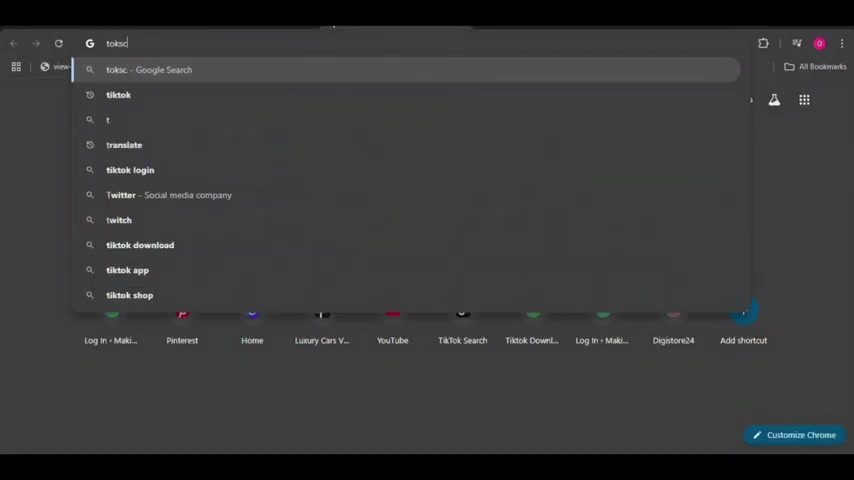
to analyze the transcript of successful videos on TikTok and YouTube.
- Analyze Transcripts: Copy the transcript of a video with a high level of engagement. This will serve as a foundation for ChatGPT to understand what type of content works.
- Train ChatGPT: Provide the video's script to ChatGPT and ask it to analyze the video. For example, instruct it to identify the strengths, areas for improvement, and other important aspects of the script. Use the following Prompt: “I need you to analyze this script” . Paste the script into ChatGPT and analyze the analysis to find new ideas .
- Generate New Scripts: Based on the analysis, ask ChatGPT to create new scripts. If the viral video covered US statistics, ask ChatGPT to generate a script with fun facts about the US.
By training ChatGPT, you can ensure that the AI writes content that is engaging, informative, and has the potential to go viral.
Step 2: Creating Realistic Voiceovers
The second step is creating high-quality voiceovers. A realistic and professional voiceover can significantly enhance the viewing experience and keep your audience engaged. ElevenLabs is an excellent AI-powered Text-to-Speech tool known for generating natural-sounding voiceovers
.
- Choosing a Voice: ElevenLabs offers a variety of voices. Select the voice that best matches the tone of your video
. You can also adjust settings like speed and clarity.
- Free vs. Paid: The free version of ElevenLabs offers sufficient features for basic use. However, the paid subscriptions provide access to more advanced voices and functionalities. A starter plan is only 5 dollars a month .
- Text-to-Speech: Copy the script generated from ChatGPT and paste it into ElevenLabs’ text-to-speech feature. Review the generated speech to ensure it flows well and makes sense .
- Generate and Download: Generate the voiceover and download the audio file. Make sure to download the file and keep it safe!
With ElevenLabs, you can create realistic voiceovers that complement your motion graphics, adding to the overall quality of your videos.
Step 3: Creating Motion Graphics with Google Earth Studio
The most important thing for making motion graphics is the visual. Google Earth Studio is a powerful, free tool that helps you create stunning visuals
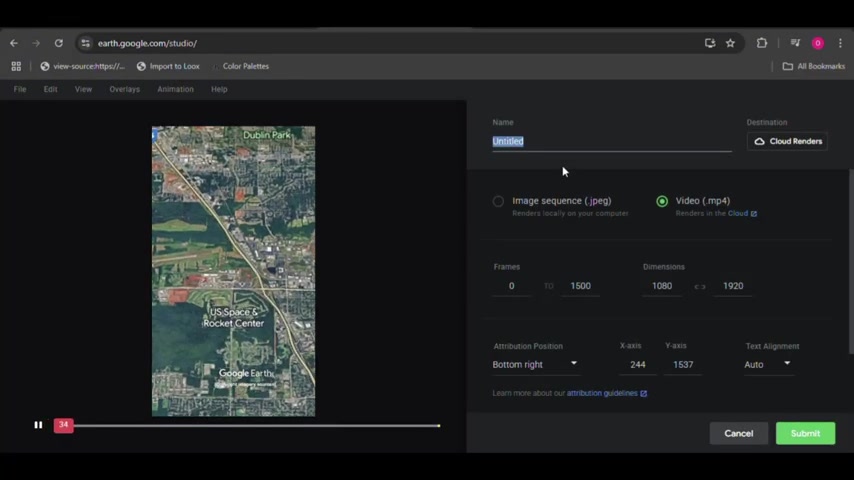
. With Google Earth Studio you can zoom in and around different geographic locations to create captivating videos, so here's how:
- Access Google Earth Studio: Open a web browser and go to earth.google.com/studio/ . Sign up for an account using your google account . You will need to provide some info like your name and email.
- Start a New Project: You can use a blank project, but here it is better to use a quick start template . With Quick Start, you can choose from premade movements. The Fly-To and Orbit is an excellent movement to start with .
- Enter a location: Go to the bottom bar of the screen to search what city you wish to zoom into . Make sure this is a location that matches the content of your voice over!
- Edit the video: Tweak a few attributes for your new video . The first thing to note is Google Earth automatically makes each movement 25 seconds. If you wish to change this, click file and go to project settings . In this tab, you can edit the video length and more . Make sure to make the video length smaller for TikTok and Shorts.
- Export Your Animation: Render and export the final video to your computer. This process may take some time.
Step 4: Editing it all Together
Once you’ve generated your voiceover and made your motion graphics video, it's time to edit everything together. You will need an editing program of your choice. CapCut is an excellent choice due to being free

.
- Import your assets: Import your voiceover and video .
- Crop to be a short: Edit your video to have a 9:16 aspect ratio . This is the resolution for short-form content on platforms like TikTok and Shorts.
- Trim the content: Cut up any blank space and add transitions !
- Auto Captions: Auto Captions help make the video more engaging and make it more accessible for the hearing impaired .
- Export: Finally Export and upload to social media!







Most people like
































Report
Please select a reason for reporting
- 13 Reasons to Switch from Snapchat to Text Messaging
- 7 Powerful Speech to Text Apps to Boost Productivity
- 10 Best Speech to Text Tools for Effortless Transcription
- 13 Free Tools to Easily Transcribe Audio to Text
- 15 Surprising Ways Google's Speech-to-Text Boosts Productivity
- 7 Best Free Online Audio to Text Transcription Tools
- 9 Tips to Transcribe Speech to Text Faster and Better
- 13 Best Speech to Text Software for Windows 10 in 2023
- 7 Tips for Choosing the Best Transcriber for Audio to Text
- 11 Reasons Why Dragon Speech-to-Text Apps are Game-Changers
- 6 Secrets to Enhance Your Speech to Text Transcription
- 6 Brilliant Ways to Boost Productivity with Talk-to-Text on Your MacBook
- 6 Ways Transcription Software Converts Audio to Text
- 8 Tips to Transcribe Speech to Text Like a Pro
- 6 Reasons IBM Watson Speech to Text is a Game-Changer
- 14 Powerful Ways Talk-to-Text Improves Your Workflow
- 12 Top Windows Speech-to-Text Software for Efficient Transcription
- 12 Game-Changing Benefits of Apple's Speech to Text Technology
- 9 Powerful Use Cases for AWS Speech to Text Technology
- 10 Easy Steps to Transcribe YouTube Videos to Text
- transcription audio en texte
- online audio transcription
- free audio file transcription
- free ai audio transcription
- audio transcription service
- audio transcription online free
- audio transcription free online
- audio to transcription software
- audio and transcript
- ai audio transcription free
- voice recording to text converter
- translate voice recording to text
- record voice to text
- audio recording to text converter
- voice recording and transcription
- chatgpt voice to text
- gmail voice to text
- speech to text reader
- speech to text ai free
- speech to talk
- How to Use AI Tools to Find Internal Linking Opportunities Across a Business Website
- Discover Your Perfect Haircut with AI Hairstyle Apps
- Free Reputation Calculator Tools: How They're Adapting to Score AI Visibility, Not Just Rankings
- Design Professional Flyers for Free on Your Phone
- Best Free Flyer Maker Apps for Android: Design Like a Pro
- How to Know If Your Business Is Ready for an AI Customer Service Agent
- Revolutionizing Storytelling: From Novels to Screenplays with AI
- Create Engaging Animated Explainer Videos with a Free AI Tool
- Stop Multi-Subscribing: Benchmark Top AI Visual Models in One Canvas
- Best Seedance 2.5 API Provider: Every Price on the Market, Checked at Source
- Top AI Social Media Management Tools: Automate Your Content Strategy
- Free AI Text to Video Generator: Create Stunning Videos from Text
- Discover 17 ChatGPT Alternatives: A Comprehensive Comparison
- Character.AI vs. Janitor AI: Which AI Chat Platform Reigns Supreme?
- Top Virtual Assistant Companies in 2026: Reviews, Pricing, and Plans Compared
- Unveiling FaceCheck.ID: Revolutionizing Reverse Image Searches with AI
- 11 Best AI Dialers in 2026: Features, Pricing, Pros and Cons
- How I Direct Consistent AI Clips: A Hands-On Guide to Multi-Model Generation
- A Realistic Review of the Photo Generator Image Tool
- Playwright MCP Server: Automated Web Testing with Agent Mode

Copyright ©2026 toolify