























Effortlessly Remove Image Backgrounds with Adobe Creative Cloud Express

Updated on Jul 01,2025








Table of Contents
- Key Points
- Introduction to Background Removal Challenges
- Adobe Creative Cloud Express: A Skill-Free Solution
- Detailed Steps for Background Removal
- Adobe Creative Cloud Express Pricing
- Weighing the Benefits and Drawbacks
- Core Features of Adobe Creative Cloud Express
- Ideal Use Cases for Adobe Creative Cloud Express
- Frequently Asked Questions
- Related Questions


Introduction to Background Removal Challenges
The Struggle with Traditional Methods
Many users find themselves struggling with complicated Photoshop tools or relying on mobile apps that lack the precision for professional-looking results. Removing backgrounds accurately, especially around tricky areas like hair, often proves challenging.

Traditional methods either demand significant expertise or compromise on quality. This creates a need for a more accessible and reliable solution that bridges the gap between complexity and effectiveness.
Why Accurate Background Removal Matters
Accurate background removal is essential for various purposes, from creating professional marketing materials to enhancing product photos for e-commerce. Cleanly isolated subjects ensure focus and visual appeal, contributing to a polished and credible brand image. Whether you’re designing graphics, editing portraits, or creating engaging social media content, precise background removal plays a critical role in achieving a professional finish.
Adobe Creative Cloud Express: A Skill-Free Solution
Leveraging Adobe's AI for Precision
Adobe Creative Cloud Express provides a straightforward solution to background removal by harnessing the power of Adobe Photoshop's artificial intelligence (AI).
This tool allows users to accurately and precisely remove backgrounds without any specialized skills or prior experience. The AI intelligently identifies the subject and cleanly separates it from the background, even in complex areas like hair, ensuring a professional-quality result.
Accessing the Free Background Remover
The Adobe Creative Cloud Express Background Remover is accessible online and free to use.

By visiting the specified website, users can quickly upload their images and let the AI do its magic. This eliminates the need for expensive software or complicated tutorials, making high-quality background removal available to everyone.
Step-by-Step Guide to Removing Backgrounds
Follow these simple steps to remove backgrounds from your images using Adobe Creative Cloud Express:
- Visit the Adobe Creative Cloud Express website: Navigate to the background remover tool.
- Upload your image: Click the 'Upload your photo' button.
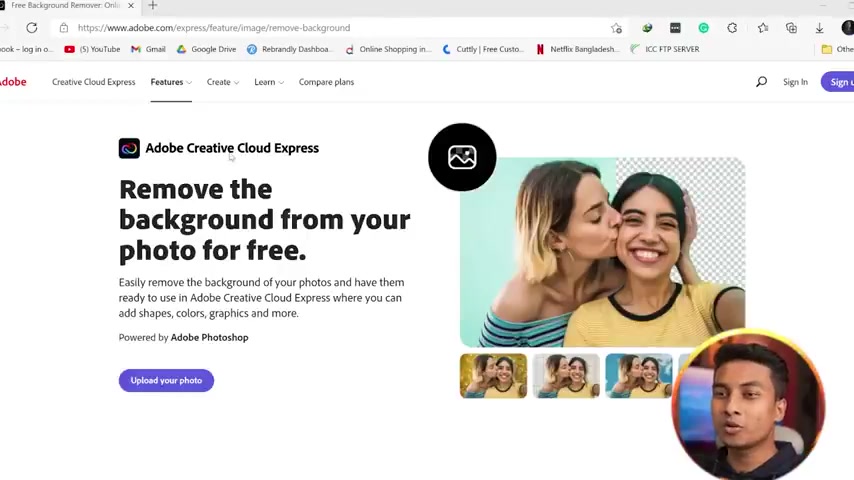
You can either browse your device or drag and drop the image directly into the designated area.
- Let the AI work: The AI will automatically analyze your image and remove the background. This process usually takes just a few seconds.
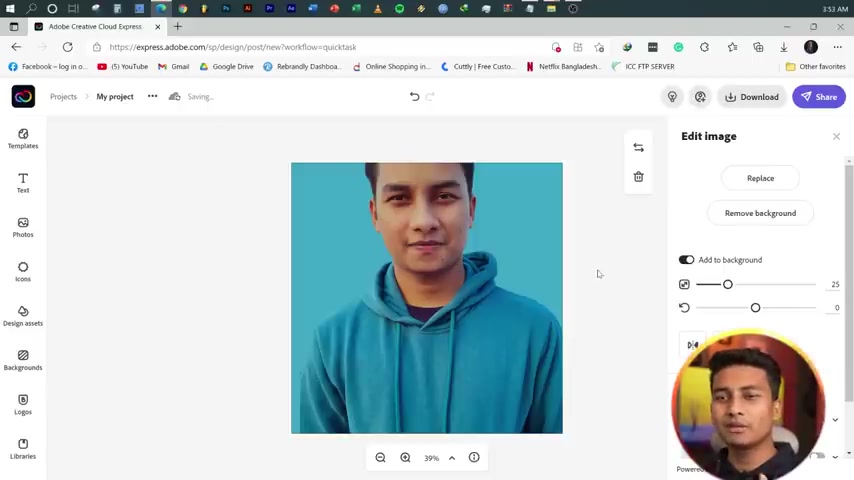
- Review and Customize: Once the background is removed, review the result. If needed, you can further customize the image using the available editing tools.
- Download your image: Create an Adobe account or sign in to download the final image with the background removed.
This process ensures even novice users can achieve impressive results quickly and efficiently.
The Magic Behind the AI
The tool uses the same artificial intelligence (AI) found in Photoshop 2021 and later versions.
This AI is specifically designed to identify and isolate subjects within images, enabling clean and accurate background removal. By using this technology, Adobe Creative Cloud Express delivers results comparable to those achieved by Photoshop experts, but without the steep learning curve.
Detailed Steps for Background Removal
Step 1: Accessing Adobe Creative Cloud Express
Begin by opening your web browser and navigating to the Adobe Creative Cloud Express website. You can easily find the background removal tool by searching 'Adobe Creative Cloud Express background remover' on any Search Engine or by directly entering the URL provided.
Step 2: Uploading Your Image
Once on the website, locate the 'Upload your photo' button and click it. A window will appear, allowing you to browse your computer for the image you want to edit. Alternatively, you can simply drag and drop the image file directly into the upload area on the webpage.
Step 3: Automatic Background Removal
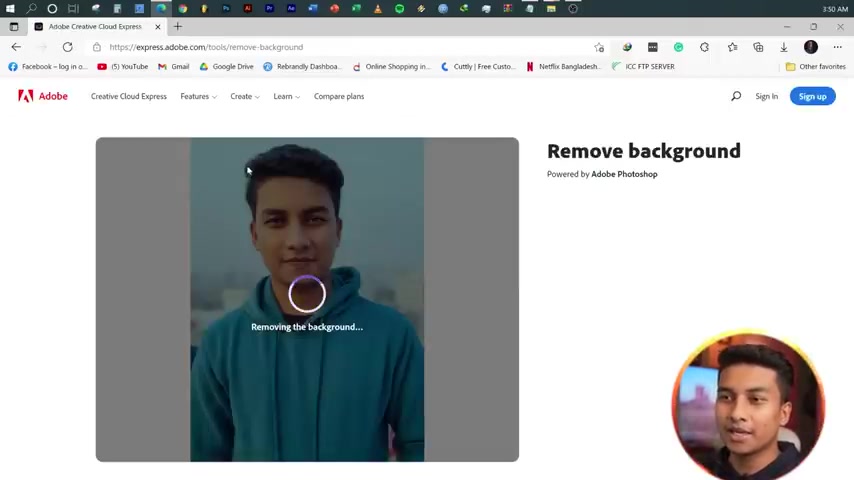
After uploading, the AI will automatically analyze the image and begin removing the background. A progress indicator will appear, showing the status of the removal process. This typically takes only a few seconds, depending on the complexity of the image.
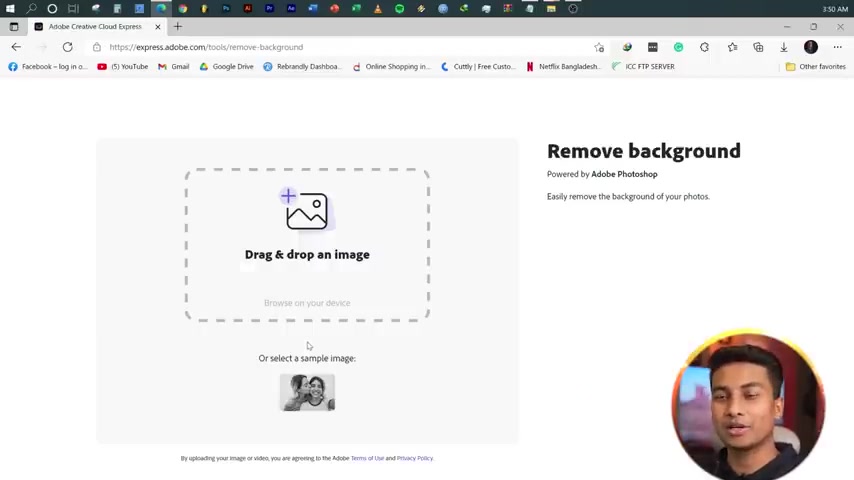
Step 4: Reviewing the Result
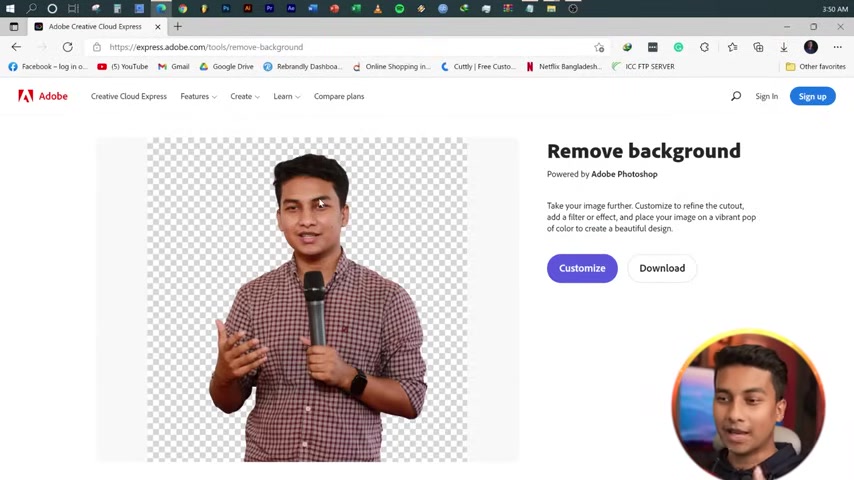
Once the background removal is complete, take a moment to review the result. Zoom in on critical areas, such as the edges of the subject and around hair, to ensure the AI has accurately removed the background without compromising the subject's details. If adjustments are needed, additional editing tools are available.
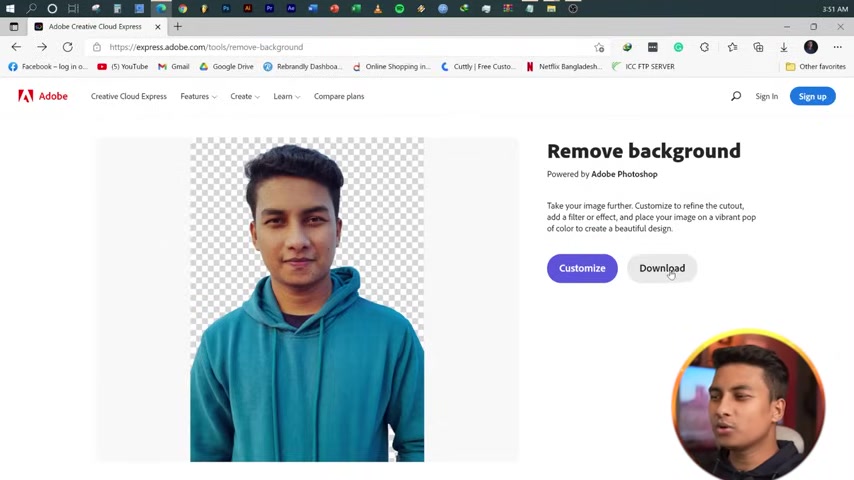
Step 5: Downloading Your Image
To download the edited image, you’ll need to either sign in with an existing Adobe account or create a new one.
If you don't have an account, click the 'Sign up' button and follow the prompts to create a free account. Once logged in, you can download the image in a format suitable for your needs.








Most people like































Report
Please select a reason for reporting
- 13 Reasons to Switch from Snapchat to Text Messaging
- 7 Powerful Speech to Text Apps to Boost Productivity
- 10 Best Speech to Text Tools for Effortless Transcription
- 13 Free Tools to Easily Transcribe Audio to Text
- 15 Surprising Ways Google's Speech-to-Text Boosts Productivity
- 7 Best Free Online Audio to Text Transcription Tools
- 9 Tips to Transcribe Speech to Text Faster and Better
- 13 Best Speech to Text Software for Windows 10 in 2023
- 7 Tips for Choosing the Best Transcriber for Audio to Text
- 11 Reasons Why Dragon Speech-to-Text Apps are Game-Changers
- 6 Secrets to Enhance Your Speech to Text Transcription
- 6 Brilliant Ways to Boost Productivity with Talk-to-Text on Your MacBook
- 6 Ways Transcription Software Converts Audio to Text
- 8 Tips to Transcribe Speech to Text Like a Pro
- 6 Reasons IBM Watson Speech to Text is a Game-Changer
- 14 Powerful Ways Talk-to-Text Improves Your Workflow
- 12 Top Windows Speech-to-Text Software for Efficient Transcription
- 12 Game-Changing Benefits of Apple's Speech to Text Technology
- 9 Powerful Use Cases for AWS Speech to Text Technology
- 10 Easy Steps to Transcribe YouTube Videos to Text
- transcription audio en texte
- online audio transcription
- free audio file transcription
- free ai audio transcription
- audio transcription service
- audio transcription online free
- audio transcription free online
- audio to transcription software
- audio and transcript
- ai audio transcription free
- voice recording to text converter
- translate voice recording to text
- record voice to text
- audio recording to text converter
- voice recording and transcription
- chatgpt voice to text
- gmail voice to text
- speech to text reader
- speech to text ai free
- speech to talk
- How to Use AI Tools to Find Internal Linking Opportunities Across a Business Website
- Discover Your Perfect Haircut with AI Hairstyle Apps
- Free Reputation Calculator Tools: How They're Adapting to Score AI Visibility, Not Just Rankings
- Design Professional Flyers for Free on Your Phone
- Best Free Flyer Maker Apps for Android: Design Like a Pro
- How to Know If Your Business Is Ready for an AI Customer Service Agent
- Revolutionizing Storytelling: From Novels to Screenplays with AI
- Create Engaging Animated Explainer Videos with a Free AI Tool
- Stop Multi-Subscribing: Benchmark Top AI Visual Models in One Canvas
- Best Seedance 2.5 API Provider: Every Price on the Market, Checked at Source
- Top AI Social Media Management Tools: Automate Your Content Strategy
- Free AI Text to Video Generator: Create Stunning Videos from Text
- Discover 17 ChatGPT Alternatives: A Comprehensive Comparison
- Character.AI vs. Janitor AI: Which AI Chat Platform Reigns Supreme?
- Top Virtual Assistant Companies in 2026: Reviews, Pricing, and Plans Compared
- Unveiling FaceCheck.ID: Revolutionizing Reverse Image Searches with AI
- 11 Best AI Dialers in 2026: Features, Pricing, Pros and Cons
- How I Direct Consistent AI Clips: A Hands-On Guide to Multi-Model Generation
- A Realistic Review of the Photo Generator Image Tool
- Playwright MCP Server: Automated Web Testing with Agent Mode

Copyright ©2026 toolify