































Table of Contents
- Key Points
- Understanding Microservices and Event-Driven Architecture
- Discovering Amazon EventBridge: A Serverless Event Bus
- Setting Up Zendesk as an Event Source in Amazon EventBridge [t:37]
- Amazon EventBridge Pricing
- Amazon EventBridge: Weighing the Benefits and Drawbacks
- Key Features of Amazon EventBridge
- Common Amazon EventBridge Use Cases
- Frequently Asked Questions
- Related Questions


Understanding Microservices and Event-Driven Architecture
The Rise of Microservices
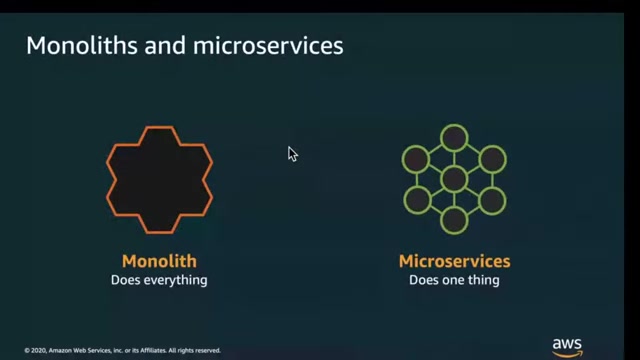
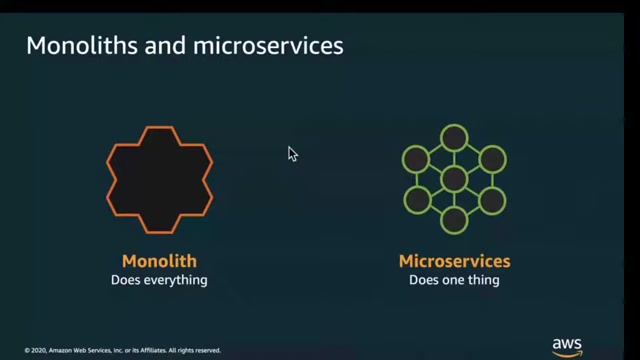
Modern software applications often require complex functionalities, leading to monolithic architectures that can become difficult to manage, scale, and update.

Microservices offer an alternative approach by breaking down these large applications into smaller, independent services that communicate with each other. This architectural style promotes agility, allowing teams to develop, deploy, and scale individual services independently. Each microservice focuses on a specific business capability, making them easier to understand, maintain, and evolve.
The key advantages of microservices include:
- Independent Deployability: Teams can deploy and update services without affecting other parts of the application.
- Scalability: Individual services can be scaled based on their specific needs, optimizing resource utilization.
- Fault Isolation: A failure in one service does not necessarily bring down the entire application.
- Technology Diversity: Teams can choose the best technology stack for each service, fostering innovation.
However, managing a distributed system of microservices introduces its own set of challenges, particularly in coordinating communication between services. This is where event-driven architecture comes into play.
Event-Driven Architecture: The Key to Microservices Coordination
Event-driven architecture is a paradigm where services communicate by emitting and reacting to events.
An event is a signal that a system's state has changed. Instead of direct service-to-service communication, services publish events to a central event bus, and other services subscribe to these events based on their interests. This decoupling of services allows them to operate independently, improving resilience and scalability.
Benefits of event-driven architecture in microservices:
- Loose Coupling: Services are not tightly coupled, reducing dependencies and enabling independent evolution.
- Asynchronous Communication: Services can react to events without blocking other services, improving responsiveness.
- Improved Scalability: Services can be scaled independently based on their event processing needs.
- Enhanced Resilience: Services can continue to operate even if other services are temporarily unavailable.
However, implementing event-driven architecture can be complex, requiring a robust and scalable event bus to handle the flow of events. This is where Amazon EventBridge becomes indispensable.
Discovering Amazon EventBridge: A Serverless Event Bus
What is Amazon EventBridge?
Amazon EventBridge is a serverless event bus service that enables you to build scalable event-driven applications.
It acts as a central hub, receiving events from various sources and routing them to target services based on predefined rules. EventBridge simplifies the development of event-driven architectures by providing a fully managed, scalable, and reliable platform for event processing.
With Amazon EventBridge, you can:
- Ingest Events from Various Sources: EventBridge can ingest events from AWS services, custom applications, and third-party SaaS providers.
- Route Events Based on Rules: Define rules to filter and route events based on their content and source.
- Deliver Events to Multiple Targets: Deliver events to various AWS services, including Lambda functions, SQS queues, and Kinesis streams.
- Build Decoupled Applications: Enable services to communicate asynchronously without direct dependencies.
- Integrate with SaaS Applications: Connect to popular SaaS providers and receive events from their systems.
By leveraging Amazon EventBridge, you can focus on building business logic rather than managing the underlying infrastructure for event processing.
Challenges with Traditional Microservices Communication
While the shift towards microservices offers significant benefits, challenges emerge in managing their communication, particularly concerning:
-
Coupling: As microservices directly integrate with one another, changes in one service can ripple through the entire system, leading to instability and hindering independent deployments.
-
Coupling Example: Imagine a client posting an order to an order service, which then synchronously calls an invoice service. If the invoice service fails, the entire ordering process is halted.
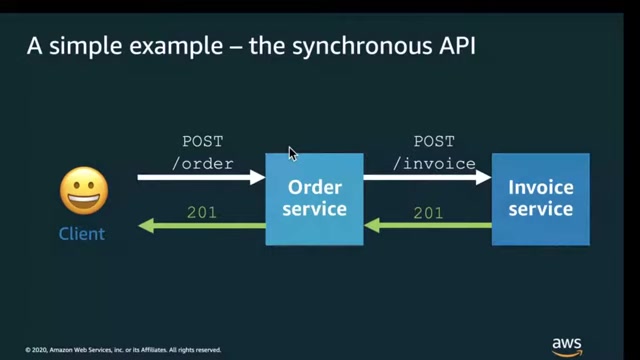
This tight coupling limits scalability and resilience. As new services like fulfillment and forecasting are added, the order service becomes increasingly complex, resembling the very monolith it was intended to replace.
-
Coupling Impact: Failures in any one part of the overall service affect the other, making applications less reliable. This is due to the synchronous nature of APIs and the dependencies they create.
-
API Choreography Complexity: With multiple microservices interacting, orchestrating the APIs becomes difficult to manage and understand. The happy path through an API workflow can quickly unravel with each addition of a microservice, creating a convoluted mess. New scenarios such as being out of stock may require routing and the service dependency path expands exponentially. This lack of modularity ultimately diminishes the value of adopting a microservice approach.
| Problems with Traditional Microservice Patterns | Benefits of EventBridge Solution |
|---|---|
| High coupling among microservices | Reduced dependencies between services |
| Synchronous communication bottlenecks | Asynchronous event-based architecture |
| Complex point-to-point integration | Simplified event routing with rules |
| Difficult scalability and resilience | Enhanced scalability and fault tolerance |
| Management of multiple APIs | Single entry-point for event management |





Most people like

































Report
Please select a reason for reporting
- 13 Reasons to Switch from Snapchat to Text Messaging
- 7 Powerful Speech to Text Apps to Boost Productivity
- 10 Best Speech to Text Tools for Effortless Transcription
- 13 Free Tools to Easily Transcribe Audio to Text
- 15 Surprising Ways Google's Speech-to-Text Boosts Productivity
- 7 Best Free Online Audio to Text Transcription Tools
- 9 Tips to Transcribe Speech to Text Faster and Better
- 13 Best Speech to Text Software for Windows 10 in 2023
- 7 Tips for Choosing the Best Transcriber for Audio to Text
- 11 Reasons Why Dragon Speech-to-Text Apps are Game-Changers
- 6 Secrets to Enhance Your Speech to Text Transcription
- 6 Brilliant Ways to Boost Productivity with Talk-to-Text on Your MacBook
- 6 Ways Transcription Software Converts Audio to Text
- 8 Tips to Transcribe Speech to Text Like a Pro
- 6 Reasons IBM Watson Speech to Text is a Game-Changer
- 14 Powerful Ways Talk-to-Text Improves Your Workflow
- 12 Top Windows Speech-to-Text Software for Efficient Transcription
- 12 Game-Changing Benefits of Apple's Speech to Text Technology
- 9 Powerful Use Cases for AWS Speech to Text Technology
- 10 Easy Steps to Transcribe YouTube Videos to Text
- transcription audio en texte
- online audio transcription
- free audio file transcription
- free ai audio transcription
- audio transcription service
- audio transcription online free
- audio transcription free online
- audio to transcription software
- audio and transcript
- ai audio transcription free
- voice recording to text converter
- translate voice recording to text
- record voice to text
- audio recording to text converter
- voice recording and transcription
- chatgpt voice to text
- gmail voice to text
- speech to text reader
- speech to text ai free
- speech to talk
- How to Use AI Tools to Find Internal Linking Opportunities Across a Business Website
- Discover Your Perfect Haircut with AI Hairstyle Apps
- Free Reputation Calculator Tools: How They're Adapting to Score AI Visibility, Not Just Rankings
- Design Professional Flyers for Free on Your Phone
- Best Free Flyer Maker Apps for Android: Design Like a Pro
- How to Know If Your Business Is Ready for an AI Customer Service Agent
- Revolutionizing Storytelling: From Novels to Screenplays with AI
- Create Engaging Animated Explainer Videos with a Free AI Tool
- Stop Multi-Subscribing: Benchmark Top AI Visual Models in One Canvas
- Best Seedance 2.5 API Provider: Every Price on the Market, Checked at Source
- Top AI Social Media Management Tools: Automate Your Content Strategy
- Free AI Text to Video Generator: Create Stunning Videos from Text
- Discover 17 ChatGPT Alternatives: A Comprehensive Comparison
- Character.AI vs. Janitor AI: Which AI Chat Platform Reigns Supreme?
- Top Virtual Assistant Companies in 2026: Reviews, Pricing, and Plans Compared
- Unveiling FaceCheck.ID: Revolutionizing Reverse Image Searches with AI
- 11 Best AI Dialers in 2026: Features, Pricing, Pros and Cons
- How I Direct Consistent AI Clips: A Hands-On Guide to Multi-Model Generation
- A Realistic Review of the Photo Generator Image Tool
- Playwright MCP Server: Automated Web Testing with Agent Mode

Copyright ©2026 toolify