































Table of Contents
- Key Points
- Understanding ExpertFlow's Integration with WebexOne
- AI-Powered Chatbots for Enhanced Customer Service
- Navigating ExpertFlow: A Practical Guide
- ExpertFlow Pricing Structure
- Evaluating ExpertFlow: Weighing the Pros and Cons
- Exploring ExpertFlow's Core Features
- Real-World Use Cases: How ExpertFlow Delivers Value
- Frequently Asked Questions About ExpertFlow
- Further Inquiries and Related Topics



Understanding ExpertFlow's Integration with WebexOne
What is ExpertFlow and Why Integrate with WebexOne?
ExpertFlow is a leading solution partner for Cisco contact centers, with 13 years of experience in optimizing customer interactions. Their platform is designed to connect chat, bots, www (web browsing activities), WebRTC voice and video to Cisco UCCE, PCCE, UCCX and your CRM systems. The integration with WebexOne provides a unified platform for managing customer interactions across various channels, enabling businesses to deliver a seamless and personalized customer experience. By integrating with WebexOne, ExpertFlow enhances its capabilities to provide a centralized solution for communication, collaboration, and customer engagement.
The problem ExpertFlow solves is the fragmented nature of customer interactions across different communication channels. Customers may interact with a business via phone, email, chat, social media, or web browsing, and each interaction can be siloed, making it difficult for agents to understand the customer's journey and provide consistent service. ExpertFlow unifies these channels, providing a single view of the customer and their interactions.
This integration simplifies the agent experience, allowing them to handle interactions across multiple channels from a single interface. It also enables businesses to leverage AI-powered chatbots to automate routine tasks and provide instant support, freeing up agents to focus on more complex issues. Ultimately, ExpertFlow helps businesses deliver better Customer Service, improve agent productivity, and reduce operational costs.
Key Features and Benefits:
- Unified Customer View: Aggregates customer interactions from various channels into a single, comprehensive view.
- AI-Powered Automation: Leverages chatbots to automate routine tasks and provide instant support.
- Simplified Agent Experience: Provides a single interface for handling interactions across multiple channels.
- Real-Time Notifications: Delivers real-time notifications to agents about incoming interactions and customer activity.
- Geolocational Tracking: Tracks customer web activities, including geolocation, to personalize interactions.
- Multimedia Campaigns: Enables businesses to launch multimedia campaigns across various channels.
- Mobile Agent Application: Empowers agents to deliver quality service even when they are on the move.
Supported Communication Channels and CRM Integrations
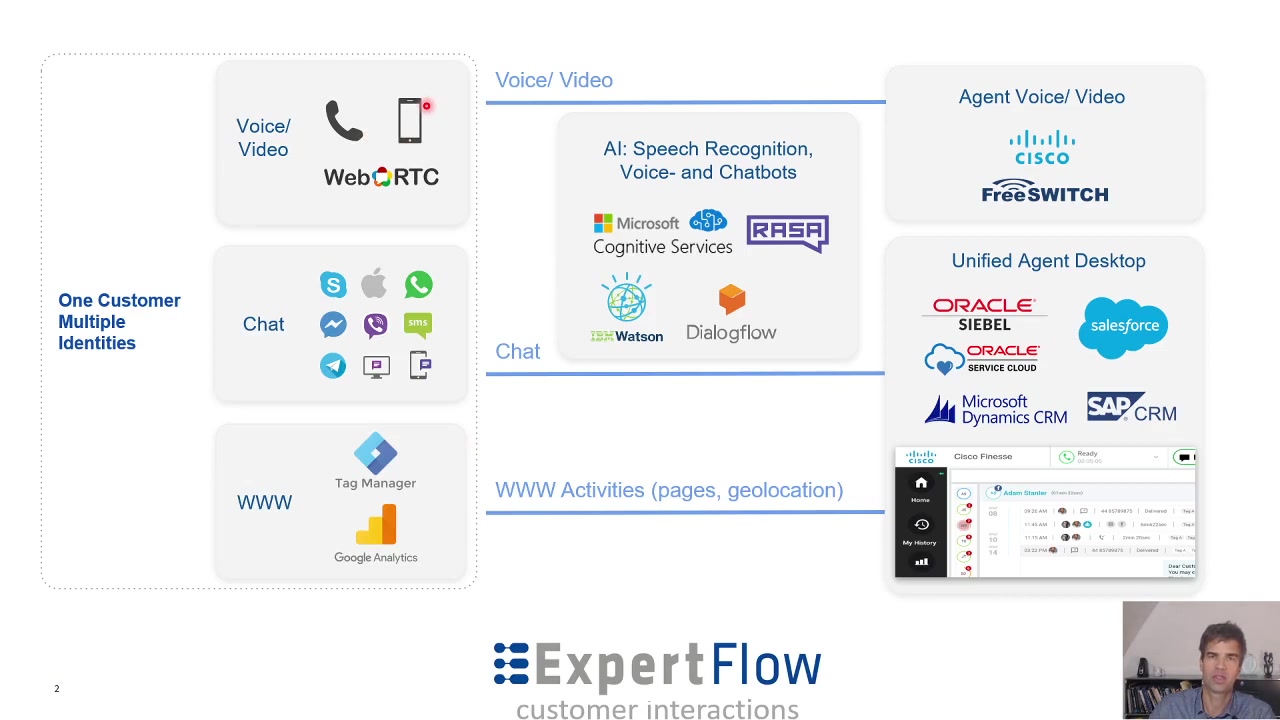
ExpertFlow supports a wide array of communication channels to ensure comprehensive coverage of customer interactions. These channels include:
- Voice Calls: Traditional phone calls are seamlessly integrated, ensuring that voice interactions are part of the unified customer view.
- WebRTC Voice and Video Calls: Interactions initiated from a web browser, offering a convenient and modern communication method, are supported.
- Chat Sessions: ExpertFlow captures chat sessions from popular messaging platforms, including WhatsApp, Facebook Messenger, Viber, SMS, web chat, and Skype.
Furthermore, ExpertFlow integrates with leading CRM systems, providing agents with customer information and interaction history directly within their CRM interface. These integrations include:
- Oracle Siebel
- Salesforce
- Microsoft Dynamics CRM
- SAP CRM
This extensive channel support and CRM integration ensure that agents have all the necessary information at their fingertips, enabling them to deliver personalized and efficient customer service.
AI-Powered Chatbots for Enhanced Customer Service
Leveraging Chatbots for Automated Conversations
One of the most compelling features of ExpertFlow is its integration of AI-powered chatbots. These chatbots can partially automate conversations between customers and agents, handling routine inquiries and tasks, freeing up agents to focus on more complex issues. ExpertFlow seamlessly integrates with AI solutions such as:
- Microsoft Cognitive Services
- RASA
- IBM Watson
- Dialogflow
This capability is particularly valuable in scenarios where customers require immediate assistance with common questions or tasks. For instance, a chatbot can provide information about order status, answer frequently asked questions, or guide customers through basic troubleshooting steps. By automating these interactions, businesses can reduce wait times, improve customer satisfaction, and optimize agent productivity. Furthermore, the AI-powered chatbot can monitor seven different chat conversations based on color: Green indicates full confidence the chatbot can handle the conversation, and Yellow or Red indicate that the agent must step in and handle the conversation due to the complexity of the situation.
Furthermore, ExpertFlow's hybrid chat capabilities enable a smooth transition between chatbots and human agents. When a chatbot is unable to handle a particular inquiry, it can seamlessly transfer the conversation to a live agent, ensuring that customers always receive the support they need. This hybrid approach combines the efficiency of automation with the empathy and expertise of human agents, resulting in a superior customer experience.
Navigating ExpertFlow: A Practical Guide
How to Use ExpertFlow
Using ExpertFlow involves understanding how the platform unifies communication channels and integrates with your existing systems. Here’s a breakdown of how to navigate and utilize the platform effectively:
-
Agent Interface:
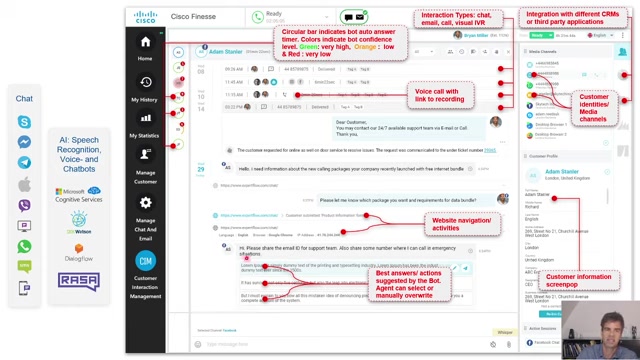
- Agents typically access ExpertFlow through Cisco Finesse or their integrated CRM system, such as Salesforce or Microsoft Dynamics CRM. The interface provides a unified view of customer interactions across various channels.
-
Real-Time Notifications:
- Agents receive real-time notifications for incoming interactions, including voice calls, chat sessions, and web activities. These notifications appear within the agent's interface, ensuring they never miss an opportunity to engage with a customer.
-
Customer Information:
- Upon receiving a notification, agents can access comprehensive customer information, including contact details, interaction history, and web browsing activities. This information is typically pulled from the integrated CRM system.
-
AI-Powered Assistance:
- During chat sessions, agents receive answer suggestions from the AI-powered chatbot. They can choose to use these suggestions or manually craft their own responses.
-
Initiating Additional Media: Agents can seamlessly transition between communication channels. For example, they can initiate a voice call from a chat session or vice versa.
-
Monitoring Chatbot Conversations:
- Agents can monitor multiple chatbot conversations simultaneously. The interface provides visual cues, such as color-coded indicators, to alert agents to conversations that require their attention.
-
Customer interaction history:
- Agents can see the entire interaction history to better understand customer issues and needs. Interaction history includes phone calls, web activities, and chat sessions.
By following these steps, agents can effectively use ExpertFlow to deliver personalized and efficient customer service across multiple channels.


Most people like






































Report
Please select a reason for reporting
- 13 Reasons to Switch from Snapchat to Text Messaging
- 7 Powerful Speech to Text Apps to Boost Productivity
- 10 Best Speech to Text Tools for Effortless Transcription
- 13 Free Tools to Easily Transcribe Audio to Text
- 15 Surprising Ways Google's Speech-to-Text Boosts Productivity
- 7 Best Free Online Audio to Text Transcription Tools
- 9 Tips to Transcribe Speech to Text Faster and Better
- 13 Best Speech to Text Software for Windows 10 in 2023
- 7 Tips for Choosing the Best Transcriber for Audio to Text
- 11 Reasons Why Dragon Speech-to-Text Apps are Game-Changers
- 6 Secrets to Enhance Your Speech to Text Transcription
- 6 Brilliant Ways to Boost Productivity with Talk-to-Text on Your MacBook
- 6 Ways Transcription Software Converts Audio to Text
- 8 Tips to Transcribe Speech to Text Like a Pro
- 6 Reasons IBM Watson Speech to Text is a Game-Changer
- 14 Powerful Ways Talk-to-Text Improves Your Workflow
- 12 Top Windows Speech-to-Text Software for Efficient Transcription
- 12 Game-Changing Benefits of Apple's Speech to Text Technology
- 9 Powerful Use Cases for AWS Speech to Text Technology
- 10 Easy Steps to Transcribe YouTube Videos to Text
- transcription audio en texte
- online audio transcription
- free audio file transcription
- free ai audio transcription
- audio transcription service
- audio transcription online free
- audio transcription free online
- audio to transcription software
- audio and transcript
- ai audio transcription free
- voice recording to text converter
- translate voice recording to text
- record voice to text
- audio recording to text converter
- voice recording and transcription
- chatgpt voice to text
- gmail voice to text
- speech to text reader
- speech to text ai free
- speech to talk
- ChatGPT Knows Ford. It Just Doesn't Quote Ford
- Meshy AI: How to Create 3D Models from Text and Images
- How SEO and Marketing Dashboards Empower Agencies to Drive Results
- How to Use AI Tools to Find Internal Linking Opportunities Across a Business Website
- Discover Your Perfect Haircut with AI Hairstyle Apps
- Free Reputation Calculator Tools: How They're Adapting to Score AI Visibility, Not Just Rankings
- Design Professional Flyers for Free on Your Phone
- Best Free Flyer Maker Apps for Android: Design Like a Pro
- How to Know If Your Business Is Ready for an AI Customer Service Agent
- Revolutionizing Storytelling: From Novels to Screenplays with AI
- Your Business Data Could Be Worth Up to $4M. Find Out Without Uploading a Single File.
- Can an eSIM Plan Save You Time During Travel Setup?
- AI Video Editor Review: A Hands-On Look at Prompt-Based Video Editing
- Keep Characters Consistent Across Scenes With Image-to-Video AI
- How to Convert BTC to HNT
- ProxyWing DuckDuckGo Proxy Review: Plans, Setup and Who It Is For
- ChatGPT Knows Ford. It Just Doesn't Quote Ford
- Automate Lead Generation: A Comprehensive Guide with AI Agents
- Revideo.io: The Future of Reverse Video Search Technology
- Revolutionizing Email Marketing Agency with AI

Copyright ©2026 toolify