































Table of Contents
- Key Points
- Introducing Genesis: The AI and Robotics Simulation Revolution
- Genesis in Action: Showcasing Key Capabilities
- How to Get Started with Genesis
- Advantages and Disadvantages of Using Genesis
- Frequently Asked Questions
- Related Questions


Introducing Genesis: The AI and Robotics Simulation Revolution
What is Genesis?
Genesis is not just another physics engine; it's a complete simulation ecosystem built to empower AI and robotics research and development.

This open-source platform, developed entirely in Python, aims to address the limitations of existing simulation tools. In the past, creating realistic simulations was a difficult task, often requiring expensive hardware, complex software, and endless manual adjustments. Genesis changes that by offering speed, simplicity, and power, lowering the barrier to entry for researchers and developers.
At its core, Genesis provides the tools needed for complex simulation. It changes the Game, according to the presentation, making high-speed, high-quality simulation more accessible. The project's goal is nothing less than a fully transparent, user-friendly ecosystem that encourages collaboration and empowers contributors from both robotics and computer graphics to collaboratively create a highly-efficient, realistic virtual world that supports the state-of-the-art physics solvers. A key element of the Genesis project is also to minimize human effort in collecting and generating data for robotics and other domains, by maximizing automated data generation.
Key features of Genesis include:
- Open Source: Accessible to everyone, promoting collaboration and community-driven development.
- Python-Native: Built entirely in Python, enhancing usability and compatibility.
- High-Speed Simulation: Capable of running simulations many times faster than real-time.
- Generative Capabilities: Creating 3D worlds and scenarios from natural language descriptions.
- Comprehensive Physics Engine: Supporting rigid bodies, fluids, and soft bodies.
- Photo-realistic Rendering: Enables high-quality visualizations of simulated environments.
The Challenges Genesis Aims to Solve
Traditionally, robotics research and development has been constrained by several factors.

Simulation has been hindered by expensive hardware, endless manual processes, and very complex software, expensive hardward. These challenges lead to slow and inefficient development cycles. Genesis is designed to directly address these obstacles.
Existing simulation platforms often lack the speed and efficiency needed for effective AI training. Training neural networks for complex robotic tasks requires immense amounts of data, which is why AI models such as Isaac Gym and MuJoCo MJX are used to train robots. Generating this data through real-world experiments is time-consuming and costly. Genesis overcomes this by offering simulation speeds that are orders of magnitude faster than real-time. Also, the current simulation tools are often not intuitive for researchers and developers. Genesis is built on a unified framework to make the tools and process more easy to use.
Compatibility is another key issue. The Genesis video highlights compatibility issues with existing tools. Genesis is designed to overcome these challenges with its cross-platform nature, working on Linux, macOS, and Windows, and supporting CPUs, Nvidia, AMD and Apple Metal backends.
Genesis in Action: Showcasing Key Capabilities
Unparalleled Simulation Speed
One of Genesis's defining features is its exceptional simulation speed. The platform achieves frame rates that can be significantly higher than real-time, reaching up to 43 million frames per Second on an RTX 4090 graphics card.
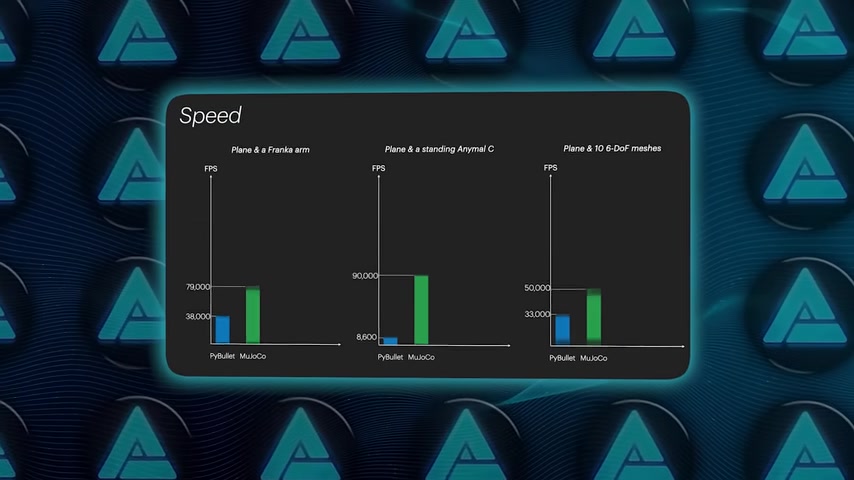
According to benchmark data in the video, Genesis is 10 to 80 times faster than other simulation tools, including Isaac Gym and MuJoCo MJX.
This speed breakthrough drastically reduces the time required to train AI models for robotics. Genesis will also offer the ability to train a locomotion policy (the method by which the robot walks). In the past, tasks that may have taken decades in real-world time can now be accomplished in hours through accelerated simulations. This will allow for a much more efficient and cost effective process.
Below is a sample comparison Chart of Genesis to other options on the market:
| Scenario | PyBullet/MuJoCo | Isaac Gym | Genesis |
|---|---|---|---|
| Plane & Franka arm | 79,000 FPS | 38,000 FPS | 4,300,000 FPS |
| Plane & Standing Anymal C | 90,000 FPS | 8,600 FPS | 15,000,000 FPS |
| Plane & 10 6-DoF Meshes | 50,000 FPS | 33,000 FPS | 244,000,000 FPS |
Generative Simulations: Creating Worlds with Natural Language
Genesis takes simulation a step further with its generative capabilities. By leveraging natural language processing, the platform can construct entire 3D environments and interactive scenarios directly from text-based prompts. This groundbreaking feature will streamline the process of building complex simulation environments. For example, one may use the Genesis Prompt bar to "rotate the plant's base back and forth for 3 seconds", and Genesis will create the proper simulation.
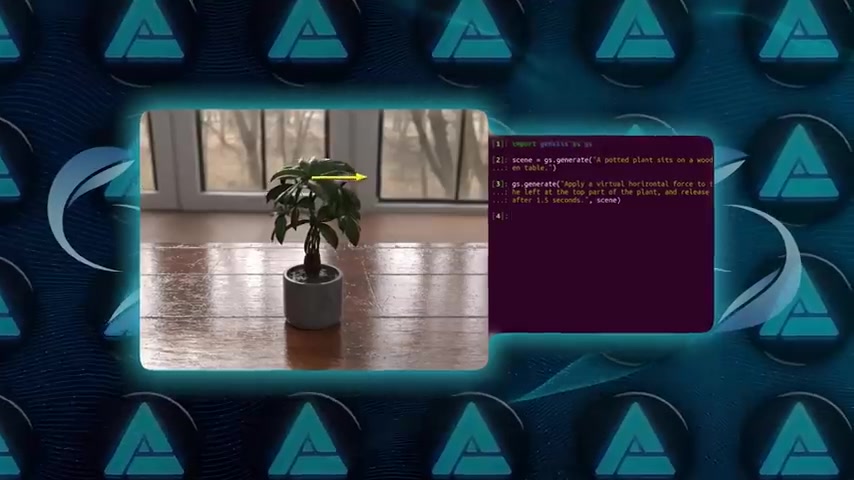
This type of simulation is essential for testing, learning, or teaching purposes.
Typing a simple description generates interactive scenes, task proposals, character movements and more. With the ability to generate new data, assets, and character motions using language description, asset creation is shortened. Instead of asset creation being an incredibly long and tedious process, you can focus on innovation. These generative skills free up much of the time formerly used in building the simulations.
These simulations can be visualized to understand all the forces involved in different physical events. With just a single line of code, one may see the support forces, gravity, friction and velocity acting on a surface.
A Comprehensive Physics Engine
The video emphasizes the importance of Genesis's robust physics engine, which allows developers to handle various materials and phenomena. It supports state-of-the-art solvers for rigid bodies, fluids and even soft bodies in one unified framework.
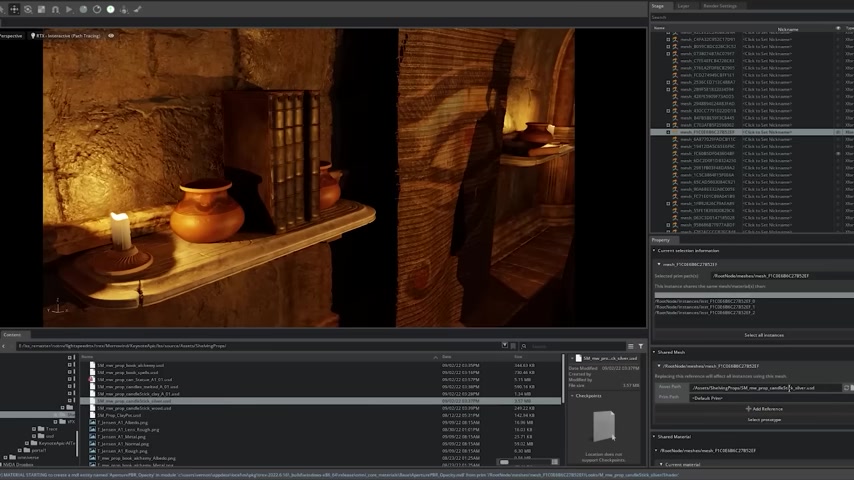
Examples of simulations are provided in the video. These include a water droplet that drops onto a beer bottle, and fluid flowing between different blocks.
This will allow developers to focus on what forces work with what physical phenomena, and better design The Simulation for whatever needs are required.
The Future: 4D Dynamic Worlds
Genesis is already looking ahead at the future of 4D worlds. 4D Dynamic Worlds allows for simulations that are not only 3D, but also incorporate motion over time. This is facilitated through vision language models and gives users the ability to make natural descriptions.
The key to understanding the scope of Genesis' possibilities is through the use of neural networks. These vision language models and the use of 4D Dynamic Worlds opens the door for high performance simulations that are easy to use, regardless of the developer's skill.
How to Get Started with Genesis
Installation and Setup
Genesis is designed to be incredibly accessible, starting with a straightforward installation process.
Here's how you can get up and running:
- Prerequisites: Ensure you have Python installed on your system (compatible with Linux, macOS, and Windows).
-
Installation via PyPI: Use the following pip command to install Genesis:
pip install genesis-world - Install PyTorch: The video requests that users also install PyTorch. Follow the instructions on their site to install the most effective versions. Be mindful of hardware when installing.
- API References: Consult the comprehensive documentation site for detailed installation steps, tutorials, and API references.
Basic Usage and Examples
Once Genesis is installed, you can start building simulations with just a few lines of Python code:
-
Import Genesis: Begin by importing the Genesis module:
import genesis as gs -
Generate a Scene: Use natural language to describe the scene you want to simulate:
scene = gs.generate("A potted plant sits on a wooden table.") -
Add Actions: Specify actions to occur within the simulation:
gs.generate("Apply a virtual horizontal force to the plant, release after 1.5 seconds.", scene) - Animate Simulations: Incorporate features such as the ability for the camera to zoom in, follow an object, or otherwise create a visualization for the event.
- Run Simulation: Run the model with a high degree of speed and a visually realistic final render.







Most people like































Report
Please select a reason for reporting
- 13 Reasons to Switch from Snapchat to Text Messaging
- 7 Powerful Speech to Text Apps to Boost Productivity
- 10 Best Speech to Text Tools for Effortless Transcription
- 13 Free Tools to Easily Transcribe Audio to Text
- 15 Surprising Ways Google's Speech-to-Text Boosts Productivity
- 7 Best Free Online Audio to Text Transcription Tools
- 9 Tips to Transcribe Speech to Text Faster and Better
- 13 Best Speech to Text Software for Windows 10 in 2023
- 7 Tips for Choosing the Best Transcriber for Audio to Text
- 11 Reasons Why Dragon Speech-to-Text Apps are Game-Changers
- 6 Secrets to Enhance Your Speech to Text Transcription
- 6 Brilliant Ways to Boost Productivity with Talk-to-Text on Your MacBook
- 6 Ways Transcription Software Converts Audio to Text
- 8 Tips to Transcribe Speech to Text Like a Pro
- 6 Reasons IBM Watson Speech to Text is a Game-Changer
- 14 Powerful Ways Talk-to-Text Improves Your Workflow
- 12 Top Windows Speech-to-Text Software for Efficient Transcription
- 12 Game-Changing Benefits of Apple's Speech to Text Technology
- 9 Powerful Use Cases for AWS Speech to Text Technology
- 10 Easy Steps to Transcribe YouTube Videos to Text
- transcription audio en texte
- online audio transcription
- free audio file transcription
- free ai audio transcription
- audio transcription service
- audio transcription online free
- audio transcription free online
- audio to transcription software
- audio and transcript
- ai audio transcription free
- voice recording to text converter
- translate voice recording to text
- record voice to text
- audio recording to text converter
- voice recording and transcription
- chatgpt voice to text
- gmail voice to text
- speech to text reader
- speech to text ai free
- speech to talk
- How to Use AI Tools to Find Internal Linking Opportunities Across a Business Website
- Discover Your Perfect Haircut with AI Hairstyle Apps
- Free Reputation Calculator Tools: How They're Adapting to Score AI Visibility, Not Just Rankings
- Design Professional Flyers for Free on Your Phone
- Best Free Flyer Maker Apps for Android: Design Like a Pro
- How to Know If Your Business Is Ready for an AI Customer Service Agent
- Revolutionizing Storytelling: From Novels to Screenplays with AI
- Create Engaging Animated Explainer Videos with a Free AI Tool
- Stop Multi-Subscribing: Benchmark Top AI Visual Models in One Canvas
- Best Seedance 2.5 API Provider: Every Price on the Market, Checked at Source
- Top AI Social Media Management Tools: Automate Your Content Strategy
- Free AI Text to Video Generator: Create Stunning Videos from Text
- Discover 17 ChatGPT Alternatives: A Comprehensive Comparison
- Character.AI vs. Janitor AI: Which AI Chat Platform Reigns Supreme?
- Top Virtual Assistant Companies in 2026: Reviews, Pricing, and Plans Compared
- Unveiling FaceCheck.ID: Revolutionizing Reverse Image Searches with AI
- 11 Best AI Dialers in 2026: Features, Pricing, Pros and Cons
- How I Direct Consistent AI Clips: A Hands-On Guide to Multi-Model Generation
- A Realistic Review of the Photo Generator Image Tool
- Playwright MCP Server: Automated Web Testing with Agent Mode

Copyright ©2026 toolify