































Table of Contents
- Key Points
- Unlocking Productivity with GitHub Copilot Agent Mode
- A Practical Demonstration: Adding a Snake Game to a Classic Arcade App
- Leveraging GitHub Copilot Agent Mode: A Step-by-Step Guide
- GitHub Copilot Pricing
- Pros and Cons of GitHub Copilot
- Key Features of GitHub Copilot
- GitHub Copilot Use Cases
- FAQ
- Related Questions


Unlocking Productivity with GitHub Copilot Agent Mode
The Power of AI-Driven Automation in Software Development
In today's fast-paced software development environment, efficiency is paramount. Developers are constantly seeking ways to streamline their workflows, reduce repetitive tasks, and focus on innovative solutions. GitHub Copilot Agent Mode addresses these challenges by introducing AI-driven automation to the development process.
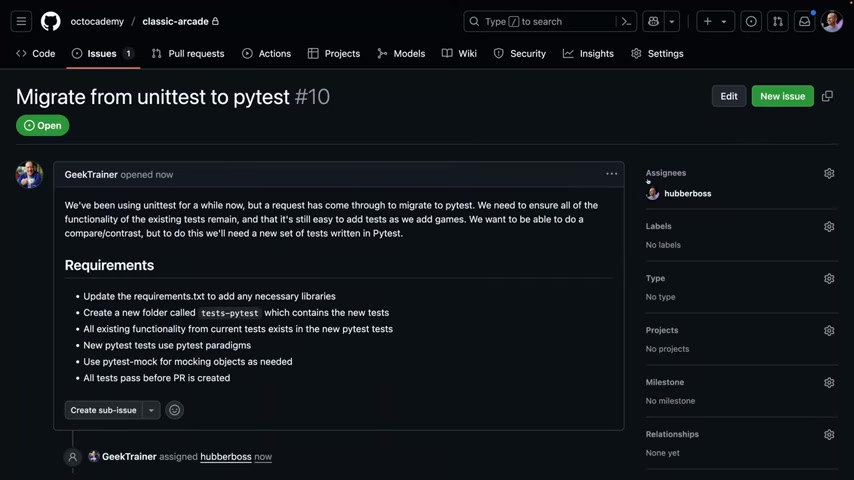
This feature allows developers to delegate tedious tasks, such as code generation, testing, and documentation, to Copilot, freeing up valuable time and resources. The benefits of AI-driven automation are numerous. It reduces the risk of human error, accelerates project timelines, and enables developers to focus on higher-level design and problem-solving. By automating routine tasks, Agent Mode empowers developers to be more creative, productive, and strategic in their work.
Agent Mode analyzes project structure, coding standards, and testing protocols to generate high-quality code that aligns with project requirements. This intelligent automation ensures consistency, reduces the need for manual code reviews, and accelerates the development lifecycle. The result is a more efficient and reliable development process, allowing teams to deliver innovative software solutions faster and with greater confidence.
Assigning Issues to Copilot: A Seamless Workflow
One of the key features of GitHub Copilot Agent Mode is the ability to assign issues directly to Copilot.
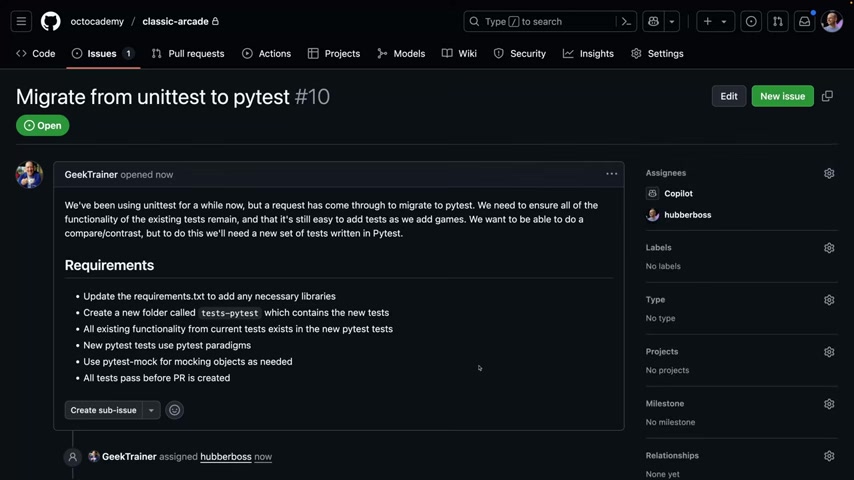
This seamless workflow simplifies Project Management and task delegation. Instead of manually assigning tasks to team members, developers can simply assign an issue to Copilot and let the AI agent handle the rest. This feature is particularly useful for tasks that are repetitive, time-consuming, or require adherence to specific coding standards. For example, a developer might assign Copilot the task of migrating a testing framework, updating documentation, or refactoring code. Copilot will then analyze the issue, explore the project structure, and generate the necessary code to resolve the issue. This streamlined workflow not only saves time but also ensures consistency and reduces the risk of errors.
By assigning issues to Copilot, developers can focus on more strategic tasks, such as designing new features, solving complex problems, and collaborating with team members. This improved allocation of resources can significantly enhance overall productivity and accelerate project timelines. The ability to delegate tasks to an AI agent also reduces the burden on individual developers, preventing burnout and fostering a more sustainable work environment. This collaborative approach, where humans and AI work together, represents the future of software development.
Copilot's Intelligent Exploration and Pattern Recognition
GitHub Copilot's Agent Mode is not just a Code Generator; it's an intelligent explorer and pattern recognizer.
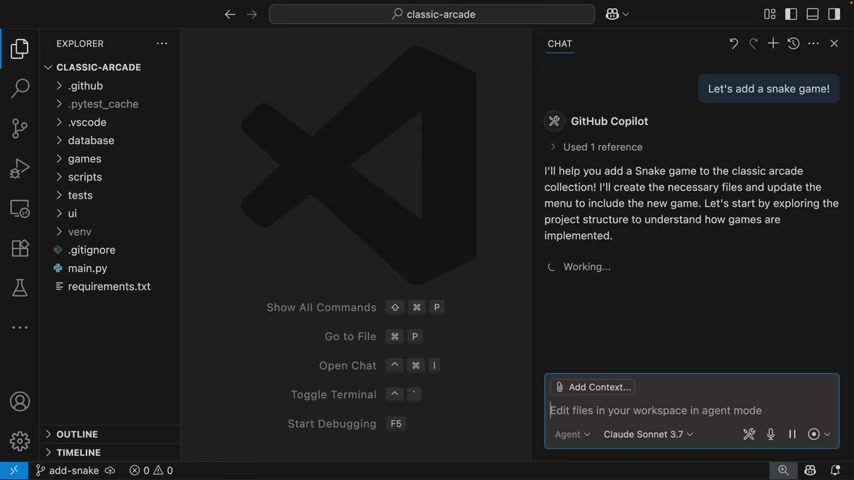
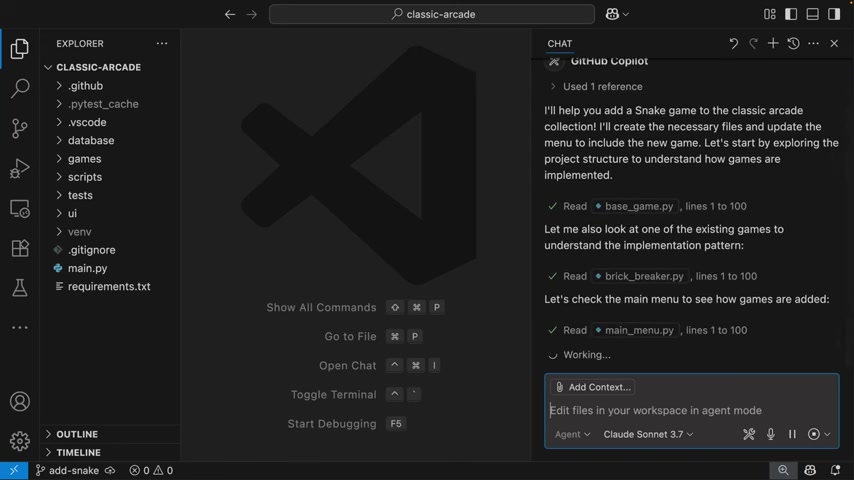
When assigned a task, Copilot doesn't simply generate code in isolation. Instead, it takes the time to explore the project structure, identify existing patterns, and understand the coding conventions in place. This deep understanding of the project allows Copilot to generate code that seamlessly integrates with the existing codebase, maintaining consistency and reducing the risk of conflicts.
For example, if a project uses a specific base class for all game components, Copilot will identify this pattern and ensure that any new Game components it generates inherit from that base class. This adherence to established patterns not only improves code quality but also makes the code easier to understand, maintain, and extend. Copilot's ability to learn from existing code patterns is a powerful feature that ensures consistency and reduces the need for manual code reviews. This intelligent exploration and pattern recognition is what sets Agent Mode apart from traditional code generation tools.
Automated Testing and Continuous Integration: Ensuring Code Reliability
In addition to code generation, GitHub Copilot Agent Mode also automates testing and continuous integration.
This feature is crucial for ensuring code reliability and reducing the risk of errors. Copilot can generate unit tests for new code, run existing tests to verify functionality, and integrate code changes into the project seamlessly. This automated testing process not only saves time but also improves code quality. By catching errors early in the development cycle, developers can avoid costly rework and deliver more reliable software.
Copilot's automated testing capabilities are particularly useful for complex projects with extensive test suites. The AI agent can quickly run through all the tests, identify any failures, and provide developers with detailed reports. This continuous integration process ensures that code changes are thoroughly tested before being merged into the main branch, reducing the risk of introducing bugs or regressions. With automated testing and continuous integration, developers can have greater confidence in the quality and reliability of their code.
A Practical Demonstration: Adding a Snake Game to a Classic Arcade App
Incorporating a New Game with Copilot's Assistance
To illustrate the capabilities of GitHub Copilot Agent Mode, consider the task of adding a new game, specifically a classic Snake game, to an existing arcade application. The challenge lies in ensuring that the new game seamlessly integrates with the existing codebase, adheres to established coding standards, and includes comprehensive unit tests. Copilot's Agent Mode simplifies this process by automating many of the routine tasks involved.
The developer starts by assigning Copilot the task of adding the Snake game. Copilot then explores the project structure, identifies the base class for all games, and generates the initial code for the Snake game, ensuring that it inherits from the base class. Copilot also creates a new unit test file, using the project's helper files to streamline the testing process. The AI agent then registers the new game in the main menu, making it accessible to users.
Copilot streamlines the creation of the Snake game, generating code that seamlessly integrates with the existing codebase and adhering to established coding standards. The AI agent also automates the creation of unit tests, ensuring code reliability and quality. This automation allows the developer to focus on the creative aspects of game development, such as designing the game's logic and user interface.
Reviewing and Validating Copilot's Work
While GitHub Copilot Agent Mode automates many of the tasks involved in adding the Snake game, the developer still plays a crucial role in reviewing and validating Copilot's work. The developer reviews the generated code, ensures that it meets the project's requirements, and makes any necessary adjustments. The developer also runs the unit tests to verify that the game functions correctly and doesn't introduce any bugs.
This collaborative approach, where humans and AI work together, is essential for ensuring the quality and reliability of the software. Copilot handles the routine tasks, such as code generation and testing, while the developer provides the domain expertise and critical thinking. This combination of AI-driven automation and human oversight results in a more efficient, reliable, and innovative development process.
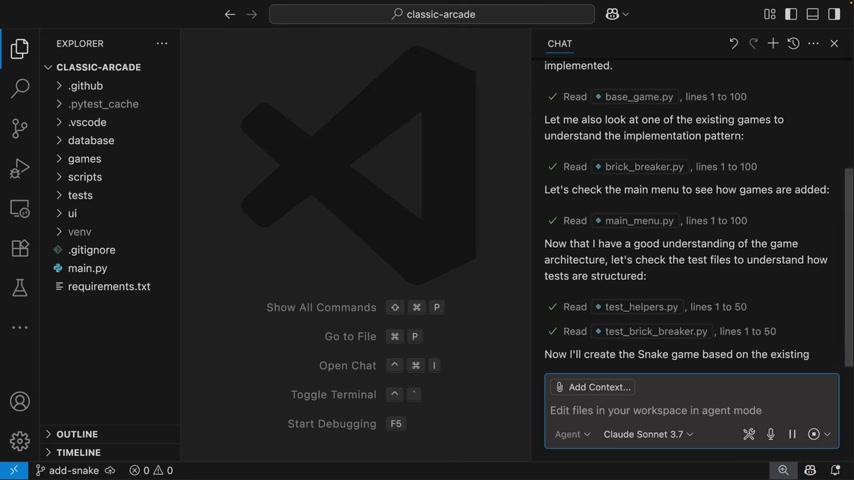
In this particular example, the developer opens the branch with Copilot's changes in Codespaces and runs the tests to ensure everything passes. This final validation step ensures the new game is fully integrated and functional within the existing arcade application.





Most people like



































Report
Please select a reason for reporting
- 13 Reasons to Switch from Snapchat to Text Messaging
- 7 Powerful Speech to Text Apps to Boost Productivity
- 10 Best Speech to Text Tools for Effortless Transcription
- 13 Free Tools to Easily Transcribe Audio to Text
- 15 Surprising Ways Google's Speech-to-Text Boosts Productivity
- 7 Best Free Online Audio to Text Transcription Tools
- 9 Tips to Transcribe Speech to Text Faster and Better
- 13 Best Speech to Text Software for Windows 10 in 2023
- 7 Tips for Choosing the Best Transcriber for Audio to Text
- 11 Reasons Why Dragon Speech-to-Text Apps are Game-Changers
- 6 Secrets to Enhance Your Speech to Text Transcription
- 6 Brilliant Ways to Boost Productivity with Talk-to-Text on Your MacBook
- 6 Ways Transcription Software Converts Audio to Text
- 8 Tips to Transcribe Speech to Text Like a Pro
- 6 Reasons IBM Watson Speech to Text is a Game-Changer
- 14 Powerful Ways Talk-to-Text Improves Your Workflow
- 12 Top Windows Speech-to-Text Software for Efficient Transcription
- 12 Game-Changing Benefits of Apple's Speech to Text Technology
- 9 Powerful Use Cases for AWS Speech to Text Technology
- 10 Easy Steps to Transcribe YouTube Videos to Text
- transcription audio en texte
- online audio transcription
- free audio file transcription
- free ai audio transcription
- audio transcription service
- audio transcription online free
- audio transcription free online
- audio to transcription software
- audio and transcript
- ai audio transcription free
- voice recording to text converter
- translate voice recording to text
- record voice to text
- audio recording to text converter
- voice recording and transcription
- chatgpt voice to text
- gmail voice to text
- speech to text reader
- speech to text ai free
- speech to talk
- Meshy AI: How to Create 3D Models from Text and Images
- How SEO and Marketing Dashboards Empower Agencies to Drive Results
- How to Use AI Tools to Find Internal Linking Opportunities Across a Business Website
- Discover Your Perfect Haircut with AI Hairstyle Apps
- Free Reputation Calculator Tools: How They're Adapting to Score AI Visibility, Not Just Rankings
- Design Professional Flyers for Free on Your Phone
- Best Free Flyer Maker Apps for Android: Design Like a Pro
- How to Know If Your Business Is Ready for an AI Customer Service Agent
- Revolutionizing Storytelling: From Novels to Screenplays with AI
- Create Engaging Animated Explainer Videos with a Free AI Tool
- Meshy AI: How to Create 3D Models from Text and Images
- ASOMobile Helps Teams Benchmark App Store Screenshots Against Competitors
- How to Match LMS Software With Your Organization's Training Plan
- Revolutionizing Email Marketing Agency with AI
- How to Convert BTC to HNT
- Unleashing the Power of AI: Cognizant's Roadmap for Transformation
- Frame to Video Review: A Practical Look at Turning Two Still Frames Into Motion
- NVIDIA NIM: Revolutionizing Supply Chain Data Analysis with AI
- Top AI Tools That Help Brands Stand Out Offline (Not Just Online)
- Top 5 Cold Email Software: Maximize Your Outreach in 2025

Copyright ©2026 toolify