































Table of Contents
- Key Points
- Understanding GitHub Copilot Coding Agent
- Diving Deeper: The Technicalities of GitHub Copilot Coding Agent
- Unlocking the Power: How to Use GitHub Copilot Coding Agent Effectively
- Availability and Pricing for GitHub Copilot Coding Agent
- GitHub Copilot Coding Agent: Evaluating the Pros and Cons
- Core Features of GitHub Copilot Coding Agent
- Real-World Applications: Use Cases for GitHub Copilot Coding Agent
- FAQ
- Related Questions


Understanding GitHub Copilot Coding Agent
What is GitHub Copilot Coding Agent?
The primary goal of GitHub Copilot Coding Agent is to enhance coding efficiency and streamline the development workflow

. It leverages the existing capabilities of GitHub Copilot, extending its reach from merely assisting with code completion to actively managing and resolving backlog issues. The agent is designed to operate in the background, autonomously taking on tasks that would otherwise consume valuable developer time. By automating routine coding and maintenance tasks, it frees up developers to concentrate on more critical and innovative aspects of their projects. This ultimately leads to faster development cycles, reduced tech debt, and higher-quality code.
GitHub Copilot Coding Agent isn't just about automating tasks; it's about transforming the entire development paradigm. It provides a proactive approach to managing code quality and project backlogs. By identifying and addressing potential issues early on, it helps prevent the accumulation of tech debt, ensuring that projects remain scalable and maintainable over time. This tool represents a significant step towards a future where AI and human developers work seamlessly together, each leveraging their strengths to achieve optimal results. GitHub Copilot is leading the charge.
Key benefits include:
- Increased developer productivity
- Reduction in tech debt
- Streamlined development processes
- Enhanced code quality
- Improved project maintainability
How GitHub Copilot Coding Agent Differs From Traditional Methods
Traditional methods of backlog management often involve manual assignment of tasks, constant monitoring, and extensive communication between team members. This can be time-consuming and prone to errors, leading to delays and increased project costs. GitHub Copilot Coding Agent automates much of this process, using AI to intelligently prioritize and address backlog items
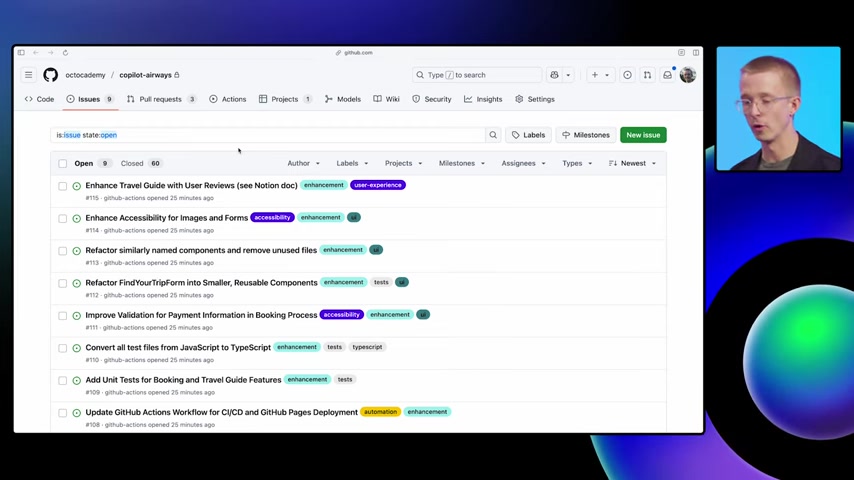
. It can work on multiple issues simultaneously, create pull requests, and even solicit feedback, all without requiring constant supervision. This allows development teams to operate more efficiently and effectively, delivering projects on time and within budget.
In contrast to the reactive nature of traditional methods, GitHub Copilot Coding Agent offers a proactive approach to backlog management. It continuously scans the codebase, identifying potential issues and suggesting solutions before they escalate into major problems. This helps prevent the accumulation of tech debt and ensures that projects remain healthy and maintainable over the long term. By providing developers with an AI-powered assistant, GitHub Copilot Coding Agent empowers them to tackle challenges more effectively and deliver higher-quality results.
Here’s a breakdown of the differences:
| Feature | Traditional Methods | GitHub Copilot Coding Agent |
|---|---|---|
| Task Assignment | Manual | Automated |
| Monitoring | Constant manual oversight | Autonomous background operation |
| Tech Debt Management | Reactive; address issues as they arise | Proactive; identifies and addresses potential issues |
| Efficiency | Time-consuming, prone to errors | Streamlined, reduces errors and delays |
| Focus | Managing tasks | Improving code quality and developer productivity |
Diving Deeper: The Technicalities of GitHub Copilot Coding Agent
Assigning Issues to GitHub Copilot Coding Agent
Assigning issues to GitHub Copilot Coding Agent is a straightforward process that can be done directly through the GitHub interface
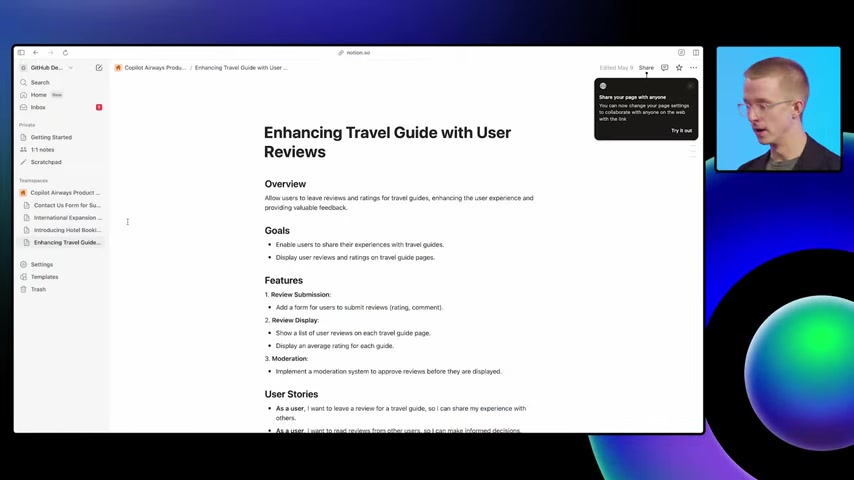
. Developers can select multiple issues from their backlog and assign them to the agent in one go. This is particularly useful for addressing routine tasks or tackling multiple issues that are related. Once assigned, the agent begins working on these issues in the background, freeing up developers to focus on other priorities. This capability greatly enhances productivity and allows for more efficient management of the development workflow.
Furthermore, GitHub Copilot Coding Agent offers the flexibility to assign multiple issues at the same time. This feature can significantly accelerate the pace of development, as the agent can work on several tasks concurrently. The process is simple:
- Select the issues from the backlog.
- Choose the 'Assign' option.
- Select 'Copilot' as the assignee.
The agent then takes over, working autonomously to resolve these issues, creating pull requests, and prompting reviews when needed.
Monitoring the Agent's Progress
GitHub Copilot Coding Agent provides transparency by allowing developers to monitor the progress of the tasks it’s handling
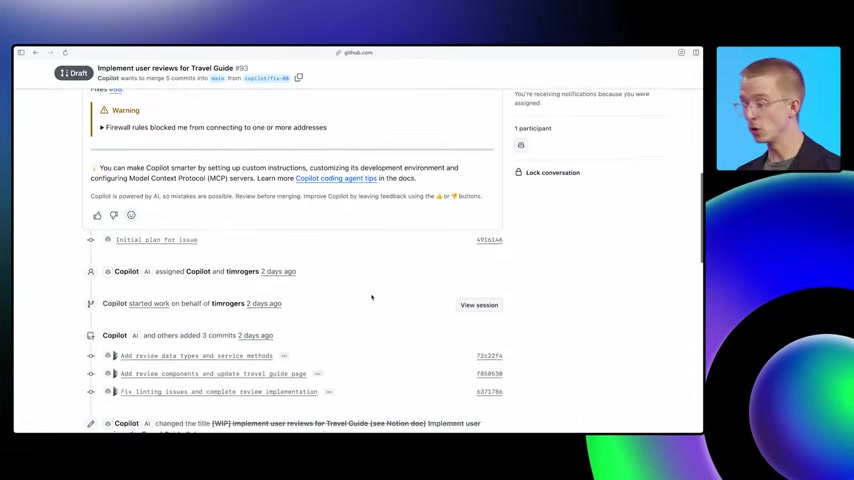
. Each pull request created by the agent includes a detailed description of its activities, offering insights into the steps it has taken and the changes it has made. This level of transparency allows developers to maintain control and ensure that the agent is working in line with their expectations. GitHub’s session view provides a more in-depth look at the agent’s activities, including:
- Exploration of the repository structure
- Code modifications
- Test executions
- Integration with external tools
GitHub provides comprehensive tools to ensure the AI assistant is working correctly and safely. You can view a step-by-step breakdown, confirming it's accessing the correct documentation (like that in Notion). MCP, or Model Context Protocol, allows the coding agent to get other context and information outside of GitHub.
These monitoring tools foster trust and allow developers to intervene if necessary.
Integrating with VS Code
GitHub Copilot Coding Agent seamlessly integrates with VS Code, allowing developers to trigger background workflows without leaving their code editor

. The agent can be activated directly from the editor, making it easier to offload tasks and keep developers focused on their primary coding responsibilities. This integration streamlines the development process and enhances productivity by minimizing distractions and ensuring a smooth workflow.
By highlighting a specific section of code and using the Copilot Chat feature, developers can instruct the agent to perform certain actions, such as refactoring or creating separate components. Once the request is sent, the agent creates a pull request with the necessary changes, enabling developers to review and merge the changes as needed. This integration simplifies collaboration and ensures that everyone on the team is aligned with the latest updates.








Most people like




























Report
Please select a reason for reporting
- 13 Reasons to Switch from Snapchat to Text Messaging
- 7 Powerful Speech to Text Apps to Boost Productivity
- 10 Best Speech to Text Tools for Effortless Transcription
- 13 Free Tools to Easily Transcribe Audio to Text
- 15 Surprising Ways Google's Speech-to-Text Boosts Productivity
- 7 Best Free Online Audio to Text Transcription Tools
- 9 Tips to Transcribe Speech to Text Faster and Better
- 13 Best Speech to Text Software for Windows 10 in 2023
- 7 Tips for Choosing the Best Transcriber for Audio to Text
- 11 Reasons Why Dragon Speech-to-Text Apps are Game-Changers
- 6 Secrets to Enhance Your Speech to Text Transcription
- 6 Brilliant Ways to Boost Productivity with Talk-to-Text on Your MacBook
- 6 Ways Transcription Software Converts Audio to Text
- 8 Tips to Transcribe Speech to Text Like a Pro
- 6 Reasons IBM Watson Speech to Text is a Game-Changer
- 14 Powerful Ways Talk-to-Text Improves Your Workflow
- 12 Top Windows Speech-to-Text Software for Efficient Transcription
- 12 Game-Changing Benefits of Apple's Speech to Text Technology
- 9 Powerful Use Cases for AWS Speech to Text Technology
- 10 Easy Steps to Transcribe YouTube Videos to Text
- transcription audio en texte
- online audio transcription
- free audio file transcription
- free ai audio transcription
- audio transcription service
- audio transcription online free
- audio transcription free online
- audio to transcription software
- audio and transcript
- ai audio transcription free
- voice recording to text converter
- translate voice recording to text
- record voice to text
- audio recording to text converter
- voice recording and transcription
- chatgpt voice to text
- gmail voice to text
- speech to text reader
- speech to text ai free
- speech to talk
- Create Engaging Animated Explainer Videos with a Free AI Tool
- Stop Multi-Subscribing: Benchmark Top AI Visual Models in One Canvas
- Best Seedance 2.5 API Provider: Every Price on the Market, Checked at Source
- AI OnlyFans: How to Generate $30,000/Month (Legally)
- Transform Your Script into an Engaging Video with AI Video Maker!
- AI Marketing Automation: A Comprehensive Guide for Small Businesses
- Midjourney Alternative for Anime Art Creators: Why PixAI May Be Better for Character Workflows
- 10 Things Most People Get Wrong About AI Image Search
- AI Girlfriend Apps: Top Choices Redefining Relationships 2025
- How to Reduce Quoting Errors in Salesforce with AI-Assisted Quote Creation
- Convert PDF to Audio: Free Urdu Text-to-Speech Tool
- Automatically Transcribe and Subtitle Audio and Video with Descript
- Revolutionize your video editing with AI-generated transcripts
- Mastering Wordpad: Essential Tips for Windows 10 Users
- AfirstSoft PDF Editor: The Ultimate PDF Solution of 2025
- UPDF: The Ultimate PDF Editor for iPadOS and macOS
- Translate PDF Documents: A Comprehensive Guide with OnlineDocTranslator
- Tenorshare PDNob PDF Editor: Smarter AI-Powered Editing
- uPDF Pro Review: AI-Powered PDF Editing for Professionals
- Master the Art of Wrapping Text in Illustrator CC

Copyright ©2026 toolify