































Table of Contents
- Key Points
- GitHub as an AI-Powered Development Platform
- GitHub Copilot: Evolution and Multi-Model Capabilities
- Step-by-Step Guidance
- Evaluate GitHub Copilot Models
- Frequently Asked Questions
- Related Questions



GitHub as an AI-Powered Development Platform
The Evolution of GitHub
GitHub, initially a source control repository established in 2008, has grown into a comprehensive development platform.
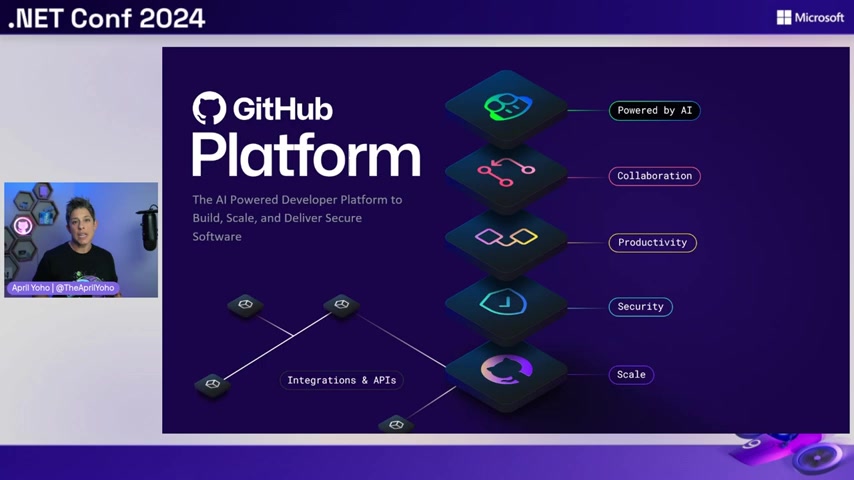
It now provides a wide variety of tools that include collaboration, productivity, security, and scaling, suited to both startups and huge organizations. GitHub stands out as an AI powered platform, which provides excellent support in each aspect of the software development lifecycle.
GitHub has transformed to enhance security at each level to make the code base secure. As a platform, it emphasizes Scale where developers can use a small startup or an enterprise level company. GitHub has really focused on integrating AI to build AI, especially over the last few years. There are constant updates on the platform that continue to promote the functionality and scalability of GitHub as the most prominent software development platform.
AI Infusion in the GitHub Platform
In every area of the GitHub Platform, AI is enhancing the platform by improving the developer experience. GitHub leverages AI to help build AI and makes it easier for developers to access new and improved functions on the platform. GitHub COPILOT is just two years old and is known as the world's adopted tool for developers using AI.
This AI infusion enables the development of intelligent machines, and LLMs, giving more insights into what models are useful and how they can be developed faster and easier.
GitHub Copilot: Evolution and Multi-Model Capabilities
The Transformation of GitHub Copilot
In its first iteration, GitHub Copilot had a simple function that was a select and accept function, but the platform has evolved significantly since then. Now GitHub Copilot is the world's most used AI development tool. The platform has integrated a lot into the function over the last two years. Now, GitHub copilot has evolved to focus on conversation and intuitive functionality.
GitHub Copilot is on an evolution to focus on conversational intuitive functionality to help developers make the most of the technology. GitHub copilot is now a multi-model system to give developers more choices.
With GitHub copilot, developers are also going to have access to multiple models such as Open AI01 review and mini which were recently released in addition to the new cloud 3.5 and Gemini 1.5. GitHub is also enabling AI code generation to help infuse its system in real time and improve all iterations.
The Benefit of GitHub's New Update
The first phase of AI code generation for GitHub Copilot was built on three key pillars that encompass AI infusion, conversation coding, and multi-model functionality.
GitHub provides a number of choices within the platform, now and including tools such as Open AI, Gemini, and other models that are improving constantly.
Developers can now enable multi-file editing, multi-model selection, code review, repo indexing, code referencing, custom instructions, and intent detection within GitHub. Now it is easier than ever to integrate AI to build a successful software development platform.
Step-by-Step Guidance
Accessing the New Features
It is now easier than ever for developers to access new and existing technologies on the GitHub platform. In the past it required a lot more to learn about tools and how they work, and now it is more automated than ever.
- Accessing New Features: The first step towards building AI applications using GitHub Copilot models and .NET involves accessing the new features within the GitHub environment.
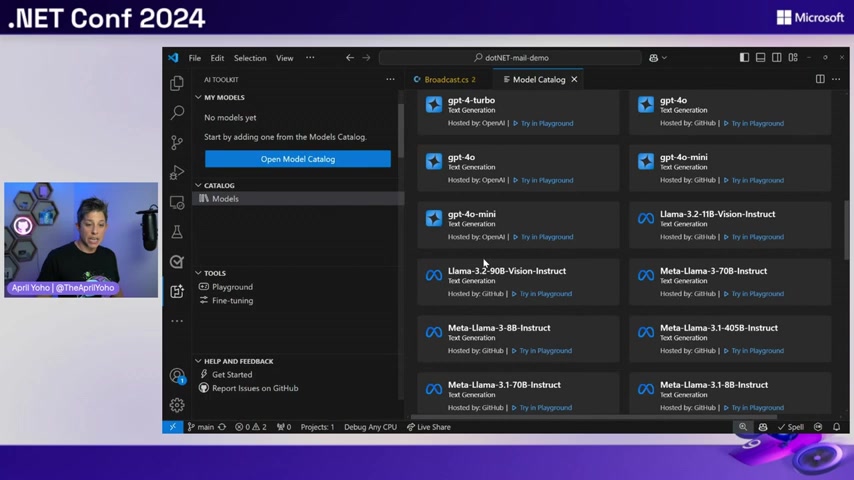
You can access all of the features with a license on copilot as an individual or business.
- Integration With Visual Studio Code: Developers need the ability to easily edit and integrate with their IDE to make the platform more scalable. Some tips include integrating the platform into the Visual Studio code editor to provide code Hints and capabilities that help improve workflow.
- Leverage GitHub’s Third Party Support Make sure you make the most of what the support systems and tools have available on the platform.
- Implement Multi-File Editing: The platform enables you to edit multiple files, improve workflow, and scale operations easier than ever before.
- Take Advantage of Repo Indexing: Implement code reviews into GitHub workflow. If these five things are implemented correctly, it will be easier than ever to improve workflow in GitHub.


Most people like







































Report
Please select a reason for reporting
- 13 Reasons to Switch from Snapchat to Text Messaging
- 7 Powerful Speech to Text Apps to Boost Productivity
- 10 Best Speech to Text Tools for Effortless Transcription
- 13 Free Tools to Easily Transcribe Audio to Text
- 15 Surprising Ways Google's Speech-to-Text Boosts Productivity
- 7 Best Free Online Audio to Text Transcription Tools
- 9 Tips to Transcribe Speech to Text Faster and Better
- 13 Best Speech to Text Software for Windows 10 in 2023
- 7 Tips for Choosing the Best Transcriber for Audio to Text
- 11 Reasons Why Dragon Speech-to-Text Apps are Game-Changers
- 6 Secrets to Enhance Your Speech to Text Transcription
- 6 Brilliant Ways to Boost Productivity with Talk-to-Text on Your MacBook
- 6 Ways Transcription Software Converts Audio to Text
- 8 Tips to Transcribe Speech to Text Like a Pro
- 6 Reasons IBM Watson Speech to Text is a Game-Changer
- 14 Powerful Ways Talk-to-Text Improves Your Workflow
- 12 Top Windows Speech-to-Text Software for Efficient Transcription
- 12 Game-Changing Benefits of Apple's Speech to Text Technology
- 9 Powerful Use Cases for AWS Speech to Text Technology
- 10 Easy Steps to Transcribe YouTube Videos to Text
- transcription audio en texte
- online audio transcription
- free audio file transcription
- free ai audio transcription
- audio transcription service
- audio transcription online free
- audio transcription free online
- audio to transcription software
- audio and transcript
- ai audio transcription free
- voice recording to text converter
- translate voice recording to text
- record voice to text
- audio recording to text converter
- voice recording and transcription
- chatgpt voice to text
- gmail voice to text
- speech to text reader
- speech to text ai free
- speech to talk
- ChatGPT Knows Ford. It Just Doesn't Quote Ford
- Meshy AI: How to Create 3D Models from Text and Images
- How SEO and Marketing Dashboards Empower Agencies to Drive Results
- How to Use AI Tools to Find Internal Linking Opportunities Across a Business Website
- Discover Your Perfect Haircut with AI Hairstyle Apps
- Free Reputation Calculator Tools: How They're Adapting to Score AI Visibility, Not Just Rankings
- Design Professional Flyers for Free on Your Phone
- Best Free Flyer Maker Apps for Android: Design Like a Pro
- How to Know If Your Business Is Ready for an AI Customer Service Agent
- Revolutionizing Storytelling: From Novels to Screenplays with AI
- Keep Characters Consistent Across Scenes With Image-to-Video AI
- How to Convert BTC to HNT
- ProxyWing DuckDuckGo Proxy Review: Plans, Setup and Who It Is For
- ChatGPT Knows Ford. It Just Doesn't Quote Ford
- Automate Lead Generation: A Comprehensive Guide with AI Agents
- Revideo.io: The Future of Reverse Video Search Technology
- Revolutionizing Email Marketing Agency with AI
- Breaking the Character Drift Dilemma: A Practical Test of Smart Shot
- Meshy AI: How to Create 3D Models from Text and Images
- ASOMobile Helps Teams Benchmark App Store Screenshots Against Competitors

Copyright ©2026 toolify