































Table of Contents
- Key Points
- Understanding GitHub Copilot: The AI-Powered Coding Assistant
- Getting Started with GitHub Copilot: A Step-by-Step Guide
- GitHub Copilot Pricing: Subscription Plans
- Benefits and Drawbacks: Weighing the Advantages and Limitations
- GitHub Copilot Core Features: AI-Powered Assistance
- GitHub Copilot Use Cases: Boosting Productivity
- Frequently Asked Questions About GitHub Copilot
- Related Questions About AI in Coding


Understanding GitHub Copilot: The AI-Powered Coding Assistant
What is GitHub Copilot? Your AI Pair Programmer
GitHub Copilot is revolutionizing the way developers write code. It's not just another auto-complete tool; it's an AI pair programmer designed to understand your coding context and provide intelligent suggestions in real-time. Imagine having an assistant that anticipates your next move, completing entire functions and code blocks based on your comments and variable names. That's the power of GitHub COPILOT.
It serves as an extension within code editors that leverages AI to suggest code completions, generate entire code snippets, and even propose tests. This capability is especially useful in simplifying the coding process and is a boon for developers keen on streamlining their workflow.
Think of GitHub Copilot as the ultimate auto-complete on steroids. It doesn't just complete single lines; it analyzes the context of your code, including comments, function names, and variables, to suggest entire code blocks. This is particularly useful for generating boilerplate code, writing tests, and exploring new libraries or frameworks.
How GitHub Copilot Works: Powered by OpenAI
At its heart, GitHub Copilot is powered by OpenAI, a leading AI research company.
It has been trained on billions of lines of public code, enabling it to recognize Patterns and generate Relevant suggestions. This vast training dataset allows GitHub Copilot to provide accurate and context-aware code completions, making it a valuable tool for developers of all skill levels.
OpenAI Codex, the engine behind Copilot, consumes public code from the internet. It learns common code blocks and then suggests the best match for your Scenario. Crucially, Copilot learns from every choice you make, improving its suggestions over time.
GitHub Copilot distinguishes itself by understanding both programming and human languages. It leverages the OpenAI Codex model, trained on publicly available source code and natural language. The GitHub Copilot editor extension transmits comments and code to the GitHub Copilot service, which then leverages OpenAI Codex to synthesize and propose individual lines and complete functions.
Key Languages Supported: Python, JavaScript, and More
GitHub Copilot is versatile, supporting a wide range of programming languages. While it works with many languages, it shines particularly brightly with:
- Python: Known for its readability and versatility, Python is a favorite for scripting, data analysis, and machine learning.
- JavaScript: The backbone of modern web development, JavaScript powers interactive front-ends and robust back-ends.
- TypeScript: A superset of JavaScript, TypeScript adds static typing, improving code maintainability and scalability.
- Ruby: A dynamic, open-source language focused on simplicity and productivity.
- Go: Google's systems programming language designed for efficiency and scalability.
These languages benefit significantly from GitHub Copilot's intelligent suggestions and code completion capabilities. The tool can generate code snippets, complete functions, and even suggest entire classes, all based on the developer's intent and the surrounding code context.

This speeds up development, reduces errors, and helps developers explore new coding patterns.
GitHub Copilot Beyond Autocomplete: A Comprehensive Coding Tool
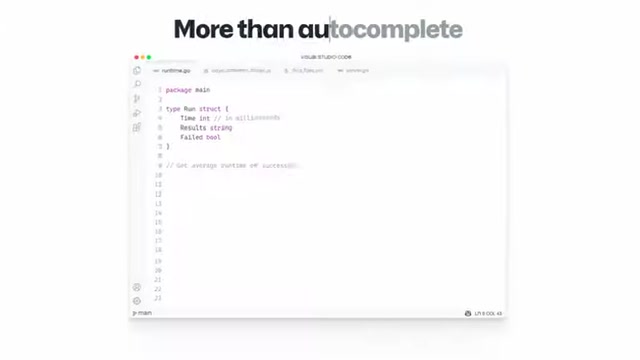
While auto-completion is a useful feature, GitHub Copilot goes far beyond simple suggestions. It aims to understand the intent behind your code. You can write a comment describing the logic you want to implement, and Copilot will make an educated guess at the code you want. It can auto-fill boilerplate or repetitive code for you. Copilot even makes writing tests easier. Just import your test Package, and Copilot can write tests that match your implementation code. It is designed to assist developers across various tasks, such as:
- Code Completion: Suggests code snippets, functions, and even entire classes based on context.
- Boilerplate Generation: Automatically generates repetitive code structures, saving time and effort.
- Test Generation: Assists in writing unit tests, ensuring code reliability and quality.
- Code Navigation: Helps developers explore unfamiliar codebases and libraries.
With GitHub Copilot, the aim isn't to replace programmers but rather to help them to code more efficiently.
Getting Started with GitHub Copilot: A Step-by-Step Guide
Step 1: Joining the Waitlist and Installing the Extension
Access to GitHub Copilot is currently limited to a small group of testers during the technical preview. To get access, you'll need to sign up for the waitlist on the GitHub Copilot website. Once you've been accepted into the preview, you can install the GitHub Copilot extension from the Visual Studio Code Marketplace.
- Sign up for the waitlist: Visit the GitHub Copilot website and sign up for the technical preview.
- Install the extension: Once you've been accepted, open Visual Studio Code and search for the GitHub Copilot extension in the Marketplace. Install the extension and reload Visual Studio Code.
Step 2: Configuring GitHub Copilot in Visual Studio Code
After installing the extension, you'll need to configure it to work with your GitHub account. This involves authenticating with GitHub and granting GitHub Copilot access to your repositories.
- Authenticate with GitHub: Open Visual Studio Code and authenticate with your GitHub account.
- Grant access to repositories: Grant GitHub Copilot access to your repositories so it can provide code suggestions based on your code context.
Step 3: Writing Code with GitHub Copilot
Now that you've installed and configured GitHub Copilot, you can start writing code with its assistance. As you type, GitHub Copilot will provide suggestions in real-time. You can accept these suggestions by pressing the Tab key or ignore them and continue typing.
GitHub Copilot learns from your coding style and provides increasingly relevant suggestions over time.
- Start coding: Open a code file in Visual Studio Code and start typing.
- Accept or ignore suggestions: As you type, GitHub Copilot will provide suggestions. Press the
Tabkey to accept a suggestion or ignore it and continue typing.
It provides editor context and suggestions, and improves suggestions as you work.
GitHub Copilot Core Features: AI-Powered Assistance
Key Capabilities
GitHub Copilot is packed with features that enhance the coding experience. Here are some of its standout capabilities:
- AI-Powered Autocomplete: Suggests code in real-time, speeding up development.
- Code Completion: Completes entire functions and code blocks based on context.
- Test Generation: Generates unit tests, ensuring code reliability.
- Multi-Language Support: Supports Python, JavaScript, TypeScript, Ruby, and Go.
- Context Awareness: Understands code context, including comments, function names, and variables.
- Learning and Adaptation: Learns from the developer's coding style, providing increasingly relevant suggestions over time.
GitHub Copilot Use Cases: Boosting Productivity
Simplifying Complex Tasks
GitHub Copilot shines when dealing with complex coding tasks. It can generate complex code snippets, complete intricate functions, and even suggest entire classes, all based on the developer's intent and the surrounding code context.
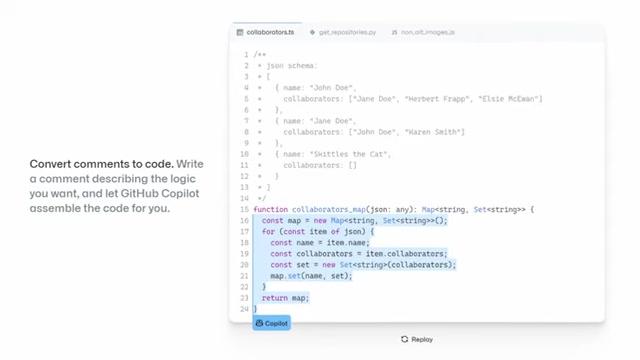
This is particularly useful when working with unfamiliar libraries or frameworks, as GitHub Copilot can provide guidance and suggestions based on its extensive training dataset.
Streamlining Repetitive Coding
One of GitHub Copilot's strengths is its ability to automate repetitive coding tasks. It can generate boilerplate code, write unit tests, and even suggest common code patterns, all with minimal input from the developer. This frees up developers to focus on more creative and strategic aspects of their work.
Learning New Libraries and Frameworks
GitHub Copilot can be a valuable learning tool for developers looking to explore new libraries and frameworks. It can provide code suggestions, examples, and best practices, all within the context of the developer's code. This makes it easier to understand and adopt new technologies, accelerating the learning process.








Most people like

































Report
Please select a reason for reporting
- 13 Reasons to Switch from Snapchat to Text Messaging
- 7 Powerful Speech to Text Apps to Boost Productivity
- 10 Best Speech to Text Tools for Effortless Transcription
- 13 Free Tools to Easily Transcribe Audio to Text
- 15 Surprising Ways Google's Speech-to-Text Boosts Productivity
- 7 Best Free Online Audio to Text Transcription Tools
- 9 Tips to Transcribe Speech to Text Faster and Better
- 13 Best Speech to Text Software for Windows 10 in 2023
- 7 Tips for Choosing the Best Transcriber for Audio to Text
- 11 Reasons Why Dragon Speech-to-Text Apps are Game-Changers
- 6 Secrets to Enhance Your Speech to Text Transcription
- 6 Brilliant Ways to Boost Productivity with Talk-to-Text on Your MacBook
- 6 Ways Transcription Software Converts Audio to Text
- 8 Tips to Transcribe Speech to Text Like a Pro
- 6 Reasons IBM Watson Speech to Text is a Game-Changer
- 14 Powerful Ways Talk-to-Text Improves Your Workflow
- 12 Top Windows Speech-to-Text Software for Efficient Transcription
- 12 Game-Changing Benefits of Apple's Speech to Text Technology
- 9 Powerful Use Cases for AWS Speech to Text Technology
- 10 Easy Steps to Transcribe YouTube Videos to Text
- transcription audio en texte
- online audio transcription
- free audio file transcription
- free ai audio transcription
- audio transcription service
- audio transcription online free
- audio transcription free online
- audio to transcription software
- audio and transcript
- ai audio transcription free
- voice recording to text converter
- translate voice recording to text
- record voice to text
- audio recording to text converter
- voice recording and transcription
- chatgpt voice to text
- gmail voice to text
- speech to text reader
- speech to text ai free
- speech to talk
- How SEO and Marketing Dashboards Empower Agencies to Drive Results
- How to Use AI Tools to Find Internal Linking Opportunities Across a Business Website
- Discover Your Perfect Haircut with AI Hairstyle Apps
- Free Reputation Calculator Tools: How They're Adapting to Score AI Visibility, Not Just Rankings
- Design Professional Flyers for Free on Your Phone
- Best Free Flyer Maker Apps for Android: Design Like a Pro
- How to Know If Your Business Is Ready for an AI Customer Service Agent
- Revolutionizing Storytelling: From Novels to Screenplays with AI
- Create Engaging Animated Explainer Videos with a Free AI Tool
- Stop Multi-Subscribing: Benchmark Top AI Visual Models in One Canvas
- DeepL Translator: The AI-Powered Translation Tool
- AI Video Upscaling: Top Tools Compared for Enhanced Quality
- Bridging the Gap: How One Indie Developer Solved the "Art Asset Nightmare" Using AI Style Transfer
- How I Direct Consistent AI Clips: A Hands-On Guide to Multi-Model Generation
- My Honest Review of VideoAI: The Ultimate Character Voice Generator I've Been Using Lately
- Why do so many AI tools underdeliver for online stores?
- My Brand New Logo: AI-Powered Logo Design for Startups
- Create Stunning Logos with Free AI Logo Generator!
- AI Logo Maker: Design a Stunning Logo in Minutes
- Elevate Your Zoom Experience with Enhanced Name Tags by Warmly

Copyright ©2026 toolify