































Table of Contents
- Key Points
- Optimizing Google Gemini for Lasting Productivity
- Unlocking Gemini’s Power: Practical Use Cases
- Understanding Gemini’s Pro and Flash Models
- Google Workspace Pricing
- Pros and Cons of Google Gemini
- Frequently Asked Questions about Google Gemini
- Delving Deeper: Related Questions about AI and Google Gemini



Optimizing Google Gemini for Lasting Productivity
Essential Gmail Setup for Gemini Optimization
Many users are unaware that maximizing Google Gemini's potential begins with adjusting settings within Gmail. Yes, you heard that right! Gmail! This initial step is crucial for Gemini to seamlessly integrate with your Google Workspace apps. To begin, navigate to Gmail's settings, located under the 'General' tab. Next, use the Command/Ctrl + F function to search for 'Smart Features'.
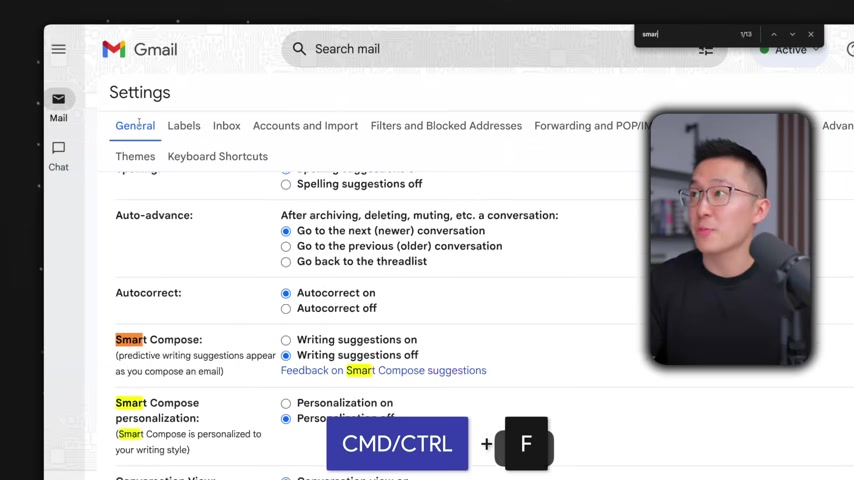
You'll find two options: 'Smart Features' and 'Google Workspace smart features'. Enable both of these settings to ensure Gemini has access to the necessary data and integration points. This seemingly small change dramatically impacts Gemini's ability to assist you across various tasks. You can see how this setting affects Gemini’s functionalities later.
Strategic App Selection for Enhanced Gemini Performance
After optimizing Gmail, focus on the Gemini web app. Head to settings, then to apps. Gemini now integrates with other applications. This functionality brings immense value but can also become a distraction if not managed properly.
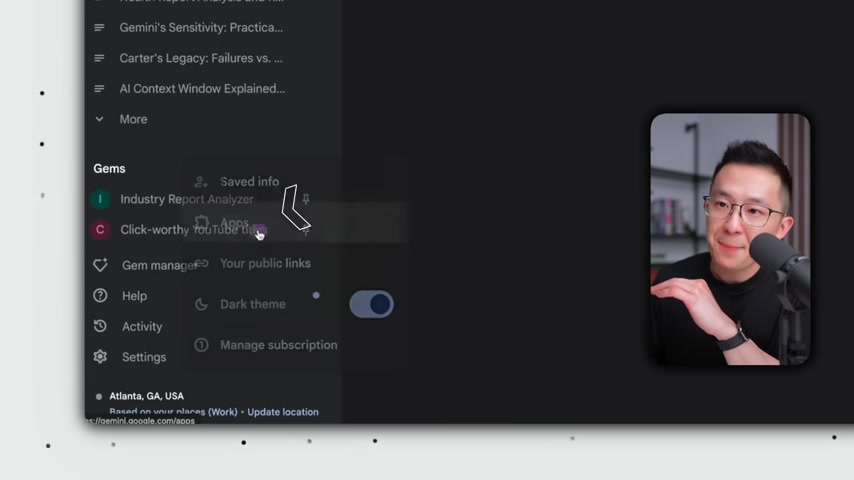
Google Workspace and YouTube are enabled for the presenter, but you can enable Google Flights, Hotels, and Maps if you find them useful. Google Workspace is a must for any professional looking to get the most out of Gemini’s ecosystem. It provides access to Gmail, Drive, Docs, and other productivity apps. If you find other applications useful, enable them! If not, there is no use using up processing power. Gemini’s ability to pull data and perform actions within these apps significantly streamlines workflows and enhances productivity.
Remember, only keep the apps and extensions enabled that you actively use, or may actively use, to help reduce clutter and any mistakes. Minimizing the apps that Gemini can trigger by mistake saves time and focuses its capabilities on what truly matters to you.
Unlocking Gemini’s Power: Practical Use Cases
Leveraging YouTube Integration for Knowledge Extraction and Application
Visual learning is more effective than just reading articles. Here is how to utilize the visual information to get an expert’s opinion. First, share a relevant YouTube video featuring expert tips. Ask Gemini to extract takeaways and frameworks. Third, ask Gemini to apply the learning to your own work. These steps effectively integrate Gemini into your learning process, making it more actionable and practical. Here’s an example using the YouTube app within Gemini.
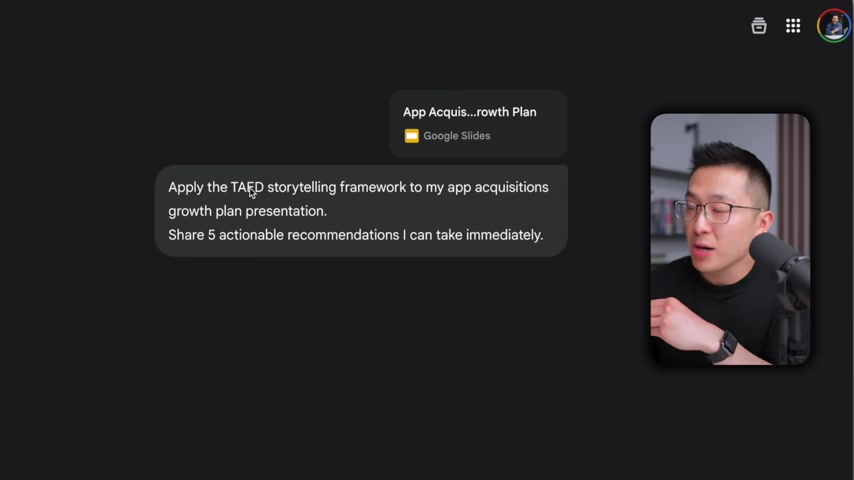
To get started, use the add command. This will allow access to YouTube within Gemini. Using the app, you can extract and understand the video more clearly. You can ask Gemini to provide actionable tips. With Gemini's ability to summarize and distill complex information, you can quickly identify the most relevant insights and implement them in your projects.
By feeding Gemini expert insights from YouTube, it becomes a powerful tool for professional development and continuous learning.
Integrating Gemini with Google Workspace for Workflow Automation
Gemini's integration with Google Workspace apps, like Gmail, Docs, Sheets, and Drive, enables powerful automation and streamlined workflows. By enabling Gmail smart features you will see how Gemini automates tasks. Here’s a look into a business meeting and the different ways you can improve. When reviewing a document, ask Gemini to share 5 actionable recommendations you can take immediately. Gemini will return excellent actionable tips.

When asking for actionable tips, Gemini can use what it knows to offer key points that will enhance efficiency. To make Gemini even more useful for daily tasks, enable Gemini in settings and under apps.
Mobile Gemini for Task Management and Accessibility Features
To use the power of Gemini on the go, use the mobile version for hands-free accessibility. Utilizing this version of Gemini, ask to create tasks due on specific dates. You can quickly use voice for better efficiency on the fly. This has been the best use case for using Gemini on the go. You can ask Gemini to open accessibility settings, as opposed to wasting time finding it yourself. Gemini saves you the pain and hassle of finding things, and gives more efficiency.
Understanding Gemini’s Pro and Flash Models
Strategic Model Selection for Task Optimization
AI is all about maximizing power and ability for what the user needs. It is important to understand when to use models. One must know when to use chat models and when to use reasoning models. Knowing the function of each model is necessary.
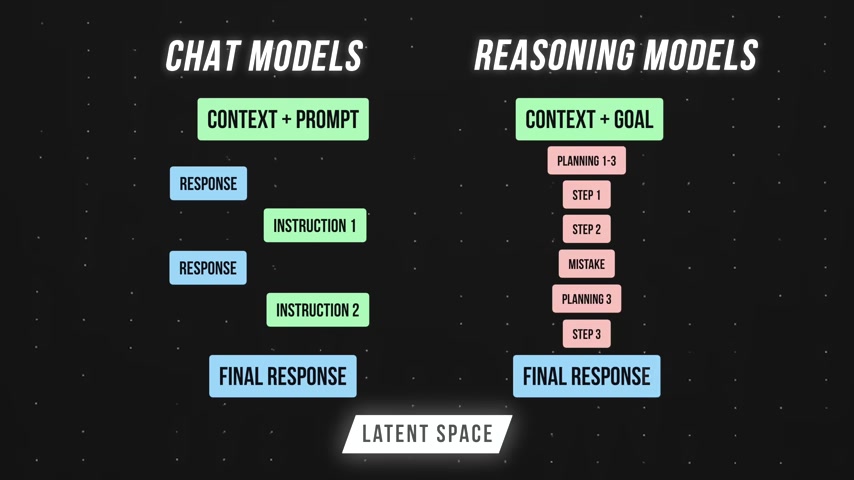
You can find the description on what the model provides in the left corner. What is more important than the Model numbers are the descriptions below, where it explains what is best for complex and everyday tasks. Depending on what Model is most suitable for your request, you can select that in the pull down.
Here is an example. The presenter is working to Translate simpler chinese into tradional chinese and it doesn’t take much, as a simple model can work for this. Gemini can be used for the tasks where thinking can be simple, in this case with a Flash everyday model is needed.
In another case, an English speaker might need an analysis of implications. To be more specific, you share an email in English and you want to translate it into Chinese. A powerful Pro model will more than likely provide the correct analysis. When an action can vary and the answer is complex, use a Pro model.








Most people like
































Report
Please select a reason for reporting
- 13 Reasons to Switch from Snapchat to Text Messaging
- 7 Powerful Speech to Text Apps to Boost Productivity
- 10 Best Speech to Text Tools for Effortless Transcription
- 13 Free Tools to Easily Transcribe Audio to Text
- 15 Surprising Ways Google's Speech-to-Text Boosts Productivity
- 7 Best Free Online Audio to Text Transcription Tools
- 9 Tips to Transcribe Speech to Text Faster and Better
- 13 Best Speech to Text Software for Windows 10 in 2023
- 7 Tips for Choosing the Best Transcriber for Audio to Text
- 11 Reasons Why Dragon Speech-to-Text Apps are Game-Changers
- 6 Secrets to Enhance Your Speech to Text Transcription
- 6 Brilliant Ways to Boost Productivity with Talk-to-Text on Your MacBook
- 6 Ways Transcription Software Converts Audio to Text
- 8 Tips to Transcribe Speech to Text Like a Pro
- 6 Reasons IBM Watson Speech to Text is a Game-Changer
- 14 Powerful Ways Talk-to-Text Improves Your Workflow
- 12 Top Windows Speech-to-Text Software for Efficient Transcription
- 12 Game-Changing Benefits of Apple's Speech to Text Technology
- 9 Powerful Use Cases for AWS Speech to Text Technology
- 10 Easy Steps to Transcribe YouTube Videos to Text
- transcription audio en texte
- online audio transcription
- free audio file transcription
- free ai audio transcription
- audio transcription service
- audio transcription online free
- audio transcription free online
- audio to transcription software
- audio and transcript
- ai audio transcription free
- voice recording to text converter
- translate voice recording to text
- record voice to text
- audio recording to text converter
- voice recording and transcription
- chatgpt voice to text
- gmail voice to text
- speech to text reader
- speech to text ai free
- speech to talk
- How SEO and Marketing Dashboards Empower Agencies to Drive Results
- How to Use AI Tools to Find Internal Linking Opportunities Across a Business Website
- Discover Your Perfect Haircut with AI Hairstyle Apps
- Free Reputation Calculator Tools: How They're Adapting to Score AI Visibility, Not Just Rankings
- Design Professional Flyers for Free on Your Phone
- Best Free Flyer Maker Apps for Android: Design Like a Pro
- How to Know If Your Business Is Ready for an AI Customer Service Agent
- Revolutionizing Storytelling: From Novels to Screenplays with AI
- Create Engaging Animated Explainer Videos with a Free AI Tool
- Stop Multi-Subscribing: Benchmark Top AI Visual Models in One Canvas
- AI Video Upscaling: Top Tools Compared for Enhanced Quality
- Bridging the Gap: How One Indie Developer Solved the "Art Asset Nightmare" Using AI Style Transfer
- How I Direct Consistent AI Clips: A Hands-On Guide to Multi-Model Generation
- My Honest Review of VideoAI: The Ultimate Character Voice Generator I've Been Using Lately
- Why do so many AI tools underdeliver for online stores?
- My Brand New Logo: AI-Powered Logo Design for Startups
- Create Stunning Logos with Free AI Logo Generator!
- AI Logo Maker: Design a Stunning Logo in Minutes
- Elevate Your Zoom Experience with Enhanced Name Tags by Warmly
- Top 5 AI Logo Makers in 2025: Design a Stunning Brand

Copyright ©2026 toolify