































Table of Contents
- Key Points
- Understanding Google's Jules
- Enhancing Jules with ByteRover
- How to use
- Jules Pricing Plans
- Advantages and Disadvantages of Using Jules
- Core Features of Google Jules
- Use Cases for Google Jules
- Frequently Asked Questions (FAQ)
- Related Questions


Understanding Google's Jules
What is Google Jules?
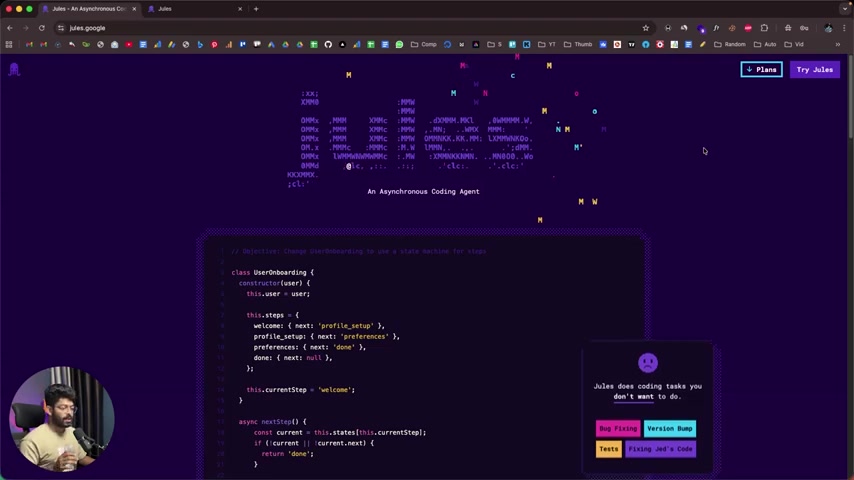
Google Jules is an innovative asynchronous AI coding agent developed by Google to assist developers with various coding tasks.

It's designed to handle tasks such as bug fixing, adding new features, and performing version bumps, all while operating asynchronously in the background. This means developers can continue working on other aspects of their projects without waiting for Jules to complete its tasks. Jules aims to take care of the tasks a developer does not enjoy, so they can focus on more interesting programming challenges.
Key Functionality:
- GitHub Integration: Jules connects directly to your GitHub repositories, enabling it to analyze code, suggest changes, and commit modifications.
- Asynchronous Operation: Jules operates in the background, allowing you to continue coding without interruption.
- Versatile Task Handling: Jules can manage various coding tasks, from bug fixes to feature implementations.
- Real World Tasks: Bug Fixing, Version Bumping, and Code Review.
The core concept behind Jules is to delegate time-consuming and repetitive coding tasks to an AI agent, freeing up developers to focus on more creative and strategic endeavors. By connecting Jules to a GitHub repository, developers can leverage the AI's capabilities to automate routine coding tasks and accelerate the development process.
Keywords: asynchronous, AI, coding agent, GitHub, bug fixing, version bump, code review.
Getting Started with Jules: A Step-by-Step Guide
To start using Google Jules, follow these steps:
-
Access the Jules Website:

Navigate to the Jules website at
jules.google.com. This is where you will begin your journey with Jules. -
Connect to GitHub: Once on the Jules website, you'll be prompted to connect your GitHub account. This will allow Jules to access your repositories and make changes to your code. Grant the necessary permissions to Jules to access your repositories.
-
Select a Repository: After connecting to GitHub, you can select the specific repository you want Jules to work on. You can grant Jules access to all repositories or select specific ones.
-
Provide Instructions: Once a repository is selected, you can provide Jules with instructions on the tasks you want it to perform. This can include bug fixes, feature implementations, or version bumps. Be specific and clear in your instructions to ensure Jules understands the task.
-
Approve the Plan: After Jules receives a Prompt it then develops a plan of action. Review this carefully to be sure it is in line with expectations.
-
Review and Approve Changes: Jules will analyze the code and propose changes. Review these changes carefully before approving them. You have the option to modify the proposed changes or reject them altogether.
-
Publish Changes: Once you are satisfied with the changes, you can publish them to your GitHub repository. Jules will create a new branch with the changes, allowing you to review and merge them at your convenience.
Note: Jules creates a virtual machine to test changes. This means it is actually running your project and verifying its function before pushing changes to the repository.
Keywords: Jules, coding assistant, GitHub, setup, Tutorial, prompts, review, code changes.
Enhancing Jules with ByteRover
Creating a Central Memory Layer with ByteRover
While Jules excels at automating coding tasks, it's important to consider how AI agents can benefit from remembering past interactions, coding styles and learned problem solving. This is where ByteRover comes in. ByteRover acts as a central memory layer for modern development teams and AI agents, providing maximum context for your coding agents across IDEs, projects, and teams.

By integrating ByteRover with Jules, you can provide the AI agent with access to a wealth of historical data, including previous coding decisions, bug fixes, and project-specific conventions. This enhanced context allows Jules to make more informed decisions, generate more accurate code suggestions, and ultimately improve the overall quality of its output.
Key Benefits of Using ByteRover with Jules:
- Improved Code Quality: ByteRover provides Jules with access to a comprehensive understanding of the codebase, leading to more accurate and reliable code suggestions.
- Faster Development Cycles: By leveraging historical data, Jules can automate tasks more efficiently, accelerating the development process.
- Enhanced Collaboration: ByteRover enables teams to share knowledge and best practices with Jules, ensuring consistent coding standards across projects.
- Git-Like Functionality: Manually add memories to the context to better describe the issues Jules faces.
Keywords: ByteRover, memory layer, AI coding, context, collaboration, memory store, share best practices, code generation.
Jules Pricing Plans
Understanding the Plans
Google Jules offers a range of pricing plans to cater to different development needs.
The core offering revolves around allowing developers to complete a certain number of tasks with an AI agent, with each plan having differing limits.
Here's a breakdown of the available plans:
- Jules (Free): This plan is ideal for developers who want to get started with Jules and explore its capabilities. It offers 15 tasks per day and supports three concurrent tasks. The free plan is powered by the Gemini 2.5 Pro model.
- Jules in Pro: This plan is designed for developers who ship code daily and need more resources. It offers 180 tasks per day and supports 15 concurrent tasks. The Pro plan also provides higher access to the latest models, starting with Gemini 2.5 Pro, with the capability to run multiple threads in parallel.
- Jules in Ultra: This plan caters to builders who run agents at scale, delivering 300 tasks per day and 60 concurrent tasks. The Ultra plan provides priority access to the latest models, starting with Gemini 2.5 Pro, and also unlocks parallel workflow.
Core Features of Google Jules
Key Features of the Coding Assistant
Google Jules offers a powerful suite of features designed to enhance the coding experience and automate various development tasks:
- Bug Fixing: Jules can automatically identify and fix bugs in your code, saving you valuable time and effort. This is done by analyzing the code for errors, proposing solutions, and allowing you to review and approve the changes.
- Feature Implementation: Jules can assist with implementing new features in your code, generating code snippets, and suggesting modifications to existing code. This allows developers to accelerate feature development and reduce manual coding efforts.
- Version Bumping: Jules can automatically update your project's version number, ensuring consistent versioning across your codebase. This simplifies version management and reduces the risk of errors.
- GitHub Integration: Seamless integration with GitHub allows for easy access to repositories, code analysis, and code modifications.
- Test Suite: Jules can run tests and run analytics to avoid breaking code.
- Virtual Machine: Jules Clones your code to a cloud VM so your environment stays safe.
- Multi-Threaded Processing: Jules can run tasks in parallel, resulting in faster code generations and bug fixes.

Here's a table that summarizes Jules' benefits:
| Feature | Description |
|---|---|
| Bug Fixing | Automatically identifies and fixes bugs in your code. |
| Feature Addition | Assists with implementing new features. |
| Version Bumping | Automatically updates project version numbers. |
| GitHub Integration | Provides seamless access to repositories. |
| Test Integration | Jule's code comes with a test suite to prevent build breakage. |
| Asynchronous Operation | Allows for concurrent task processing in the background. |
Keywords: Code Editor, Asynchronous, automated tasks, GitHub Integration, Versatile Task Handling.








Most people like

































Report
Please select a reason for reporting
- 13 Reasons to Switch from Snapchat to Text Messaging
- 7 Powerful Speech to Text Apps to Boost Productivity
- 10 Best Speech to Text Tools for Effortless Transcription
- 13 Free Tools to Easily Transcribe Audio to Text
- 15 Surprising Ways Google's Speech-to-Text Boosts Productivity
- 7 Best Free Online Audio to Text Transcription Tools
- 9 Tips to Transcribe Speech to Text Faster and Better
- 13 Best Speech to Text Software for Windows 10 in 2023
- 7 Tips for Choosing the Best Transcriber for Audio to Text
- 11 Reasons Why Dragon Speech-to-Text Apps are Game-Changers
- 6 Secrets to Enhance Your Speech to Text Transcription
- 6 Brilliant Ways to Boost Productivity with Talk-to-Text on Your MacBook
- 6 Ways Transcription Software Converts Audio to Text
- 8 Tips to Transcribe Speech to Text Like a Pro
- 6 Reasons IBM Watson Speech to Text is a Game-Changer
- 14 Powerful Ways Talk-to-Text Improves Your Workflow
- 12 Top Windows Speech-to-Text Software for Efficient Transcription
- 12 Game-Changing Benefits of Apple's Speech to Text Technology
- 9 Powerful Use Cases for AWS Speech to Text Technology
- 10 Easy Steps to Transcribe YouTube Videos to Text
- transcription audio en texte
- online audio transcription
- free audio file transcription
- free ai audio transcription
- audio transcription service
- audio transcription online free
- audio transcription free online
- audio to transcription software
- audio and transcript
- ai audio transcription free
- voice recording to text converter
- translate voice recording to text
- record voice to text
- audio recording to text converter
- voice recording and transcription
- chatgpt voice to text
- gmail voice to text
- speech to text reader
- speech to text ai free
- speech to talk
- How to Use AI Tools to Find Internal Linking Opportunities Across a Business Website
- Discover Your Perfect Haircut with AI Hairstyle Apps
- Free Reputation Calculator Tools: How They're Adapting to Score AI Visibility, Not Just Rankings
- Design Professional Flyers for Free on Your Phone
- Best Free Flyer Maker Apps for Android: Design Like a Pro
- How to Know If Your Business Is Ready for an AI Customer Service Agent
- Revolutionizing Storytelling: From Novels to Screenplays with AI
- Create Engaging Animated Explainer Videos with a Free AI Tool
- Stop Multi-Subscribing: Benchmark Top AI Visual Models in One Canvas
- Best Seedance 2.5 API Provider: Every Price on the Market, Checked at Source
- Top AI Social Media Management Tools: Automate Your Content Strategy
- Free AI Text to Video Generator: Create Stunning Videos from Text
- Discover 17 ChatGPT Alternatives: A Comprehensive Comparison
- Character.AI vs. Janitor AI: Which AI Chat Platform Reigns Supreme?
- Top Virtual Assistant Companies in 2026: Reviews, Pricing, and Plans Compared
- Unveiling FaceCheck.ID: Revolutionizing Reverse Image Searches with AI
- 11 Best AI Dialers in 2026: Features, Pricing, Pros and Cons
- How I Direct Consistent AI Clips: A Hands-On Guide to Multi-Model Generation
- A Realistic Review of the Photo Generator Image Tool
- Playwright MCP Server: Automated Web Testing with Agent Mode

Copyright ©2026 toolify