































Table of Contents
- Key Points
- Understanding the Fundamentals of JavaScript Code
- Explanation of the JavaScript Code Example
- Running the JavaScript Code
- Advantages and Disadvantages of JavaScript
- Frequently Asked Questions (FAQ)
- Related Questions


Understanding the Fundamentals of JavaScript Code
What is JavaScript?
JavaScript is a versatile, high-level programming language primarily used to add interactivity and dynamic content to websites.
It's an essential tool for front-end web development, enabling developers to create engaging user interfaces and responsive web applications. Additionally, JavaScript has expanded its reach to back-end development through Node.js, making it a full-stack solution for web projects.
JavaScript's strength lies in its ability to manipulate the Document Object Model (DOM), allowing developers to modify website content, structure, and style in real-time. This capability is crucial for creating dynamic and interactive web experiences that enhance user engagement. The language also supports event handling, enabling developers to respond to user actions such as clicks, form submissions, and keyboard input.
Furthermore, JavaScript's asynchronous programming model allows it to perform multiple tasks concurrently without blocking the main thread, resulting in faster and more responsive applications. This feature is particularly important for handling network requests and other time-consuming operations, ensuring a smooth user experience.
To harness the full potential of JavaScript, it's essential to grasp core concepts such as variables, functions, and control structures. Mastering these fundamentals is crucial for building robust and maintainable web applications that deliver exceptional user experiences.
Defining a Variable
In JavaScript, a variable is a named storage location in the computer's memory used to hold a value. Variables are essential for storing and manipulating data within a program.
To define a variable, you use keywords like let, const, or var, followed by the variable name. For example:
let num = 5;This code declares a variable named num and assigns it the value 5. The let keyword is used here to indicate that the variable's value may change during the program's execution. Alternatively, you can use the const keyword to declare a constant variable, whose value cannot be reassigned after initialization. Understanding the proper use of let and const is vital for writing maintainable and predictable code.
Variables in JavaScript can hold different types of data, such as numbers, strings, booleans, and objects. Choosing the right data type is crucial for optimizing memory usage and ensuring accurate calculations. JavaScript is dynamically typed, which means that you don't need to explicitly declare the data type of a variable; the interpreter infers it based on the assigned value. However, it's still essential to understand the underlying data types for effective programming.
Here are a few examples of variable declarations with different data types:
let name = "John"; // String
let age = 30;       // Number
let isStudent = false; // Boolean
let person = { name: "John", age: 30 }; // Object
Properly defining and using variables is fundamental to writing effective JavaScript code. Understanding the scope and lifetime of variables is also important for avoiding common programming pitfalls, such as variable hoisting and memory leaks. Mastering these concepts will enable you to create more reliable and efficient JavaScript applications.
Creating a Function
In JavaScript, a function is a block of code designed to perform a specific task. Functions are essential for organizing code, promoting reusability, and improving program structure.
To define a function, you use the function keyword, followed by the function name, a list of parameters (optional), and a block of code enclosed in curly braces. For example:
function square(x) {
  return x * x;
}
This code defines a function named square that takes one parameter, x, and returns the square of x. The return keyword is used to specify the value that the function should return to the caller. If a function doesn't have a return statement, it implicitly returns undefined.
Functions in JavaScript can be called by using the function name followed by parentheses, and passing in any required arguments. For example:
let result = square(5);
console.log(result); // Output: 25
In this example, the square function is called with the argument 5, and the returned value (25) is stored in the result variable. The console.log method is then used to print the value of result to the console.
Functions can also be defined as expressions, arrow functions, or methods of objects. Understanding these different ways of defining functions is crucial for writing flexible and expressive JavaScript code. Function expressions allow you to assign a function to a variable, while arrow functions provide a concise syntax for writing simple functions. Methods of objects are functions that are associated with a particular object, and they can access and manipulate the object's properties.
Here are a few examples of different function definitions:
// Function expression
let square = function(x) {
  return x * x;
};

// Arrow function
let square = x => x * x;

// Method of an object
let calculator = {
  square: function(x) {
    return x * x;
  }
};
Mastering functions is essential for writing modular, reusable, and maintainable JavaScript code. Understanding how to define, call, and pass arguments to functions is crucial for building complex applications that solve real-world problems. Functions also form the basis for more advanced programming concepts such as closures, higher-order functions, and callbacks.
Explanation of the JavaScript Code Example
Step-by-Step Code Analysis
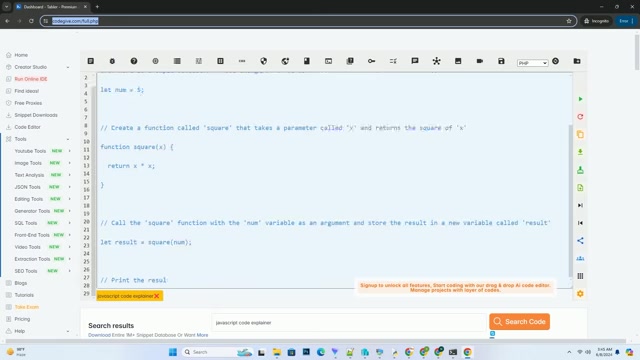
Let's break down the JavaScript code example provided and explain each part step by step.
-
Defining a Variable: In the first line, we define a variable called
numand assign it the value5. This is achieved using theletkeyword, which allows us to declare a variable within a specific scope.let num = 5;Here,
numis the variable name, and5is the value assigned to it. This variable will be used later in the code to perform calculations. -
Creating a Function: We then define a function called
squarethat takes a parameterxand returns the square ofx.function square(x) { return x * x; }This function is designed to calculate the square of any number passed to it. The
return x * x;statement calculates the square of the inputxand returns the result. -
Calling the Function: Next, we call the
squarefunction with thenumvariable as an argument and store the result in a new variable calledresult.let result = square(num);This line calls the
squarefunction, passing the value ofnum(which is5) as an argument. The function calculates the square of5(which is25) and returns the result, which is then stored in theresultvariable. -
Printing the Result: Finally, we print the value of
resultto the console usingconsole.log().console.log(result);This line prints the value of the
resultvariable (which is25) to the console. Theconsole.log()method is a built-in JavaScript function that allows us to display output in the console, making it a valuable tool for debugging and testing code.
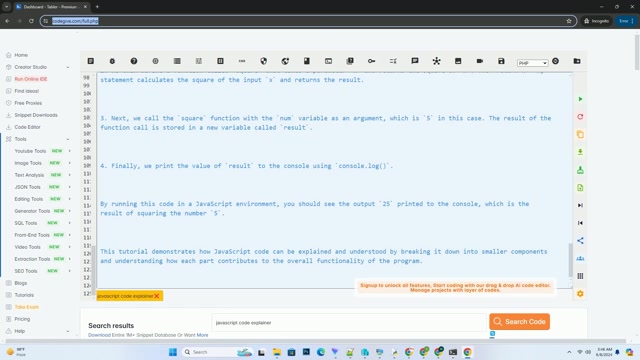
By running this code in a JavaScript environment, you should see the output 25 printed to the console, which is the result of squaring the number 5.







Most people like



































Report
Please select a reason for reporting
- 13 Reasons to Switch from Snapchat to Text Messaging
- 7 Powerful Speech to Text Apps to Boost Productivity
- 10 Best Speech to Text Tools for Effortless Transcription
- 13 Free Tools to Easily Transcribe Audio to Text
- 15 Surprising Ways Google's Speech-to-Text Boosts Productivity
- 7 Best Free Online Audio to Text Transcription Tools
- 9 Tips to Transcribe Speech to Text Faster and Better
- 13 Best Speech to Text Software for Windows 10 in 2023
- 7 Tips for Choosing the Best Transcriber for Audio to Text
- 11 Reasons Why Dragon Speech-to-Text Apps are Game-Changers
- 6 Secrets to Enhance Your Speech to Text Transcription
- 6 Brilliant Ways to Boost Productivity with Talk-to-Text on Your MacBook
- 6 Ways Transcription Software Converts Audio to Text
- 8 Tips to Transcribe Speech to Text Like a Pro
- 6 Reasons IBM Watson Speech to Text is a Game-Changer
- 14 Powerful Ways Talk-to-Text Improves Your Workflow
- 12 Top Windows Speech-to-Text Software for Efficient Transcription
- 12 Game-Changing Benefits of Apple's Speech to Text Technology
- 9 Powerful Use Cases for AWS Speech to Text Technology
- 10 Easy Steps to Transcribe YouTube Videos to Text
- transcription audio en texte
- online audio transcription
- free audio file transcription
- free ai audio transcription
- audio transcription service
- audio transcription online free
- audio transcription free online
- audio to transcription software
- audio and transcript
- ai audio transcription free
- voice recording to text converter
- translate voice recording to text
- record voice to text
- audio recording to text converter
- voice recording and transcription
- chatgpt voice to text
- gmail voice to text
- speech to text reader
- speech to text ai free
- speech to talk
- Create Engaging Animated Explainer Videos with a Free AI Tool
- Stop Multi-Subscribing: Benchmark Top AI Visual Models in One Canvas
- Best Seedance 2.5 API Provider: Every Price on the Market, Checked at Source
- AI OnlyFans: How to Generate $30,000/Month (Legally)
- Transform Your Script into an Engaging Video with AI Video Maker!
- AI Marketing Automation: A Comprehensive Guide for Small Businesses
- Midjourney Alternative for Anime Art Creators: Why PixAI May Be Better for Character Workflows
- 10 Things Most People Get Wrong About AI Image Search
- AI Girlfriend Apps: Top Choices Redefining Relationships 2025
- How to Reduce Quoting Errors in Salesforce with AI-Assisted Quote Creation
- Top 5 AI Video Generators: A Hands-On Guide to Image and Word Workflows
- Gemma 2: Google's Powerful Open-Source LLM for Developers
- NVIDIA's Llama 3.1: Nemotron 70B Outperforms GPT-4 & Claude?
- Maximizing AI Performance with MLPerf Benchmarks
- Unveiling Free Willy: The Revolutionary Open Source Language Models
- Revolutionizing AI Model Evaluation with Arthur Bench
- AI Benchmarks: Unveiling the Tests That Challenge Artificial Intelligence
- Google DeepMind's SAFE: Revolutionizing AI Fact-Checking
- Unlocking the Power of LLMs: Evaluating LLMs like Never Before!
- AI Model Benchmarks: Navigating Truth & Corporate Hype

Copyright ©2026 toolify