JavaScript Coding: Enhancing Your Quiz App with Functions

Updated on May 11,2025

Table of Contents

Welcome back to the exciting journey of coding a quiz application! In this comprehensive guide, we'll delve into the heart of JavaScript to add essential functionalities that elevate the app's interactivity and user experience. By creating dynamic functions, such as adding text chats and integrating multiple-choice questions, we'll transform a basic structure into an engaging learning tool. Get ready to enhance your coding skills and build an exceptional quiz app!

Key Points

Learn to create dynamic JavaScript functions.

Implement the 'addLine' function to dynamically add text chats.

Incorporate parameters for different chat modes (AI vs. Human).

Develop an 'addMCQ' function to integrate multiple-choice questions.

Use JSON parsing for seamless data handling.

Implement a try-catch block for error prevention and robustness.

Building Essential JavaScript Functions for Your Quiz App

Introduction to JavaScript Functions

JavaScript functions are fundamental building blocks for creating dynamic and interactive web applications.

They allow developers to encapsulate a set of instructions that can be executed whenever needed, making code more modular, reusable, and easier to manage. In the context of building a coding quiz app, functions play a pivotal role in handling user interactions, updating the user interface, and managing the flow of the quiz.

By leveraging JavaScript functions effectively, you can create an engaging and dynamic quiz experience that enhances user learning and provides valuable feedback. Functions can be designed to add text chats, incorporate multiple-choice questions, validate user inputs, and provide immediate feedback based on the user's performance. With the proper application of JavaScript functions, your coding quiz app can become a powerful tool for education and self-assessment.

Several key aspects of JavaScript functions make them indispensable for modern web development. These include the ability to define parameters for accepting inputs, return values to communicate results, and handle errors gracefully using try-catch blocks. By understanding and mastering these concepts, you'll be well-equipped to build robust and interactive web applications that deliver a superior user experience.

Key Benefits of JavaScript Functions:

  • Modularity: Break down complex tasks into smaller, manageable units.
  • Reusability: Use the same code in multiple places, reducing redundancy.
  • Readability: Improve code Clarity and make it easier to understand.
  • Maintainability: Simplify updates and bug fixes.
  • Interactivity: Enable dynamic responses to user actions.

Creating the 'addLine' Function for Dynamic Text Chats

One of the first steps in enhancing your coding quiz app is to add the ability to display dynamic text chats.

This can be achieved using the addLine function, which allows you to dynamically add text messages to the user interface. The addLine function will create new HTML elements and append them to the chat container, ensuring that each message is displayed in an organized and readable manner. This function is essential for providing feedback, instructions, or simply engaging in a conversation with the user.

Defining the Function:

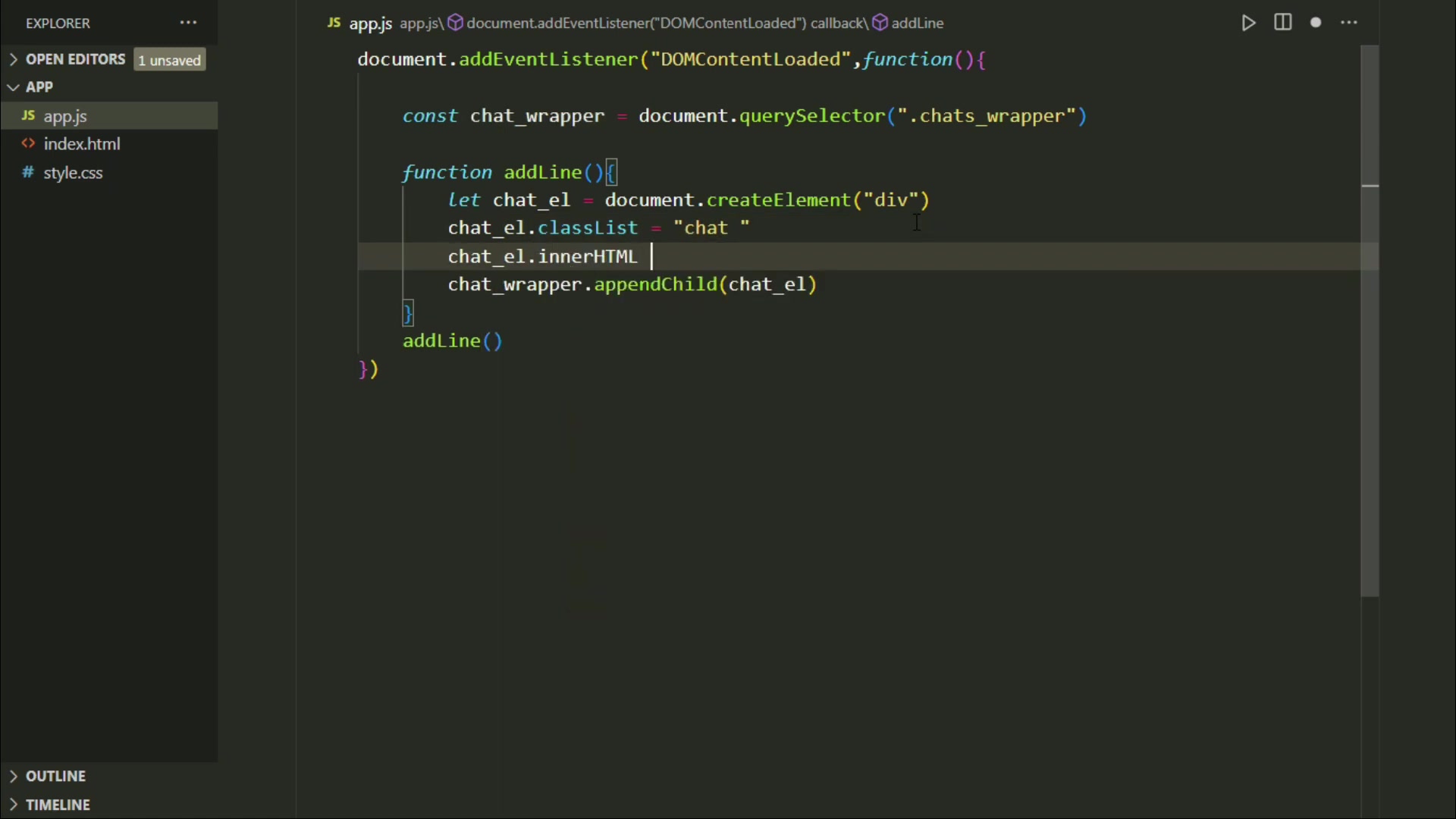
To begin, define the addLine function using the function keyword. This function will take two parameters: txt for the text message and mode to distinguish between AI and human messages.

function addLine(txt, mode) {
    // Function body
}

Creating the Chat Element:

Inside the addLine function, use document.createElement('div') to create a new div element dynamically. This element will serve as the container for the chat message. To ensure proper styling and positioning, add a class to this element using chat_el.classList = 'chat ' + mode;. This sets the class name to chat and appends the mode (either human or ai) to apply different styles based on the message source.

let chat_el = document.createElement('div');
chat_el.classList = 'chat ' + mode;

Adding Text to the Chat Element:

Set the text content of the chat element using chat_el.innerHTML = txt;. This places the text message inside the div element.

chat_el.innerHTML = txt;

Appending the Chat Element to the Chat Container:

Finally, append the new chat element to the chat container using chat_wrapper.appendChild(chat_el);. This adds the message to the user interface.

chat_wrapper.appendChild(chat_el);

Calling the Function:

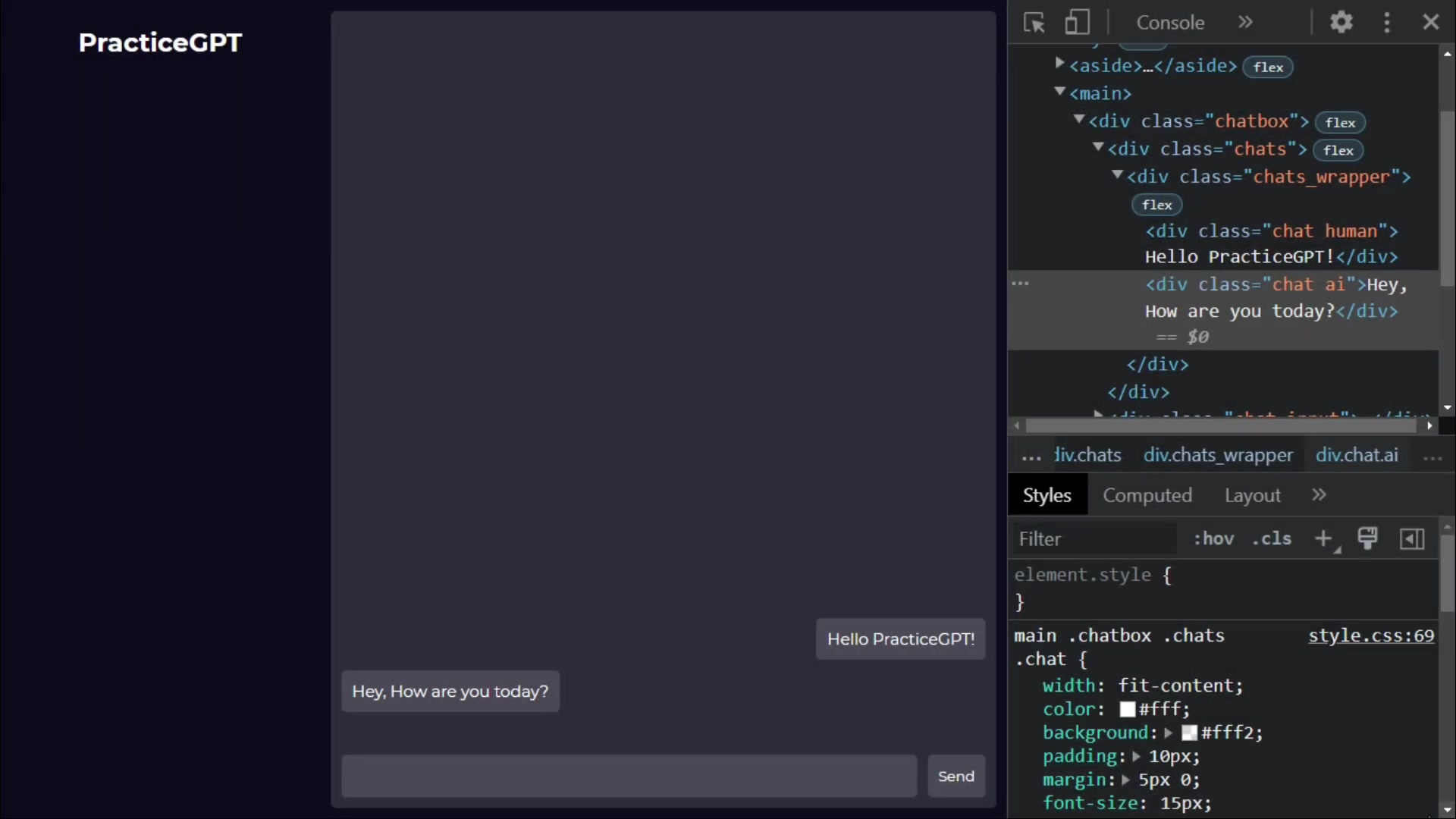
To display a message, simply call the addLine function with the desired text and mode. For example:

addLine("Hello PracticeGPT!", "human");
addLine("How are you today?", "ai");
addLine("I'm fine", "human");

This will add three messages to the chat container, each styled according to whether it was sent by a human or AI.

By using the addLine function, you can easily add dynamic text chats to your coding quiz app, enhancing the user interface and providing a more interactive experience. This function is versatile and can be used to display instructions, feedback, or even engage in a conversation with the user, making your app more engaging and effective.

Enhancing Chat Dynamics with 'mode' Parameter

To enhance the dynamics of your chat application, incorporating a 'mode' parameter in the addLine function is crucial.

This parameter enables the distinction between messages from different sources, such as AI and human users, allowing for distinct styling and functionality based on the message origin. The 'mode' parameter enhances the chat's user experience by making it more intuitive and engaging.

Setting Up the 'mode' Parameter:

Modify the addLine function to accept a mode parameter, which can be either 'human' or 'ai'. This parameter will be used to determine the CSS class applied to the chat element, enabling different styling for messages from each source.

function addLine(txt, mode) {
    let chat_el = document.createElement('div');
    chat_el.classList = 'chat ' + mode;
    chat_el.innerHTML = txt;
    chat_wrapper.appendChild(chat_el);
}

Applying Different Styles:

With the 'mode' parameter in place, you can apply different CSS styles to the chat elements. For example, you can Align human messages to the right and AI messages to the left, or use different background colors for each. This can be achieved by defining CSS rules for the .chat.human and .chat.ai classes.

.chat.human {
    text-align: right;
    background-color: #f0f0f0;
}

.chat.ai {
    text-align: left;
    background-color: #e0e0e0;
}

Dynamic Chat Example:

By calling the addLine function with different 'mode' values, you can create a dynamic chat experience that clearly distinguishes between AI and human messages.

addLine("Hey PracticeGPT!", "human");
addLine("Hello, How are you?", "ai");
addLine("I'm fine", "human");

This approach not only enhances the user interface but also adds an element of clarity to the conversation, making it easier for users to follow along. By using the 'mode' parameter, you can create a more engaging and user-friendly chat application that effectively communicates information and enhances the overall experience of your coding quiz app.

Implementing 'addMCQ' Function to Add Multiple Choice Questions

Integrating multiple-choice questions (MCQs) into your coding quiz app can significantly enhance its interactivity and educational value.

To accomplish this, you can create an addMCQ function that dynamically adds questions to the user interface, along with multiple answer options. This function will take a JSON object as input, which contains the question text and the answer options. By parsing the JSON data and creating HTML elements for each question and option, you can seamlessly incorporate MCQs into your app.

JSON Structure:

The JSON object will have the following structure:

{
    "question": "What will be the output? 
function print() {
 console.log(this)
 print()
}",
    "options": ["window", "global object", "null", "undefined"]
}

Creating the 'addMCQ' Function:

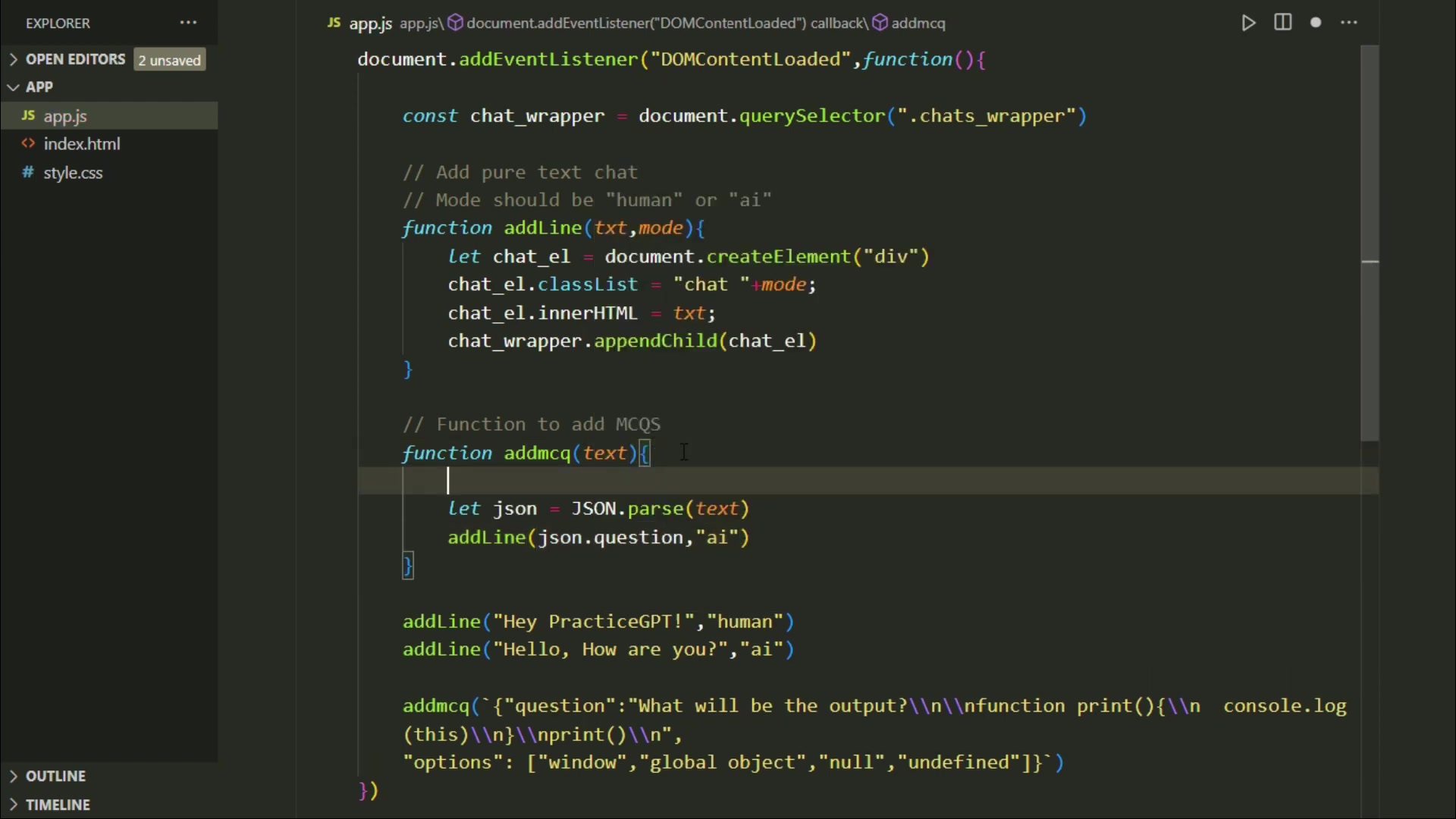
Define the addMCQ function to accept a text parameter, which is the JSON STRING containing the question and answer options.

function addMCQ(text) {
    // Function body
}

Parsing the JSON Data:

Inside the addMCQ function, parse the JSON string into a JavaScript object using JSON.parse(text). This will allow you to access the question and answer options easily.

let json = JSON.parse(text);

Adding the Question to the UI:

Use the addLine function to add the question to the user interface. Access the question text from the JSON object using json.question.

addLine(json.question, "ai");

Error Handling:

Wrap the code in a try-catch block to handle any errors that may occur during JSON parsing. If an error occurs, log it to the console.

try {
    let json = JSON.parse(text);
    addLine(json.question, "ai");
} catch (err) {
    console.error(err);
}

Calling the 'addMCQ' Function:

To add a multiple-choice question, simply call the addMCQ function with the JSON string.

addMCQ('{"question": "What will be the output? 
function print() {
 console.log(this)
 print()
}", "options": ["window", "global object", "null", "undefined"]}');

By implementing the addMCQ function, you can dynamically add multiple-choice questions to your coding quiz app, enhancing its educational value and providing a more engaging learning experience. This function is versatile and can be used with different question types and answer options, making your app more adaptable and effective.

Advanced JavaScript Concepts for Quiz App Development

Implementing Try-Catch Blocks for Error Prevention

Error handling is a critical aspect of software development, ensuring that your application can gracefully handle unexpected issues and continue to function smoothly. In JavaScript, the try-catch block provides a mechanism for catching and handling errors that may occur during the execution of your code. By implementing try-catch blocks in your coding quiz app, you can prevent errors from crashing the application and provide informative feedback to the user.

Structure of the Try-Catch Block:

The try-catch block consists of two main sections:

  • Try Block: This section contains the code that you suspect may throw an error.
  • Catch Block: This section contains the code that will be executed if an error occurs in the try block.
try {
    // Code that may throw an error
} catch (err) {
    // Code to handle the error
}

Example with JSON Parsing:

When parsing JSON data, there is always a risk that the data may be invalid, which can lead to an error. To handle this, you can wrap the JSON parsing code in a try-catch block.

try {
    let json = JSON.parse(text);
    addLine(json.question, "ai");
} catch (err) {
    console.error("Invalid JSON data:", err);
    addLine("Error: Invalid JSON data", "ai");
}

In this example, if JSON.parse(text) throws an error, the catch block will be executed, logging the error to the console and displaying an error message to the user. This prevents the application from crashing and provides valuable feedback to the user.

Key Benefits of Try-Catch Blocks:

  • Prevents Application Crashes: By catching errors, you can prevent your application from crashing and ensure that it continues to function.
  • Provides Informative Feedback: You can display informative error messages to the user, helping them understand what went wrong and how to fix it.
  • Enhances User Experience: By handling errors gracefully, you can improve the overall user experience and make your application more reliable.
  • Simplifies Debugging: Try-catch blocks make debugging easier by providing a clear indication of where errors are occurring and what type of errors they are.

Step-by-Step Guide: Implementing Functions in Your Quiz App

Step 1: Setting Up the JavaScript File

First, create a JavaScript file (e.g., app.js) and link it to your HTML file. This is where you'll write your JavaScript functions. Ensure that the script tag is placed at the end of the body section in your HTML file to allow the DOM to load fully before the script runs.

<!DOCTYPE html>
<html>
<head>
    <title>Coding Quiz App</title>
    <link rel="stylesheet" href="./style.css">
</head>
<body>
    <main>
        <!-- Your HTML content here -->
    </main>
    <script src="./app.js"></script>
</body>
</html>

Step 2: Creating the 'addLine' Function

In your app.js file, define the addLine function. This function will dynamically create div elements to display chat messages.

document.addEventListener("DOMContentLoaded", function() {
    const chat_wrapper = document.querySelector(".chats_wrapper");

    function addLine(txt, mode) {
        let chat_el = document.createElement('div');
        chat_el.classList = 'chat ' + mode;
        chat_el.innerHTML = txt;
        chat_wrapper.appendChild(chat_el);
    }

    addLine("Hey PracticeGPT!", "human");
    addLine("Hello, How are you?", "ai");
    addLine("I'm fine", "human");
});

This code adds an event listener to ensure the DOM is fully loaded before running. It also defines the addLine function and calls it with example messages.

Step 3: Adding the 'addMCQ' Function

Next, add the addMCQ function to your app.js file. This function will dynamically add multiple-choice questions to the user interface.

document.addEventListener("DOMContentLoaded", function() {
    const chat_wrapper = document.querySelector(".chats_wrapper");

    function addLine(txt, mode) {
        let chat_el = document.createElement('div');
        chat_el.classList = 'chat ' + mode;
        chat_el.innerHTML = txt;
        chat_wrapper.appendChild(chat_el);
    }

    function addMCQ(text) {
        try {
            let json = JSON.parse(text);
            addLine(json.question, "ai");
        } catch (err) {
            console.error("Invalid JSON data:", err);
            addLine("Error: Invalid JSON data", "ai");
        }
    }

    addLine("Hey PracticeGPT!", "human");
    addLine("Hello, How are you?", "ai");
    addLine("I'm fine", "human");

    addMCQ('{"question": "What will be the output? 
function print() {
 console.log(this)
 print()
}", "options": ["window", "global object", "null", "undefined"]}');
});

This code defines the addMCQ function and calls it with an example JSON string. It also includes error handling to prevent crashes from invalid JSON data.

Step 4: Testing Your Functions

Open your HTML file in a web browser. You should see the chat messages and the multiple-choice question displayed in the user interface. Check the browser's console for any errors. If everything looks correct, you have successfully implemented the addLine and addMCQ functions in your coding quiz app.

Pricing for the PracticeGPT Tool

Overview of Subscription Plans

PracticeGPT offers a range of subscription plans to cater to different user needs, from casual learners to professional developers. Each plan provides varying levels of access to features and resources, ensuring that users can find a plan that aligns with their budget and learning objectives. By providing transparent pricing and clear distinctions between plans, PracticeGPT aims to offer value and flexibility to its user base.

To better understand the options, here’s a breakdown:

  • Free Plan: Offers limited access to basic features and resources, ideal for beginners who want to explore the platform.
  • Standard Plan: Provides enhanced access to a wider range of features, including more Quizzes and interactive lessons.
  • Premium Plan: Unlocks all features and resources, designed for advanced learners and professionals seeking comprehensive learning tools.
  • Enterprise Plan: Customized solutions tailored to organizations and educational institutions with specific learning requirements and volume discounts.

With clear pricing tiers and comprehensive offerings, PracticeGPT is committed to providing accessible and high-quality learning resources for everyone.

Detailed Pricing Table

To further illustrate the pricing structure of PracticeGPT, here's a detailed breakdown in a table format:

Plan Price Features
Free Free Limited access to basic features, a small collection of quizzes, and standard support.
Standard $9/month Expanded access to quizzes, more interactive lessons, priority support, and ad-free experience.
Premium $19/month Unlimited access to all quizzes, advanced lessons, premium support, personalized learning paths, and early access to new features.
Enterprise Custom Tailored solutions for organizations, volume discounts, dedicated account manager, custom training modules, and advanced analytics reports.

This table offers a clear and concise comparison of the features and benefits provided by each subscription plan. Whether you're just starting or need advanced features, PracticeGPT has a plan to suit your needs.

Pros and Cons of PracticeGPT

👍 Pros

AI-powered Chat: Provides real-time assistance and feedback.

Dynamic Quizzes: Interactive quizzes with adaptive difficulty.

JSON Parsing Support: Handles JSON data efficiently.

Customizable Chat Modes: Enhances user experience with distinct chat styles.

Real-Time Error Handling: Prevents application crashes and provides informative feedback.

Progress Tracking: Monitors learning progress and provides detailed reports.

Adaptive Learning Paths: Tailors learning paths based on skill level and goals.

👎 Cons

AI chat may not always provide perfect solutions.

Some advanced features are limited to premium plans.

Adaptive learning paths may require initial configuration.

Core Features of PracticeGPT

Detailed Breakdown of Key Functionalities

PracticeGPT stands out due to its wide array of features designed to enhance the learning experience for coders of all skill levels. The core features of PracticeGPT are tailored to provide a comprehensive and interactive coding education. These features not only make learning more engaging but also more effective, ensuring users retain and apply their knowledge in real-world scenarios.

Here are some key features that make PracticeGPT an exceptional tool:

  • AI-Powered Chat: Provides real-time assistance and feedback, making learning more interactive. Offers personalized responses and suggestions based on your coding challenges.
  • Dynamic Quizzes: Interactive quizzes with multiple-choice questions that adapt to your skill level. Offers immediate feedback and detailed explanations for each answer.
  • JSON Parsing Support: Handles JSON data efficiently, ensuring seamless integration and error prevention with try-catch blocks. This improves data handling and application stability.
  • Customizable Chat Modes: Distinguishes between AI and human messages through customizable chat modes ('human' or 'ai'), enhancing user experience and clarity.
  • Real-Time Error Handling: Implements try-catch blocks for robust error handling, preventing application crashes and providing informative feedback.
  • Progress Tracking: Monitors your learning progress and provides detailed reports on your performance. This feature helps identify areas where you excel and areas that need improvement.
  • Adaptive Learning Paths: Tailors your learning path based on your skill level and learning goals. This ensures that you are always challenged appropriately and progressing effectively.
  • Community Support: Access to a community forum where you can connect with other learners, share knowledge, and get help with coding challenges. This collaborative environment enhances your learning experience and provides additional support.

By focusing on these core features, PracticeGPT ensures users have the tools and resources needed to achieve their coding goals effectively and efficiently.

Use Cases for PracticeGPT

Versatile Applications of the Platform

PracticeGPT is a versatile platform that caters to a wide range of use cases, making it an invaluable tool for various users and settings. Whether you are a student, a professional developer, or an educational institution, PracticeGPT provides the resources and features needed to enhance coding skills and achieve specific learning goals. The platform's adaptability ensures it remains Relevant and effective across diverse applications.

Here are several key use cases for PracticeGPT:

  • Individual Learning: Ideal for students and self-learners looking to improve their coding skills. Provides personalized learning paths, adaptive quizzes, and real-time feedback.
  • Professional Development: Helps professional developers stay up-to-date with the latest technologies and practices. Offers advanced lessons, coding challenges, and progress tracking.
  • Educational Institutions: Enhances coding education for schools and universities. Provides tailored solutions, custom training modules, and volume discounts.
  • Corporate Training: Supports corporate training programs by offering interactive coding lessons and skill assessments. Facilitates Team Collaboration and progress monitoring.
  • Skill Assessment: Assists in evaluating coding proficiency for recruitment or promotion. Delivers accurate assessments and detailed performance reports.
  • Coding Bootcamps: Improves the effectiveness of coding bootcamps by providing additional interactive practice and personalized feedback. Supports various learning styles and paces.

By addressing these diverse use cases, PracticeGPT establishes itself as a valuable resource for anyone looking to enhance their coding skills and knowledge.

Frequently Asked Questions About JavaScript Coding and Quiz App Development

What is the significance of using JavaScript functions in building a quiz app?
JavaScript functions are critical for creating dynamic and interactive web applications. Functions allow you to encapsulate a set of instructions that can be executed whenever needed, making your code more modular, reusable, and easier to manage. In the context of a quiz app, functions handle user interactions, update the UI, and manage the flow of the quiz. Using functions enhances code clarity and maintainability, leading to a better user experience.
How does the addLine function enhance the user interface in a coding quiz app?
The addLine function allows you to dynamically add text messages to the user interface. It creates new HTML elements and appends them to the chat container, ensuring each message is displayed in an organized and readable manner. This function is essential for providing feedback, instructions, or engaging in a conversation with the user, making the app more interactive and user-friendly.
Why is the 'mode' parameter important in the addLine function?
The 'mode' parameter enables the distinction between messages from different sources, such as AI and human users. By setting the 'mode' to either 'human' or 'ai', you can apply different CSS styles to the chat elements, making it easier for users to differentiate between the sources. This enhances the chat's user experience by making it more intuitive and engaging.
How does the addMCQ function integrate multiple-choice questions into a coding quiz app?
The addMCQ function dynamically adds multiple-choice questions to the user interface. It takes a JSON object as input, which contains the question text and the answer options. By parsing the JSON data and creating HTML elements for each question and option, you can seamlessly incorporate MCQs into your app, enhancing its interactivity and educational value.
What is the role of try-catch blocks in JavaScript coding, and why are they important?
Try-catch blocks provide a mechanism for catching and handling errors that may occur during the execution of your code. In JavaScript, these blocks are essential for ensuring that your application can gracefully handle unexpected issues and continue to function smoothly. By implementing try-catch blocks, you can prevent errors from crashing the application and provide informative feedback to the user, improving the overall user experience.

Related Questions for Advanced JavaScript Coding Techniques

How can I improve the performance of my JavaScript functions in a coding quiz app?
Improving the performance of JavaScript functions is crucial for ensuring a smooth and responsive user experience. This involves optimizing your code to reduce execution time and memory consumption, which can be achieved through several techniques. Firstly, minimize DOM manipulations. DOM manipulations are expensive operations, so reducing the number of times you interact with the DOM can significantly improve performance. Instead of repeatedly updating the DOM, consider batching your updates or using techniques like virtual DOM to minimize direct manipulations. Secondly, optimize loops. Loops are a common source of performance bottlenecks, so optimizing them can have a big impact. Use efficient looping constructs like for loops instead of forEach when performance is critical. Additionally, avoid unnecessary calculations or DOM manipulations inside loops. Thirdly, cache frequently accessed data. If your functions frequently access the same data, caching it can reduce the need to repeatedly fetch it. Use variables to store the data and reuse it whenever possible. Fourthly, use efficient algorithms. Choosing the right algorithm for your task can have a significant impact on performance. Consider the time complexity of your algorithms and choose the most efficient one for the job. Fifthly, debounce and throttle functions. These techniques can help reduce the number of times a function is called in response to rapid events like scrolling or resizing. Debouncing ensures that a function is only called after a certain amount of time has passed since the last event, while throttling limits the rate at which a function is called. By implementing these techniques, you can significantly improve the performance of your JavaScript functions and ensure a smooth and responsive user experience in your coding quiz app. Performance Improvement Techniques: Minimize DOM Manipulations: Reduce direct interactions with the DOM. Optimize Loops: Use efficient looping constructs. Cache Data: Store frequently accessed data for reuse. Efficient Algorithms: Choose the right algorithms for the job. Debounce/Throttle Functions: Limit the rate at which functions are called.

Most people like