































Table of Contents
- Key Points
- Understanding Conversational AI Bots in GoHighLevel
- Practical Scenarios for Using Conversational AI Bots
- Step-by-Step Guide to Using the 'Update Conversation AI Bot and Status' Action
- Benefits and Limitations of Using Conversational AI Bots in GoHighLevel
- Frequently Asked Questions
- Related Questions


Understanding Conversational AI Bots in GoHighLevel
What are Conversational AI Bots?
Conversational AI bots are automated programs designed to simulate conversations with users.

Within GoHighLevel, these bots can interact with customers across multiple channels, providing information, answering questions, and even completing tasks. The key benefit lies in their ability to provide instant responses and personalized experiences, leading to increased engagement and customer satisfaction. By leveraging AI, these bots can understand and respond to a wide range of inquiries, making them a valuable asset for businesses looking to automate their customer communication.
These bots are not just about responding to simple queries; they can be trained to handle complex scenarios, such as booking appointments, providing product support, and even guiding customers through the sales process. The integration of AI allows them to learn from each interaction, improving their responses and becoming more effective over time. For businesses, this means reduced workload for human agents, faster response times, and the ability to handle a larger volume of customer interactions without sacrificing quality.
GoHighLevel's platform provides the tools needed to create, train, and manage these bots, allowing businesses to tailor them to their specific needs and objectives. The platform supports integration with various communication channels, ensuring that customers receive a consistent experience regardless of how they choose to interact. The flexibility and scalability of these bots make them an ideal solution for businesses of all sizes, from small startups to large enterprises.
One of the most significant advantages of using Conversational AI bots is their availability. Unlike human agents, bots can operate 24/7, providing instant support and information to customers around the clock. This is particularly important for businesses with a global customer base, as it ensures that customers in different time zones receive the same level of service. The ability to provide consistent and reliable support, regardless of the time of day, can significantly enhance customer loyalty and satisfaction.
In addition to providing direct customer support, Conversational AI bots can also be used to gather valuable data and insights. By analyzing customer interactions, businesses can identify common questions, pain points, and areas for improvement. This information can be used to refine marketing strategies, improve product offerings, and enhance the overall customer experience. The ability to gather and analyze data in real-time provides businesses with a competitive edge, allowing them to adapt to changing customer needs and market trends quickly.
The 'Update Conversation AI Bot and Status' Workflow Action
The 'Update Conversation AI Bot and Status' workflow action in GoHighLevel is a powerful tool that allows users to control and optimize the behavior of their Conversational AI bots.

This action enables businesses to dynamically adjust which bot is active based on specific triggers and conditions within a workflow. Two primary functionalities are unlocked:
- Controlling Bot Activation: Activate or deactivate bots based on specific events or conditions.
- Switching Between Bots: Seamlessly transition between different bots to handle diverse customer needs and interactions.
This workflow action provides a flexible and efficient way to manage Conversational AI bots, ensuring that the right bot is always available to handle specific customer inquiries. The ability to automate these processes reduces the manual effort required to manage bots, allowing businesses to focus on more strategic initiatives. By leveraging this action, businesses can create more personalized and effective customer experiences, leading to increased satisfaction and loyalty.
The 'Update Conversation AI Bot and Status' action is integrated into GoHighLevel's workflow builder, making it easy to incorporate into existing automation sequences. Users can define triggers that activate the action, such as a customer submitting a form, sending a message, or booking an appointment. Once triggered, the action can then modify the bot assigned to the contact or change the bot's status to active or inactive. The configuration options are designed to be intuitive and user-friendly, allowing users to quickly set up and deploy complex automation sequences.
This functionality is particularly useful for businesses with multiple bots trained to handle different types of inquiries. For example, a business might have one bot trained to handle appointment booking and another trained to handle customer support. By using the 'Update Conversation AI Bot and Status' action, the business can ensure that customers are always connected to the most relevant bot, improving the efficiency and effectiveness of their communication.
Another key benefit of this workflow action is its ability to optimize resource allocation. By deactivating bots when they are not needed, businesses can reduce the computational resources required to run their Conversational AI systems. This can lead to cost savings and improved performance, particularly for businesses with a large number of bots. The ability to dynamically manage bot status allows businesses to adapt to changing customer needs and optimize their resource utilization in real-time.
In addition to controlling bot activation and switching between bots, the 'Update Conversation AI Bot and Status' action also provides options for customizing the bot's behavior. Users can define specific responses, set time delays, and even trigger other workflow actions based on the bot's interactions. This level of customization allows businesses to create highly personalized and engaging customer experiences, tailored to the unique needs of each individual.
Practical Scenarios for Using Conversational AI Bots
Handling Bots Based on Channel Type
One of the most effective use cases for the 'Update Conversation AI Bot and Status' action is to manage bots based on the channel type.
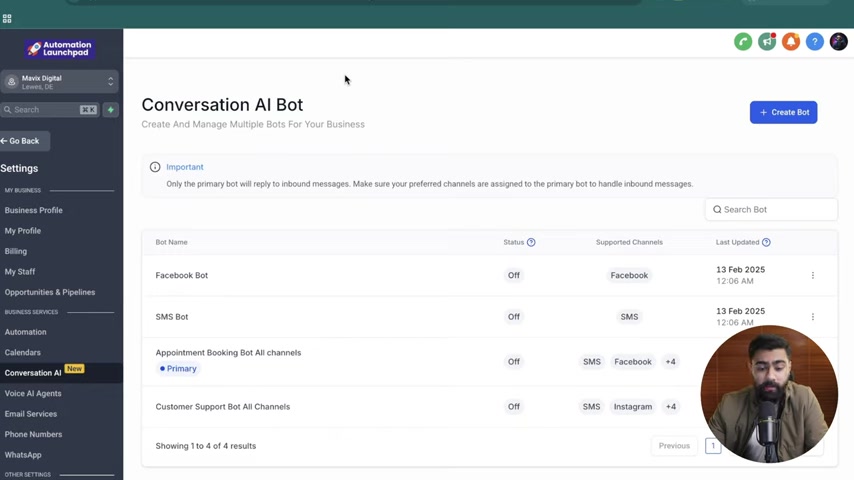
This allows businesses to tailor the bot experience to the specific platform being used, ensuring that customers receive the most relevant and engaging interactions.
For example, a business might have a dedicated Facebook bot designed to handle inquiries received through Facebook Messenger. This bot could be trained to provide information about the business's Facebook page, answer questions about promotions and events, and even assist with Customer Service issues. Similarly, the business might have a separate SMS bot designed to handle inquiries received through text messages. This bot could be used to provide quick updates, send reminders, and even collect feedback from customers.
To implement this scenario, users can create separate triggers for each communication channel. For instance, one trigger could be set to activate when a customer sends a message through Facebook Messenger, while another trigger could be set to activate when a customer sends a text message. Each trigger would then activate the 'Update Conversation AI Bot and Status' action, assigning the appropriate bot to the contact. This ensures that customers always interact with the bot that is best suited to handle their specific inquiry, improving the overall customer experience.
In addition to assigning bots based on channel type, businesses can also use this approach to customize the bot's behavior. For example, the Facebook bot could be configured to use a more casual and conversational tone, while the SMS bot could be configured to use a more formal and concise tone. This level of customization allows businesses to create a more engaging and personalized experience for their customers, leading to increased satisfaction and loyalty.
This scenario is particularly useful for businesses with a diverse customer base, as it allows them to cater to the preferences of different customer segments. By tailoring the bot experience to the specific channel being used, businesses can ensure that customers receive the most relevant and engaging interactions, regardless of how they choose to communicate. The ability to provide a consistent and personalized experience across multiple channels is a key differentiator in today's competitive market.
To implement channel-specific bots, consider the following steps:
- Create Dedicated Bots: Design specific Conversational AI bots for each channel you want to support (e.g., Facebook, SMS, Instagram).
- Configure Channel Settings: Assign each bot to its corresponding communication channel in GoHighLevel.
- Set Up Workflow Triggers: Create triggers for each channel to initiate the workflow.
- Use 'Update Conversation AI Bot and Status': Employ this workflow action to assign the appropriate bot based on the incoming channel.
Adjusting Bot Status Based on Different Goals
Another valuable application of the 'Update Conversation AI Bot and Status' action is to adjust bot status based on different goals or objectives.

This allows businesses to dynamically activate or deactivate bots based on specific events or conditions, ensuring that the most appropriate bot is always available to handle customer inquiries.
For example, a business might have one bot trained to handle initial customer inquiries and another bot trained to handle appointment booking. Once a customer has expressed interest in booking an appointment, the business could use the 'Update Conversation AI Bot and Status' action to deactivate the initial inquiry bot and activate the appointment booking bot. This ensures that the customer is seamlessly transitioned to the bot that is best suited to handle their specific need, improving the efficiency and effectiveness of their communication.
Similarly, a business might want to deactivate a bot once a customer has completed a specific task or reached a certain stage in the sales process. For example, once a customer has booked an appointment, the business could use the 'Update Conversation AI Bot and Status' action to deactivate the appointment booking bot, preventing it from interfering with other customer interactions. This ensures that the customer receives a clean and focused experience, free from unnecessary distractions.
To implement goal-based bot status adjustments, consider the following steps:
- Identify Key Goals: Determine specific objectives for your Conversational AI bots (e.g., lead qualification, appointment Scheduling).
- Create Relevant Bots: Design Conversational AI bots trained to achieve each goal.
- Set Up Triggers: Define workflow triggers that correspond to the achievement of each goal (e.g., tag added).
- Use 'Update Conversation AI Bot and Status': Employ this workflow action to activate the corresponding bot when a goal-related trigger occurs.
Step-by-Step Guide to Using the 'Update Conversation AI Bot and Status' Action
Accessing the Workflow Builder
- Navigate to Automation: In your GoHighLevel account, find and click on the 'Automation' tab.
- Create a New Workflow: Click on 'Create Workflow' and choose to start from scratch to build a custom workflow.
Setting Up Triggers
- Add a New Trigger: Click on 'Add New Trigger' to define the event that will initiate the workflow.
- Choose a Trigger Event: Select an appropriate trigger event, such as 'Customer Replied' or 'Contact Tag'.
Configure the trigger settings based on the selected event. For example, for 'Customer Replied,' specify the channel (SMS, Facebook Messenger, etc.).
- Name Your Trigger: Give your trigger a descriptive name to easily identify it later.
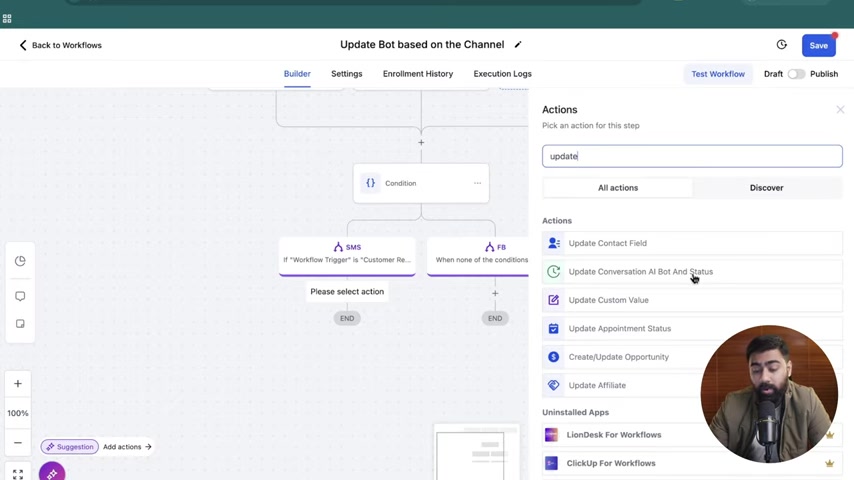
Adding the 'Update Conversation AI Bot and Status' Action
- Add an Action: Click on the '+' icon in the workflow builder to add a new action.
- Search for the Action: Type 'Update Conversation AI Bot and Status' in the search bar and select the action.
- Configure the Action:
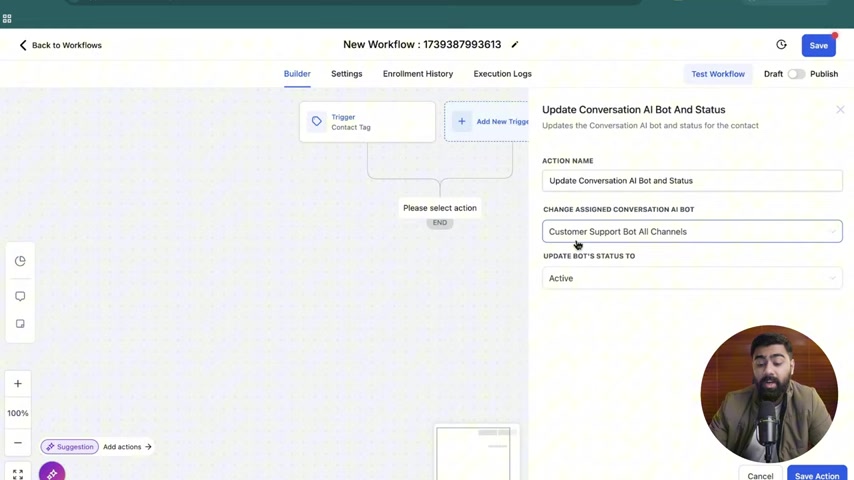
Choose whether to 'Keep Same' bot or select a specific bot from the dropdown menu.Set the bot's status to 'Active' or 'Inactive' based on your requirements.You can also configure options for reactivating the bot after a specified time if needed.
- Name Your Action: Give your action a descriptive name for easy identification.
Testing and Publishing
- Test Your Workflow: Use the 'Test Workflow' option to ensure that the workflow functions as expected.
- Troubleshoot and Adjust: Make any necessary adjustments based on the test results.
- Publish Your Workflow: Once you are satisfied with the results, click 'Save' and then 'Publish' to activate the workflow.








Most people like































Report
Please select a reason for reporting
- 13 Reasons to Switch from Snapchat to Text Messaging
- 7 Powerful Speech to Text Apps to Boost Productivity
- 10 Best Speech to Text Tools for Effortless Transcription
- 13 Free Tools to Easily Transcribe Audio to Text
- 15 Surprising Ways Google's Speech-to-Text Boosts Productivity
- 7 Best Free Online Audio to Text Transcription Tools
- 9 Tips to Transcribe Speech to Text Faster and Better
- 13 Best Speech to Text Software for Windows 10 in 2023
- 7 Tips for Choosing the Best Transcriber for Audio to Text
- 11 Reasons Why Dragon Speech-to-Text Apps are Game-Changers
- 6 Secrets to Enhance Your Speech to Text Transcription
- 6 Brilliant Ways to Boost Productivity with Talk-to-Text on Your MacBook
- 6 Ways Transcription Software Converts Audio to Text
- 8 Tips to Transcribe Speech to Text Like a Pro
- 6 Reasons IBM Watson Speech to Text is a Game-Changer
- 14 Powerful Ways Talk-to-Text Improves Your Workflow
- 12 Top Windows Speech-to-Text Software for Efficient Transcription
- 12 Game-Changing Benefits of Apple's Speech to Text Technology
- 9 Powerful Use Cases for AWS Speech to Text Technology
- 10 Easy Steps to Transcribe YouTube Videos to Text
- transcription audio en texte
- online audio transcription
- free audio file transcription
- free ai audio transcription
- audio transcription service
- audio transcription online free
- audio transcription free online
- audio to transcription software
- audio and transcript
- ai audio transcription free
- voice recording to text converter
- translate voice recording to text
- record voice to text
- audio recording to text converter
- voice recording and transcription
- chatgpt voice to text
- gmail voice to text
- speech to text reader
- speech to text ai free
- speech to talk
- How SEO and Marketing Dashboards Empower Agencies to Drive Results
- How to Use AI Tools to Find Internal Linking Opportunities Across a Business Website
- Discover Your Perfect Haircut with AI Hairstyle Apps
- Free Reputation Calculator Tools: How They're Adapting to Score AI Visibility, Not Just Rankings
- Design Professional Flyers for Free on Your Phone
- Best Free Flyer Maker Apps for Android: Design Like a Pro
- How to Know If Your Business Is Ready for an AI Customer Service Agent
- Revolutionizing Storytelling: From Novels to Screenplays with AI
- Create Engaging Animated Explainer Videos with a Free AI Tool
- Stop Multi-Subscribing: Benchmark Top AI Visual Models in One Canvas
- ASOMobile Helps Teams Benchmark App Store Screenshots Against Competitors
- How to Match LMS Software With Your Organization's Training Plan
- Revolutionizing Email Marketing Agency with AI
- How to Convert BTC to HNT
- Unleashing the Power of AI: Cognizant's Roadmap for Transformation
- Frame to Video Review: A Practical Look at Turning Two Still Frames Into Motion
- NVIDIA NIM: Revolutionizing Supply Chain Data Analysis with AI
- Top AI Tools That Help Brands Stand Out Offline (Not Just Online)
- Top 5 Cold Email Software: Maximize Your Outreach in 2025
- Magic School AI: Revolutionizing Quiz & Assessment Generation

Copyright ©2026 toolify