































Table of Contents
- Key Points
- Understanding Parler-TTS: A Powerful Text-to-Speech System
- Getting Started with Parler-TTS: A Practical Guide
- How to Use Parler-TTS: Step-by-Step Guide
- Pricing of the Parler-TTS
- Parler-TTS: Pros and Cons
- What are the Core Features of the Parler-TTS
- Use Cases for the Parler-TTS
- Frequently Asked Questions about Parler-TTS
- Related Questions About Open Source Voice to Text Generators


Understanding Parler-TTS: A Powerful Text-to-Speech System
What is Parler-TTS?
Parler-TTS is an open-source text-to-speech (TTS) system designed to provide developers with granular control over various aspects of voice generation. Unlike many other TTS systems, Parler-TTS offers amazing flexibility and customization options, making it a compelling choice for projects requiring specific voice characteristics. While it might not have gained widespread traction, the system is among the more robust and powerful TTS solutions available to developers. Parler-TTS, developed by Hugging Face, offers different voice and attribute controls. This Text-to-Speech system did not gain enough traction but it's flexible. The flexibility is one of the best attributes of this system. Because the system has an apache 2.0 license, it is free to do whatever you want with this code.
The Core Philosophy: Flexibility and Control
The core philosophy behind Parler-TTS revolves around providing developers with an amazing level of flexibility and control over the generated voice.

This is achieved through a combination of several design choices, but one aspect that sets it apart is the use of a description or Prompt. The main characteristics of this system revolve around how flexible it is as it gives the user control of different voices and their attributes. With Parler-TTS, developers can adjust settings such as:
- Gender: Define the gender of the generated voice.
- Pitch: Adjust the pitch to create a higher or lower tone.
-
Speaking style: Control the speaking style to convey a certain emotion or persona.
By combining these elements, developers can craft audio that aligns perfectly with their project's specific requirements.
Open Source Advantages and Licensing
Parler-TTS distinguishes itself from other TTS models by being fully open source. All of the datasets, pre-processing tools, training code, and weights are available publicly under a permissive license. This allows developers to use the system freely, modify it, and build upon it for their specific needs without the restrictions often associated with proprietary software.
The model is released under the Apache 2.0 license. A 2.0 license means that you can do anything you want with this system. You can train the model or fine-tune the model using the training guide. The open nature of Parler-TTS fosters collaboration and innovation within the AI community, enabling developers to contribute to its improvement and create more powerful TTS models. It is important to give credit where credit is due and that the paper is not from Hugging Face, but the model is from Hugging Face.
Getting Started with Parler-TTS: A Practical Guide
Setting up Parler-TTS on Kaggle

To get started with Parler-TTS, developers can use platforms like Kaggle or Google Colab, which offer access to computational resources and a user-friendly environment for running code. Here's a step-by-step guide on how to set up Parler-TTS on Kaggle:
- Enable GPU acceleration: Within the Kaggle notebook, enable GPU acceleration to improve the performance of the TTS model.
- Select Python Language: Make sure that the notebook is set to the Python language.
- Enable Internet Access: Enable internet access so that the notebook can install the necessary libraries.
By following these steps, you will be able to have your Kaggle collab setup to start using the Parler-TTS system.
Installing the Required Libraries
To run Parler-TTS, you'll need to install certain libraries. The most important ones are:
parler_tts: Contains core functionality for Parler-TTS.transformers: Provides pre-trained models and tools for natural language processing.soundfile: Helps to process audio files.
All of these libraries come from GitHub so there is no need to run pip install for all the libraries. To install these, use the following command in your notebook, like in the video pip install git+https://github.com/huggingface/parler-tts.git transformers soundfile -q. These are lightweight dependencies so they can be installed in one line.
Code Implementation
The implementation code to run this powerful voice to text generator system can be broken down to the following:
- Import Necessary Modules: Start by importing the necessary modules, including torch, ParlerTTSforConditionalGeneration, AutoTokenizer, and soundfile.
- Device Selection: The code then determines whether to use GPU (CUDA) or CPU based on availability. If CUDA is available, the device is set to CUDA; otherwise, it uses the CPU.
- Model Loading: The ParlerTTSforConditionalGeneration model is loaded from pre-trained weights. This model requires a description and tokenizer for use. Input and prompt IDs are tokenized.
- Audio Generation: The generation, audio array, and generation CPU functions all work together to give the final audio output.
- Wave File Generation: Finally, a file is created using the configuration and sampling rate information.
How to Use Parler-TTS: Step-by-Step Guide
Generating Spoken Audio Step-by-step
These steps will give a spoken audio output:
-
First start by downloading the pre-trained weights.
To do this add the following code
model = ParlerTTSforConditionalGeneration.from_pretrained('parler-tts/parler-tts-mini-v1').to(device) tokenizer = AutoTokenizer.from_pretrained('parler-tts/parler-tts-mini-v1').to(device) -
Next, configure the prompt and description code. To do this add the following code
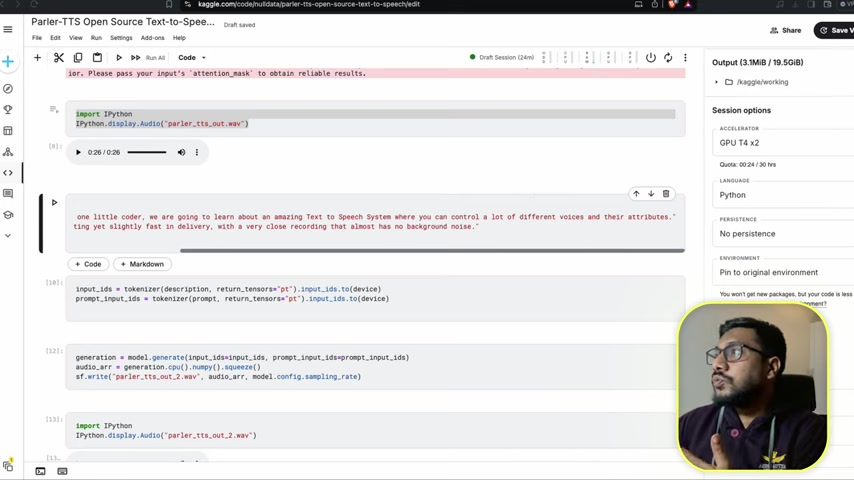
prompt = “Hey everyone, Welcome to one little coder, we are going to learn about an amazing text to speech System where you can control a lot of different voices and their attributes. John’s voice is exciting yet slightly fast in delivery, with a very close Recording that almost has no background noise.” description = “John’s voice is exciting yet slightly fast in delivery, with a very close recording that almost has no background noise.” -
Tokenize the input IDs . You must tokenize the input so that it can be understood and generated from the model. Add the following code:
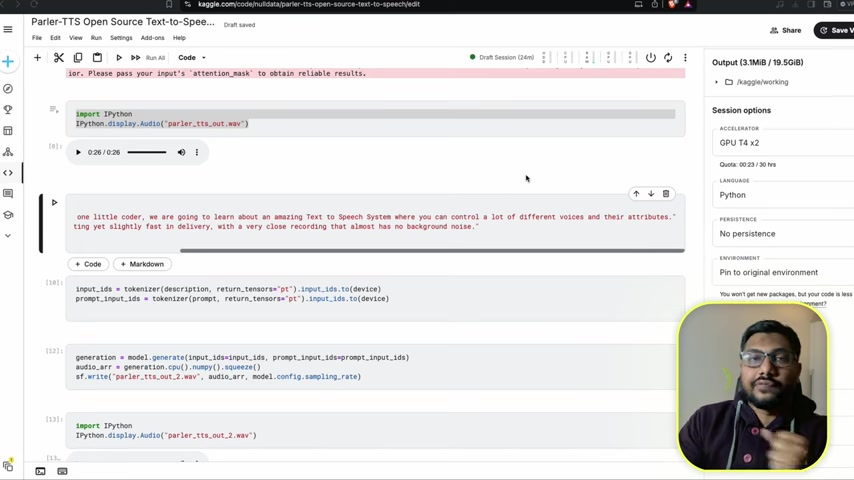
input_ids = tokenizer(description, return_tensors=”pt”).input_ids.to(device) prompt_input_ids = tokenizer(prompt, return_tensors=”pt”).input_ids.to(device) -
Generate the audio and squeeze out any unwanted noise . To do this add the following code:
generation = model.generate(input_ids=input_ids, prompt_input_ids=prompt_input_ids) audio_arr = generation.cpu().numpy().squeeze() -
Create the wave file . To do this add the following code:
sf.write(‘parler_tts_out.wav’, audio_arr, model.config.sampling_rate)With these simple coding steps, you can create high quality audio.





Most people like

































Report
Please select a reason for reporting
- 13 Reasons to Switch from Snapchat to Text Messaging
- 7 Powerful Speech to Text Apps to Boost Productivity
- 10 Best Speech to Text Tools for Effortless Transcription
- 13 Free Tools to Easily Transcribe Audio to Text
- 15 Surprising Ways Google's Speech-to-Text Boosts Productivity
- 7 Best Free Online Audio to Text Transcription Tools
- 9 Tips to Transcribe Speech to Text Faster and Better
- 13 Best Speech to Text Software for Windows 10 in 2023
- 7 Tips for Choosing the Best Transcriber for Audio to Text
- 11 Reasons Why Dragon Speech-to-Text Apps are Game-Changers
- 6 Secrets to Enhance Your Speech to Text Transcription
- 6 Brilliant Ways to Boost Productivity with Talk-to-Text on Your MacBook
- 6 Ways Transcription Software Converts Audio to Text
- 8 Tips to Transcribe Speech to Text Like a Pro
- 6 Reasons IBM Watson Speech to Text is a Game-Changer
- 14 Powerful Ways Talk-to-Text Improves Your Workflow
- 12 Top Windows Speech-to-Text Software for Efficient Transcription
- 12 Game-Changing Benefits of Apple's Speech to Text Technology
- 9 Powerful Use Cases for AWS Speech to Text Technology
- 10 Easy Steps to Transcribe YouTube Videos to Text
- transcription audio en texte
- online audio transcription
- free audio file transcription
- free ai audio transcription
- audio transcription service
- audio transcription online free
- audio transcription free online
- audio to transcription software
- audio and transcript
- ai audio transcription free
- voice recording to text converter
- translate voice recording to text
- record voice to text
- audio recording to text converter
- voice recording and transcription
- chatgpt voice to text
- gmail voice to text
- speech to text reader
- speech to text ai free
- speech to talk
- How to Use AI Tools to Find Internal Linking Opportunities Across a Business Website
- Discover Your Perfect Haircut with AI Hairstyle Apps
- Free Reputation Calculator Tools: How They're Adapting to Score AI Visibility, Not Just Rankings
- Design Professional Flyers for Free on Your Phone
- Best Free Flyer Maker Apps for Android: Design Like a Pro
- How to Know If Your Business Is Ready for an AI Customer Service Agent
- Revolutionizing Storytelling: From Novels to Screenplays with AI
- Create Engaging Animated Explainer Videos with a Free AI Tool
- Stop Multi-Subscribing: Benchmark Top AI Visual Models in One Canvas
- Best Seedance 2.5 API Provider: Every Price on the Market, Checked at Source
- Top AI Social Media Management Tools: Automate Your Content Strategy
- Free AI Text to Video Generator: Create Stunning Videos from Text
- Discover 17 ChatGPT Alternatives: A Comprehensive Comparison
- Character.AI vs. Janitor AI: Which AI Chat Platform Reigns Supreme?
- Top Virtual Assistant Companies in 2026: Reviews, Pricing, and Plans Compared
- Unveiling FaceCheck.ID: Revolutionizing Reverse Image Searches with AI
- 11 Best AI Dialers in 2026: Features, Pricing, Pros and Cons
- How I Direct Consistent AI Clips: A Hands-On Guide to Multi-Model Generation
- A Realistic Review of the Photo Generator Image Tool
- Playwright MCP Server: Automated Web Testing with Agent Mode

Copyright ©2026 toolify