































Table of Contents
- Key Points
- Delving Into Stable Diffusion's Core Principles
- Maximizing Stable Diffusion's Potential: Tips and Tricks
- Step-by-Step: Generating Images with Stable Diffusion
- Pricing Considerations
- Stable Diffusion: Pros and Cons
- Frequently Asked Questions
- Dive Deeper: Related Questions Answered


Delving Into Stable Diffusion's Core Principles
Text to Image Explained
At its core, Stable Diffusion bridges the gap between the linguistic and visual worlds. It accepts textual descriptions as input and transforms them into realistic or stylized images. This process involves several key steps, which we'll explore in detail. It’s essential to understand that this text-to-image generation is not a simple copy-paste operation. The AI uses its extensive training to interpret the Prompt and construct a Novel image that matches the description.
This interpretation and creation process is what makes Stable Diffusion so powerful.
One way to understand it is to think of Stable Diffusion as an artist that has been trained on countless artworks. When you give it a prompt, like "a serene landscape with snow-capped mountains", it knows how to combine elements of landscapes, mountains, snow, and serenity to create a new picture in its own style.
The Role of the Text Encoder
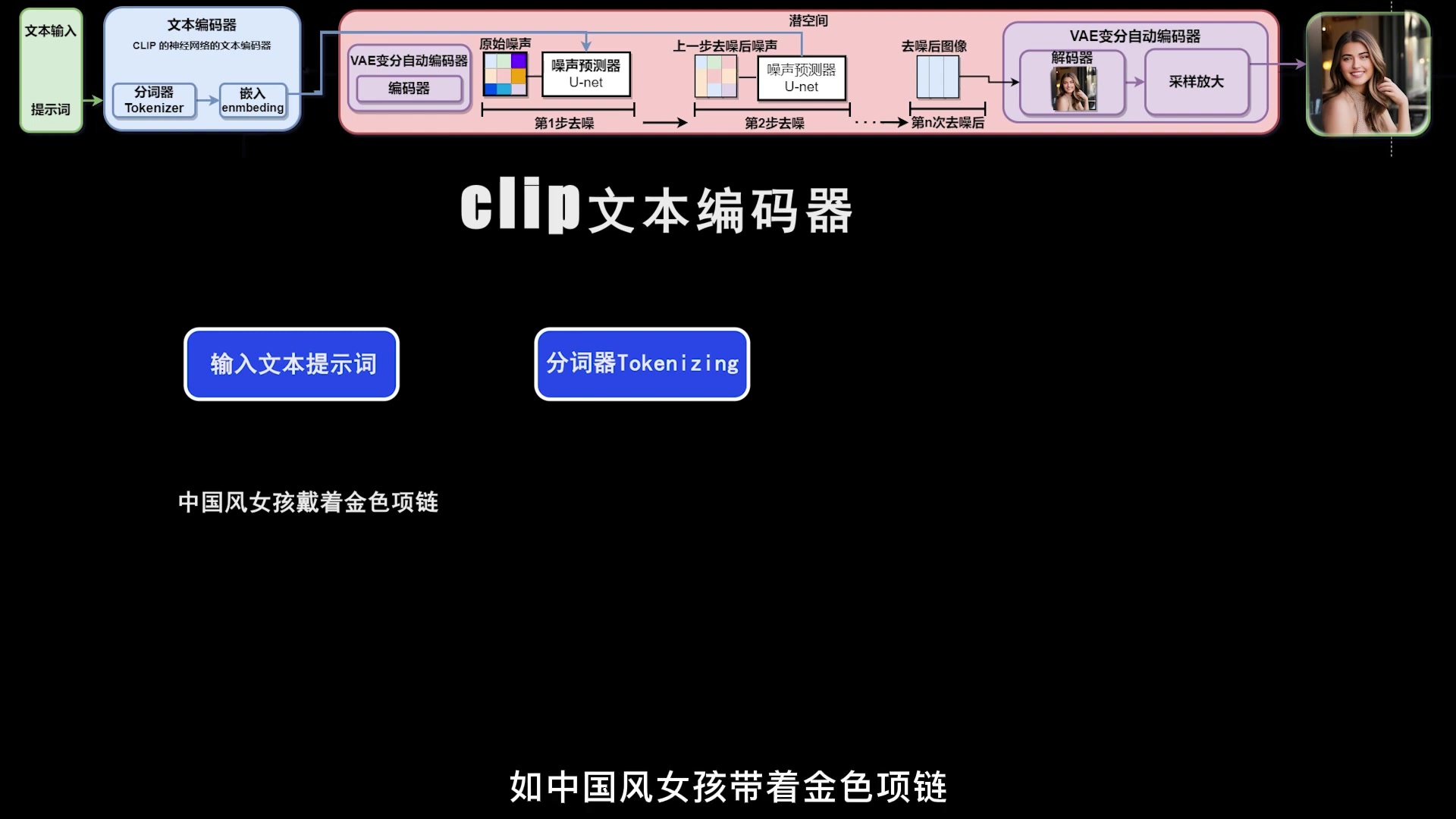
The first critical step in Stable Diffusion is encoding the input text. This task falls to the text encoder, often a model like CLIP (Contrastive Language-Image Pre-training). The text encoder translates human language into a numerical representation that the AI can understand.
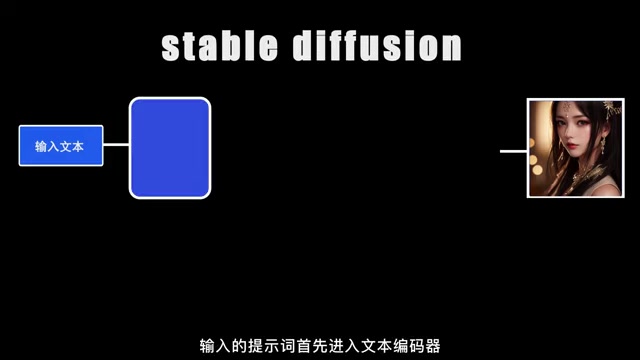
Imagine that you are translating english text into numbers that the AI can use to generate the best images based on that prompt.
CLIP excels at understanding the relationships between images and text. It's been trained on a massive dataset of images with corresponding text captions. Because of its data training, it’s capable of recognizing which words are most relevant to specific visual elements. For example, the WORD "ocean" will have a strong association with images of water, waves, and coastlines. The result of this encoding is a set of numerical vectors that capture the essence of the text prompt. These vectors are then passed on to the next stage of the image generation process.
To break down the process more, imagine you input a prompt like "A Chinese woman wearing a golden necklace”. The text encoder does the following:
- Tokenization: Breaks the sentence down into individual tokens. These tokens are then mapped to numerical IDs.
- Embedding: Transforms each token ID into a high-dimensional vector, that contains semantic meanings. This is called text embeddings.
- Contextualization: Takes the order of the words to provide additional context, and adjust the meanings of text embeddings, to ensure that the AI sees the tokens "Chinese” and “Woman” and uses that relationship when constructing the image.
Navigating the Latent Space
The concept of a latent space is critical to the efficiency of Stable Diffusion. It's a compressed representation of image data. Instead of working directly with high-resolution images (like 512x512 or greater), the AI operates within this lower-dimensional space.
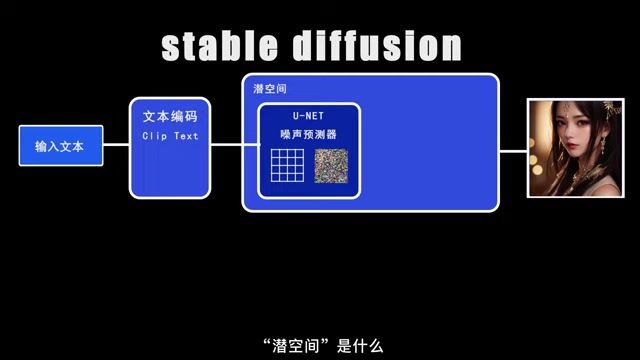
By compressing the data we reduce the strain on our CPU, and therefore improve the image output process.
Consider an example, that, in computer vision, a 512x512 pixel image is a set of 786,432 individual values (512 512 3, for the red, green, and blue color channels). Directly processing data in this format requires a lot of processing power. So instead it condenses the image into a smaller representation, and performs the refining process in the lower dimension.
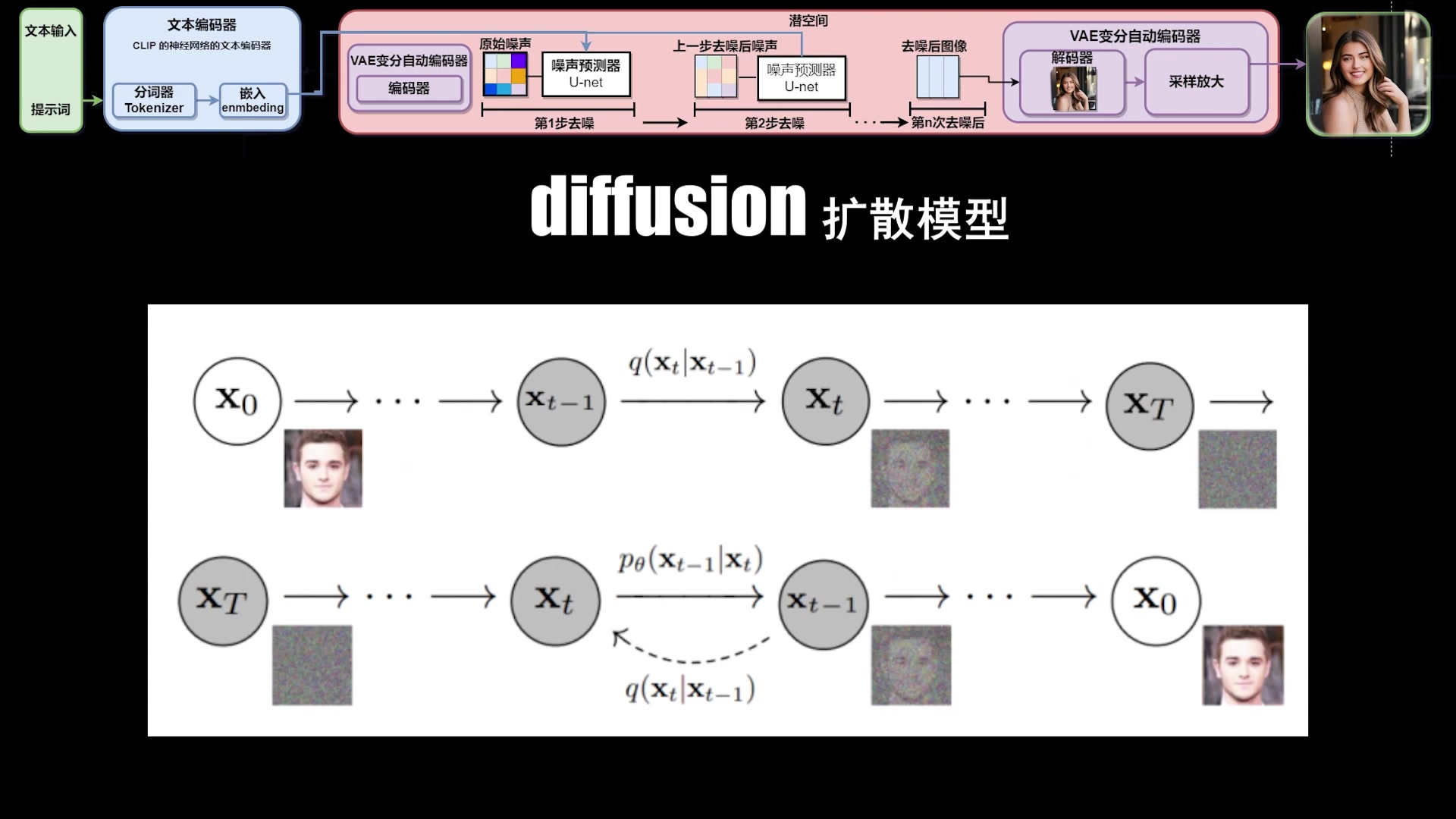
It then uses this latent space and goes through a process called diffusion and reverse diffusion.
- Diffusion: Adding random noise to the compressed version of an image over multiple steps. This process gradually destroys the details until the original image becomes unidentifiable.
- Reverse Diffusion: is where the magic happens. The AI learns to reverse the diffusion process, it starts with pure noise, and gradually removes the noise to reveal an image.
This ability to reverse the diffusion process allows the AI to generate new images that are related to the original training data but are not exact copies.
The UNet Architecture and Noise Prediction
Within the latent space, Stable Diffusion uses a U-Net architecture to predict and remove noise. U-Net is a type of neural network particularly well-suited for Image Segmentation tasks. In Stable Diffusion, it iteratively refines the image by estimating the noise present and subtracting it.
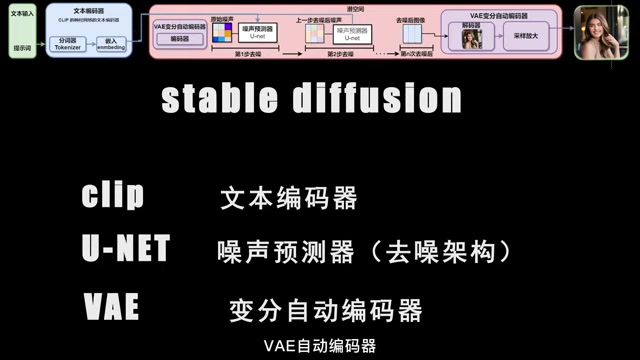
The U-Net model is trained to take in these text embeddings and “noisy” versions of images, to predict the added noise. By removing the predicted noise at each step, we slowly start to see the original images starting to reappear.
The reverse diffusion process guided by the text embedding that was created by the text encoder, the AI can generate an image that is semantically aligned with the prompt given.
VAE (Variational Autoencoder): From Latent Space to Visible Image
Once the U-Net has refined the image within the latent space, the Variational Autoencoder (VAE) comes into play. This component consists of two parts:
- Encoder: Compresses the image from the pixel space into the latent space.
-
Decoder: Transforms the image data in the latent space back into the pixel space to reconstruct a visually interpretable image.
The VAE decoder takes the refined latent representation produced by the U-Net and expands it back into a full-resolution image.
This step is crucial for producing the final output that we can see and appreciate. Without the VAE, we would only have a compressed, abstract representation of the image. The VAE’s decoder makes all the previous efforts visually rewarding.
CLIP: Bridging Text and Image
CLIP(Contrastive Language-Image Pre-Training) facilitates a powerful connection between text and images.
In order for AI to generate high quality images, it requires an understanding of how text descriptions relate to corresponding images.
CLIP trains the AI to recognize the underlying concepts in image data. It has a deep understanding of the relationship between words and visual content that allows it to generate images based off a text prompt.
To visualize what that looks like imagine the follow:
- You want a photo of “cat”
- CLIP will take all of that training data and link all the photos that contain “cat” and generate something for you.
- Then if you add additional context it will adjust the data to ensure that the generated result is correct.
By adding this text-to-image correlation, Stable Diffusion can generate images from textual prompts.
Diffusion Models Demystified
At the heart of Stable Diffusion lies the diffusion model, composed of two key components: a forward diffusion process and a reverse diffusion process. These two work to generate high quality AI images from text, as well as create realistic images.
Forward Diffusion entails gradually introducing noise to an image until it becomes pure noise. This might seem counterintuitive, but it is essential to understanding how to reverse the diffusion process.
Reverse Diffusion involves “reversing” the forward diffusion process, this process starts with pure noise and gradually removes this noise to reveal the image. To remove the noise it relies on all of the previous training data to slowly predict and take out data until the image begins to appear.
In other words, diffusion models can be seen as a procedure to deconstruct and reconstruct images, where they are deconstructed in the diffusion, and rebuilt using training data.








Most people like
































Report
Please select a reason for reporting
- 13 Reasons to Switch from Snapchat to Text Messaging
- 7 Powerful Speech to Text Apps to Boost Productivity
- 10 Best Speech to Text Tools for Effortless Transcription
- 13 Free Tools to Easily Transcribe Audio to Text
- 15 Surprising Ways Google's Speech-to-Text Boosts Productivity
- 7 Best Free Online Audio to Text Transcription Tools
- 9 Tips to Transcribe Speech to Text Faster and Better
- 13 Best Speech to Text Software for Windows 10 in 2023
- 7 Tips for Choosing the Best Transcriber for Audio to Text
- 11 Reasons Why Dragon Speech-to-Text Apps are Game-Changers
- 6 Secrets to Enhance Your Speech to Text Transcription
- 6 Brilliant Ways to Boost Productivity with Talk-to-Text on Your MacBook
- 6 Ways Transcription Software Converts Audio to Text
- 8 Tips to Transcribe Speech to Text Like a Pro
- 6 Reasons IBM Watson Speech to Text is a Game-Changer
- 14 Powerful Ways Talk-to-Text Improves Your Workflow
- 12 Top Windows Speech-to-Text Software for Efficient Transcription
- 12 Game-Changing Benefits of Apple's Speech to Text Technology
- 9 Powerful Use Cases for AWS Speech to Text Technology
- 10 Easy Steps to Transcribe YouTube Videos to Text
- transcription audio en texte
- online audio transcription
- free audio file transcription
- free ai audio transcription
- audio transcription service
- audio transcription online free
- audio transcription free online
- audio to transcription software
- audio and transcript
- ai audio transcription free
- voice recording to text converter
- translate voice recording to text
- record voice to text
- audio recording to text converter
- voice recording and transcription
- chatgpt voice to text
- gmail voice to text
- speech to text reader
- speech to text ai free
- speech to talk
- How to Use AI Tools to Find Internal Linking Opportunities Across a Business Website
- Discover Your Perfect Haircut with AI Hairstyle Apps
- Free Reputation Calculator Tools: How They're Adapting to Score AI Visibility, Not Just Rankings
- Design Professional Flyers for Free on Your Phone
- Best Free Flyer Maker Apps for Android: Design Like a Pro
- How to Know If Your Business Is Ready for an AI Customer Service Agent
- Revolutionizing Storytelling: From Novels to Screenplays with AI
- Create Engaging Animated Explainer Videos with a Free AI Tool
- Stop Multi-Subscribing: Benchmark Top AI Visual Models in One Canvas
- Best Seedance 2.5 API Provider: Every Price on the Market, Checked at Source
- Top AI Social Media Management Tools: Automate Your Content Strategy
- Free AI Text to Video Generator: Create Stunning Videos from Text
- Discover 17 ChatGPT Alternatives: A Comprehensive Comparison
- Character.AI vs. Janitor AI: Which AI Chat Platform Reigns Supreme?
- Top Virtual Assistant Companies in 2026: Reviews, Pricing, and Plans Compared
- Unveiling FaceCheck.ID: Revolutionizing Reverse Image Searches with AI
- 11 Best AI Dialers in 2026: Features, Pricing, Pros and Cons
- How I Direct Consistent AI Clips: A Hands-On Guide to Multi-Model Generation
- A Realistic Review of the Photo Generator Image Tool
- Playwright MCP Server: Automated Web Testing with Agent Mode

Copyright ©2026 toolify