































Table of Contents
- Key Points
- The Evolution of AI in Voiceflow
- Voiceflow's Prompt Library
- Migrating to the New AI Features: A Step-by-Step Guide
- Voiceflow Pricing
- Pros and Cons of Voiceflow's AI Integration
- Voiceflow's Core Features: AI-Powered Conversational Design
- Use Cases for Voiceflow's Enhanced AI Capabilities
- Frequently Asked Questions
- Related Questions


The Evolution of AI in Voiceflow
Moving Beyond Isolated AI Steps
Voiceflow has fundamentally changed how AI is integrated into its platform.

Instead of treating AI as a separate component with designated 'AI Steps,' the company has opted for a fully integrated approach where AI capabilities are woven into the very fabric of the design environment. This means that AI is no longer an isolated task but rather a readily accessible tool that empowers designers to build more sophisticated and context-aware conversational agents. This marks a shift from a step-based process to an environment where AI is an inherent part of the design process. This approach addresses the feedback Voiceflow received regarding the limitations of the original AI Steps. Users wanted more control over prompts, easier ways to test them, and a more seamless way to share them. They also wanted to integrate prompts natively with other steps, like the Logic step. Now, with the AI natively throughout Voiceflow, all that’s possible. Voiceflow is really leveling up the playing field in the conversational AI space, empowering designers with native AI integrations and powerful prompt management tools. The move towards native AI embedding directly addresses the limitations of the previous step-based approach, offering a more fluid and intuitive design experience. With this transition, Voiceflow is setting a new standard for how AI should be integrated into conversational AI platforms.
Introducing the Prompt CMS: A Central Hub for AI Prompts
At the heart of this AI revolution lies the Prompt CMS, a dedicated environment for crafting, testing, and managing AI prompts.

This new hub provides a centralized location for designers to iterate on their prompts, ensuring consistency and reusability across different agents and projects. The Prompt CMS streamlines the AI design process by providing a robust set of tools for prompt engineering. This central hub empowers designers to create, test, and manage prompts effectively, leading to more sophisticated and accurate AI-driven interactions. This ensures that designers can iterate effectively, maintain consistency, and leverage prompts across multiple projects. Designers gain access to tools such as conversation pair testing, message history injection, and latency checking, allowing them to fine-tune prompts for optimal performance and user experience. The Prompt CMS serves as a Knowledge Base, promoting knowledge sharing and collaboration among designers. The new Prompt CMS also offers enhanced testing features, including the ability to add conversation pairs to simulate interactions and inject message history at any point. This allows designers to create more realistic testing scenarios, enabling them to fine-tune their prompts for optimal performance. This approach also allows for latency checking, to keep the experience seamless.
The Sunset of AI Steps: What You Need to Know
As part of this transition, Voiceflow is phasing out the 'Set AI' and 'Response AI' steps. These legacy steps will officially stop working on June 3rd, 2025. While this change might require some adjustments, the new AI-native design and Prompt CMS offer a far more powerful and flexible approach to AI integration. Migration is key to ensure continued functionality and access to the latest features and improvements. Designers are encouraged to migrate their existing projects to take full advantage of the enhanced AI capabilities and avoid any disruption to their agents' performance. Voiceflow has introduced new tools that make migration straightforward. For designers familiar with 'Set AI' and 'Response AI' steps, there might be a slight learning curve adapting to the new workflow. However, the investment in learning the new system will be well worth it, as the AI native design and Prompt CMS provide a far more powerful and flexible approach to AI integration. Voiceflow ensures a smooth transition by providing comprehensive documentation, tutorials, and support to assist users during the migration process.
Migrating to the New AI Features: A Step-by-Step Guide
Replacing 'Response AI' with the 'Prompt' Step
If you've been using the 'Response AI' step, the 'Prompt' step will now be your go-to for generating AI-driven responses.

The Prompt step gives you much more granular control over your agent's replies, allows you to customize prompt instructions, and integrates seamlessly with the Knowledge Base. In the workflow, you can add a Prompt step. Now, in the prompt step you can select an existing prompt or create a new prompt. You can design a prompt, test it, and check latency. You can add conversation pairs and inject message history at a certain point. This ensures a more robust, tested, and integrated AI Tool. The Prompt CMS is the place where you can do all of this. Now, instead of simply typing something and hoping it works, you can craft precisely worded messages, simulate full conversation pairs, and inject conversation history as desired.
Leveraging the Knowledge Base with Enhanced Prompt Control
The Knowledge Base remains a powerful asset, but with the new AI integrations, you now have greater control over how your agent uses it.
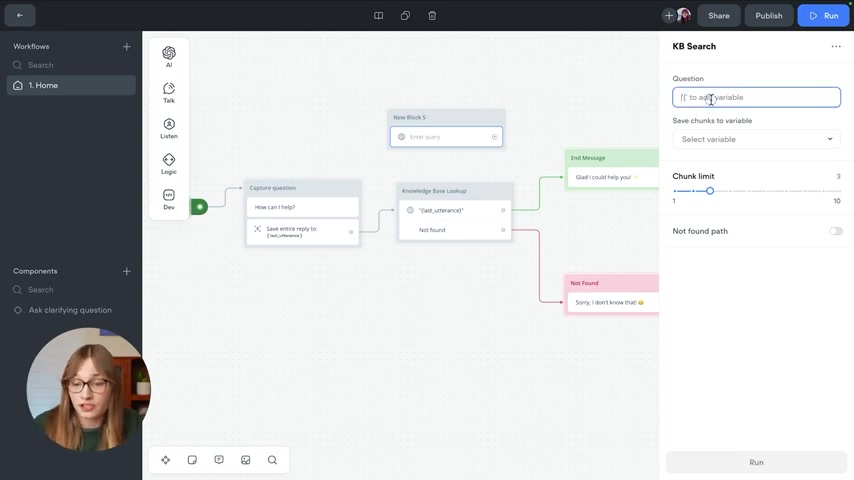
You can inject the last utterance or other variables into your question to give it a frame of reference. Rather than relying on the older Response AI step for Knowledge Base lookups, Voiceflow now encourages using the new KB search under the Develop Section. Instead of the AI Model / Knowledge Base selection previously available, Voiceflow now is using a KB Search Tool under the Develop menu. This KB search tool is to be used with the Prompt CMS, offering even more creative power. This will get your question just like previously. After the question is answered, you'll have a variable that contains the KB results, which are now in chunks. You are then encouraged to use the Prompt step, the step hidden under the Talk menu, which is so incredibly powerful. Now you can either select an existing prompt, or build an entirely new prompt. The system provides some instructions at the top of the prompt to guide you. You are really empowering the user to get more from their knowledge base.
Replacing 'Set AI' with the Versatile 'Set' Step
The 'Set AI' step is being replaced by the 'Set' step, a tool you're likely already familiar with. Now, whatever it is you are trying to set, you can use the set step. Variables can be set using everything that you have always done, but now you can also use a prompt to set a variable. And that’s pretty cool, too. With a prompt selected, you can apply the output to a variable, even creating an entirely new variable as you see fit. This enables you to use this exact same pattern with the condition step. This lets you run a prompt, detect what’s coming out of it, and do an action based on that.








Most people like































Report
Please select a reason for reporting
- 13 Reasons to Switch from Snapchat to Text Messaging
- 7 Powerful Speech to Text Apps to Boost Productivity
- 10 Best Speech to Text Tools for Effortless Transcription
- 13 Free Tools to Easily Transcribe Audio to Text
- 15 Surprising Ways Google's Speech-to-Text Boosts Productivity
- 7 Best Free Online Audio to Text Transcription Tools
- 9 Tips to Transcribe Speech to Text Faster and Better
- 13 Best Speech to Text Software for Windows 10 in 2023
- 7 Tips for Choosing the Best Transcriber for Audio to Text
- 11 Reasons Why Dragon Speech-to-Text Apps are Game-Changers
- 6 Secrets to Enhance Your Speech to Text Transcription
- 6 Brilliant Ways to Boost Productivity with Talk-to-Text on Your MacBook
- 6 Ways Transcription Software Converts Audio to Text
- 8 Tips to Transcribe Speech to Text Like a Pro
- 6 Reasons IBM Watson Speech to Text is a Game-Changer
- 14 Powerful Ways Talk-to-Text Improves Your Workflow
- 12 Top Windows Speech-to-Text Software for Efficient Transcription
- 12 Game-Changing Benefits of Apple's Speech to Text Technology
- 9 Powerful Use Cases for AWS Speech to Text Technology
- 10 Easy Steps to Transcribe YouTube Videos to Text
- transcription audio en texte
- online audio transcription
- free audio file transcription
- free ai audio transcription
- audio transcription service
- audio transcription online free
- audio transcription free online
- audio to transcription software
- audio and transcript
- ai audio transcription free
- voice recording to text converter
- translate voice recording to text
- record voice to text
- audio recording to text converter
- voice recording and transcription
- chatgpt voice to text
- gmail voice to text
- speech to text reader
- speech to text ai free
- speech to talk
- How to Use AI Tools to Find Internal Linking Opportunities Across a Business Website
- Discover Your Perfect Haircut with AI Hairstyle Apps
- Free Reputation Calculator Tools: How They're Adapting to Score AI Visibility, Not Just Rankings
- Design Professional Flyers for Free on Your Phone
- Best Free Flyer Maker Apps for Android: Design Like a Pro
- How to Know If Your Business Is Ready for an AI Customer Service Agent
- Revolutionizing Storytelling: From Novels to Screenplays with AI
- Create Engaging Animated Explainer Videos with a Free AI Tool
- Stop Multi-Subscribing: Benchmark Top AI Visual Models in One Canvas
- Best Seedance 2.5 API Provider: Every Price on the Market, Checked at Source
- Top AI Social Media Management Tools: Automate Your Content Strategy
- Free AI Text to Video Generator: Create Stunning Videos from Text
- Discover 17 ChatGPT Alternatives: A Comprehensive Comparison
- Character.AI vs. Janitor AI: Which AI Chat Platform Reigns Supreme?
- Top Virtual Assistant Companies in 2026: Reviews, Pricing, and Plans Compared
- Unveiling FaceCheck.ID: Revolutionizing Reverse Image Searches with AI
- 11 Best AI Dialers in 2026: Features, Pricing, Pros and Cons
- How I Direct Consistent AI Clips: A Hands-On Guide to Multi-Model Generation
- A Realistic Review of the Photo Generator Image Tool
- Playwright MCP Server: Automated Web Testing with Agent Mode

Copyright ©2026 toolify