































Table of Contents
- Key Points
- Understanding Zero-Shot Text Classification
- Enhancing Zero-Shot Classification
- Practical Steps for Using Zero-Shot Classification
- Pricing for Hugging Face Transformers
- Pros and Cons of Zero-Shot Text Classification
- Key Features of Hugging Face for Zero-Shot Classification
- Practical Use Cases for Zero-Shot Text Classification
- Frequently Asked Questions
- Related Questions


Understanding Zero-Shot Text Classification
What is Zero-Shot Text Classification?
Zero-shot text classification is a method of categorizing text into classes that the model has never seen before during training.
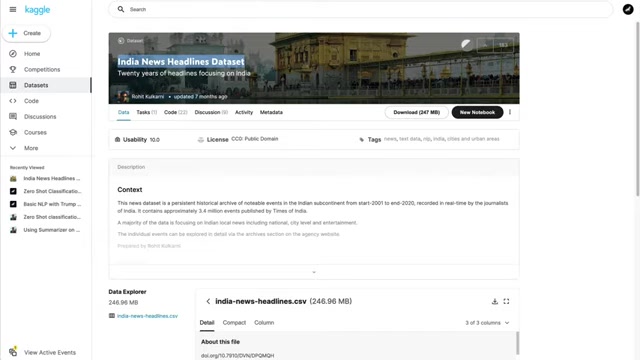
It leverages the power of pre-trained language models, which have learned rich representations of language from vast amounts of text data. These models can generalize to new tasks by understanding the relationships between words and concepts. In essence, it means performing text classification without needing to train a specific model on the data you wish to classify. This opens up exciting possibilities for natural language processing, particularly for tasks where labeled training data is limited or non-existent.
Traditional Text Classification vs. Zero-Shot
Traditional text classification relies heavily on labeled datasets. You'd typically need to gather a large collection of text examples, manually assign categories to each example (such as 'politics', 'Sports', or 'entertainment'), and then train a machine learning model on this labeled data. The model learns to associate specific features in the text with each category, enabling it to classify new, unseen text. This is a supervised learning approach. Zero-shot circumvents this by using models already trained to understand language and relationships, negating manual labeling and task specific model training. The advantages of zero-shot text classification are considerable:
- Reduced Data Labeling: No need to spend time and resources manually labeling data.
- Flexibility: Easily adapt to new categories without retraining.
- Accessibility: Makes text classification feasible even when labeled data is unavailable.
The Zero-shot approach makes labeling training data less necessary.
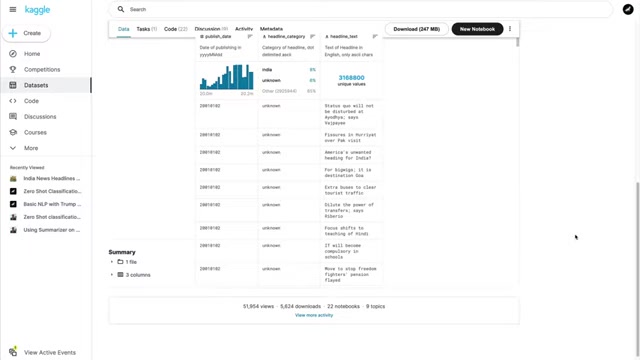
The Role of Hugging Face Transformers
The Hugging Face Transformers library is a treasure trove of pre-trained language models. It provides easy access to state-of-the-art models like BERT, RoBERTa, and DistilBERT, which can be used for a variety of NLP tasks, including zero-shot text classification. The library offers a user-friendly 'pipeline' function that simplifies the process of using these models, allowing you to perform complex NLP tasks with just a few lines of code.
Practical Steps for Using Zero-Shot Classification
Step 1: Install Necessary Libraries
Install the transformers library from Hugging Face and pandas for data handling.
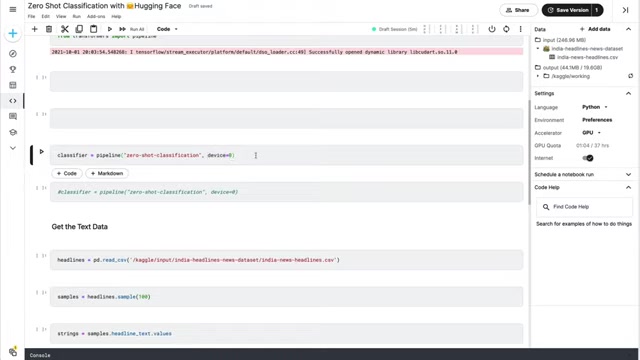
pip install transformers pandasStep 2: Import Libraries
Import pipeline from the transformers library and pandas to read the CSV file.
from transformers import pipeline
import pandas as pd
Step 3: Load Data and Initialize Classifier
Load data from your CSV and initialize the zero-shot classification pipeline.
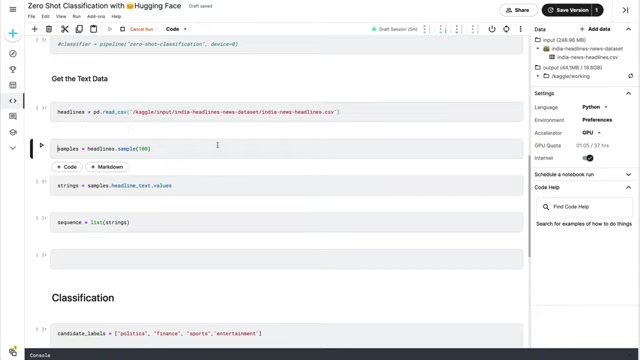
# Load data
headlines = pd.read_csv('your_news_data.csv')

# Initialize zero-shot classifier
classifier = pipeline('zero-shot-classification', device=0)
Ensure the 'device' is set appropriately for GPU usage.
Step 4: Define Candidate Labels and Classify Text
Set the candidate labels for classification (e.g., 'politics', 'finance', 'sports') and classify your text data.
candidate_labels = ['politics', 'finance', 'sports', 'entertainment']
samples = headlines['headline_text'].sample(100).tolist()
results = classifier(samples, candidate_labels)
Step 5: Analyze and Interpret Results
Iterate through the results to analyze classifications, adjusting candidate labels or model parameters as needed for improved accuracy.
for result in results:
    print(result)





Most people like

































Report
Please select a reason for reporting
- 13 Reasons to Switch from Snapchat to Text Messaging
- 7 Powerful Speech to Text Apps to Boost Productivity
- 10 Best Speech to Text Tools for Effortless Transcription
- 13 Free Tools to Easily Transcribe Audio to Text
- 15 Surprising Ways Google's Speech-to-Text Boosts Productivity
- 7 Best Free Online Audio to Text Transcription Tools
- 9 Tips to Transcribe Speech to Text Faster and Better
- 13 Best Speech to Text Software for Windows 10 in 2023
- 7 Tips for Choosing the Best Transcriber for Audio to Text
- 11 Reasons Why Dragon Speech-to-Text Apps are Game-Changers
- 6 Secrets to Enhance Your Speech to Text Transcription
- 6 Brilliant Ways to Boost Productivity with Talk-to-Text on Your MacBook
- 6 Ways Transcription Software Converts Audio to Text
- 8 Tips to Transcribe Speech to Text Like a Pro
- 6 Reasons IBM Watson Speech to Text is a Game-Changer
- 14 Powerful Ways Talk-to-Text Improves Your Workflow
- 12 Top Windows Speech-to-Text Software for Efficient Transcription
- 12 Game-Changing Benefits of Apple's Speech to Text Technology
- 9 Powerful Use Cases for AWS Speech to Text Technology
- 10 Easy Steps to Transcribe YouTube Videos to Text
- transcription audio en texte
- online audio transcription
- free audio file transcription
- free ai audio transcription
- audio transcription service
- audio transcription online free
- audio transcription free online
- audio to transcription software
- audio and transcript
- ai audio transcription free
- voice recording to text converter
- translate voice recording to text
- record voice to text
- audio recording to text converter
- voice recording and transcription
- chatgpt voice to text
- gmail voice to text
- speech to text reader
- speech to text ai free
- speech to talk
- How to Use AI Tools to Find Internal Linking Opportunities Across a Business Website
- Discover Your Perfect Haircut with AI Hairstyle Apps
- Free Reputation Calculator Tools: How They're Adapting to Score AI Visibility, Not Just Rankings
- Design Professional Flyers for Free on Your Phone
- Best Free Flyer Maker Apps for Android: Design Like a Pro
- How to Know If Your Business Is Ready for an AI Customer Service Agent
- Revolutionizing Storytelling: From Novels to Screenplays with AI
- Create Engaging Animated Explainer Videos with a Free AI Tool
- Stop Multi-Subscribing: Benchmark Top AI Visual Models in One Canvas
- Best Seedance 2.5 API Provider: Every Price on the Market, Checked at Source
- Top AI Social Media Management Tools: Automate Your Content Strategy
- Free AI Text to Video Generator: Create Stunning Videos from Text
- Discover 17 ChatGPT Alternatives: A Comprehensive Comparison
- Character.AI vs. Janitor AI: Which AI Chat Platform Reigns Supreme?
- Top Virtual Assistant Companies in 2026: Reviews, Pricing, and Plans Compared
- Unveiling FaceCheck.ID: Revolutionizing Reverse Image Searches with AI
- 11 Best AI Dialers in 2026: Features, Pricing, Pros and Cons
- How I Direct Consistent AI Clips: A Hands-On Guide to Multi-Model Generation
- A Realistic Review of the Photo Generator Image Tool
- Playwright MCP Server: Automated Web Testing with Agent Mode

Copyright ©2026 toolify