Sponsored by
APIMaster



AnyPicker - Chrome Extension
3.7
89 Reviews
0 Saved
Introduction:
A free and easy-to-use web data scraper with A.I.-powered pattern recognition.
Updated Time
Apr 23 2024
Active Users
20.0K

SocQ
AI-Agent-Ready Social API. Simple. Reliable. Scalable.

Nextbrowser
Automate logins, scraping, outreach, and more — just by chatting with AI.

APIMart
AI API, 99.9% SLA. Your AI, Always On.

PoYo.AI
High concurrency. Stable AI API. Better pricing.

APIMaster
GPT up to 95% off + $20 trial. Fingerprint-verified APIs. Low-cost and stable.

AnyPicker AI Chrome Extension Information
What is AnyPicker ai chrome extension?
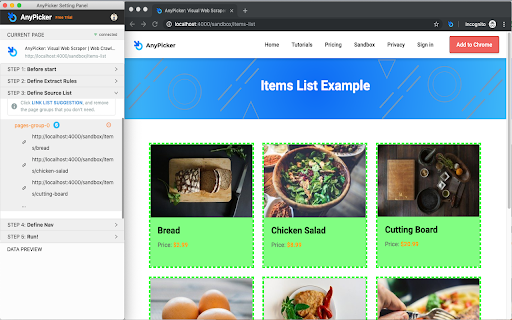
AnyPicker is a free and easy-to-use web data scraper. With a powerful A.I.-powered pattern recognition engine, you can extract any website data easily with just a few clicks.
How to use AnyPicker ai chrome extension?
Use AnyPicker's graphical interface to select the data you want to extract from a website. The A.I. engine will recognize patterns and allow you to scrape data with just a few clicks. You can then export the data in XLS Excel or CSV format.
AnyPicker ai chrome extension's Core Features
Simple yet Powerful Graphical Interface
Works With Any Web Site, Even Behind Logins
Export XLS Excel and CSV format
Scrape and Download Images
A.I. powered Patterns Recognition
Full Support for Pagination and Infinite Scroll
Auto Anti-Scraping Detection
Save Recipes For Repeat Scraping
Crawl Multiple Pages At the Same Time
AnyPicker ai chrome extension's Use Cases
#1
Public business lead scraping, email collector, or public phone scraping
#2
Scrape real estate data from Zillow, RedFin estate agent, or broker websites
#3
Amazon, Shopify, BigCommerce, or any eCommerce platform data scraper for price monitoring, detailed description extraction
#4
Extract Amazon, Walmart, Etsy, Lazada, AliExpress product reviews, and work with any eCommerce website
#5
eBay listing scraper to track competition on eBay for SME owners and home businesses
#6
Scraping data on Yelp, Yellow Pages to optimize your eCommerce shops
#7
Contact scraping and data scraper for data extraction freelancers on Fiverr and Upwork
#8
Use AnyPicker for Data entry, automation form filling, and data extraction assistant for working from home or home business
#9
Scrape Website data scraping for SEO and content extraction tools
#10
Monitoring new job posting on Indeed or Monster, or any employer websites for job seekers
#11
Scrape Lead information from LinkedIn or Indeed and enter into Salesforce for potential sales opportunities and or recruiter job candidate database
#12
Gather data from any website for data mining purposes
FAQ from AnyPicker
What if AnyPicker doesn't work in my case?
How can I provide feedback or feature requests?
iMean AI Trip Planner
AI trip planner that creates personalized itineraries, finds cheap flights and hotels, and helps you plan an entire trip in one chat.
Try Now
YouArt
Agentic Creative OS
Try Now
AD
Analytic of AnyPicker AI Chrome Extension
AnyPicker Active Users
Total Installed User
20.0K (10.0K)