Sponsored by
Vmake Labs Video Enhancer


Chat Cache
5
0 Reviews
0 Saved
Introduction:
Browser extension to save and reuse ChatGPT prompts locally.
Added on:
Mar 20 2024
Monthly Visitors:
--

ScholarSail
Connected AI study workspace for flashcards, mind maps, memory palaces, and focused planning

Decksy AI
AI presentation maker that creates researched, professional slides from topics, text, or uploaded documents.

Maxworker.ai
Max is an AI coworker for your team inside Slack. He connects to 25+ essential work tools today, with 3,000+ tools coming soon, and turns your team’s context into ready-to-review work. Fixed price, no surprise.

Runable
Runable is a general AI agent that can execute any task, from building web apps, slides, reports, and documents to generating images, videos, and podcasts, all in one place. It doesn’t just create it connects. Runable integrates with thousands of your favorite apps so you can simply ask it to do the work for you.

Flowith 2.0
AI Creation Workspace for knowledge transformation and collaboration with AI models.

Chat Cache Product Information
What is Chat Cache?
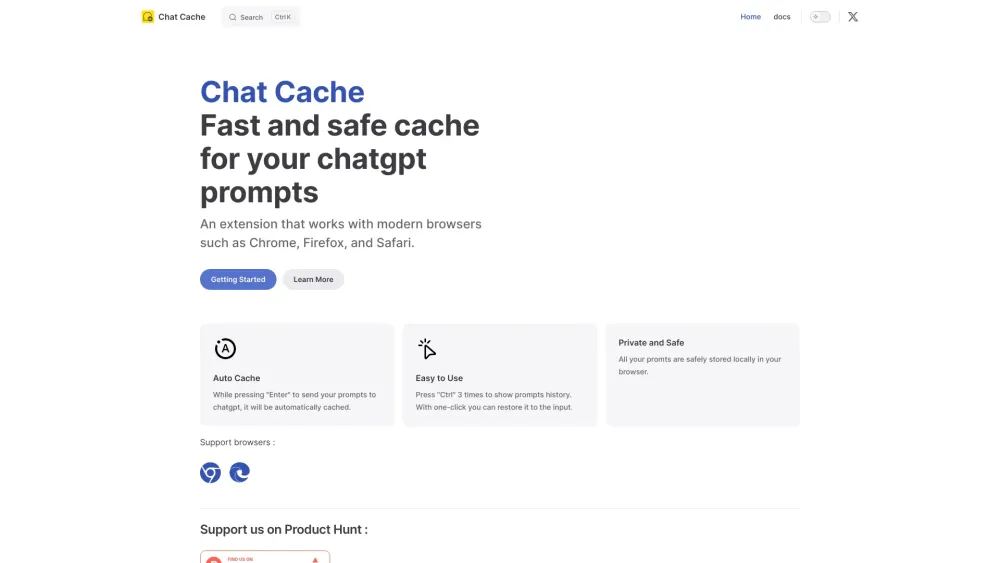
Chat Cache is a browser extension designed to save, manage, and reuse ChatGPT prompts. It allows users to keep their prompts cached locally for easy access and reuse.
How to use Chat Cache?
Install the Chat Cache extension. Prompts are automatically cached when you send them to ChatGPT. Press 'Ctrl' three times to show the prompts history and restore a prompt with one click.
Chat Cache's Core Features
Automatic caching of ChatGPT prompts
Easy access to prompt history with 'Ctrl' + 'Ctrl' + 'Ctrl'
One-click prompt restoration
Local and private storage of prompts
Chat Cache's Use Cases
#1
Quickly reuse frequently used ChatGPT prompts without retyping them.
FAQ from Chat Cache
What is Chat Cache?
How do I use Chat Cache?
Where are my prompts stored?
PaioClaw
Managed, secure platform for deploying and automating OpenClaw AI assistants in 60 seconds.
Try Now
AD
Chat Cache Reviews (0)
5 point out of 5 point
ezsub
Unbeatable Price! Get ChatGPT Plus for only $12.95 with NO credit card required. Smooth local payments for global users.
Try Now
AD
Analytic of Chat Cache
Chat Cache Website Traffic Analysis
Chat Cache Launch embeds
Use website badges to drive support from your community for your Toolify Launch. They're easy to embed on your homepage or footer.
Light
Neutral
Dark



Copy embed code
How to install?Alternative of Chat Cache

Website
Freemium
Paid
Contact for Pricing
AI Productivity ToolsAI WorkflowAI AgentAI For Data AnalyticsAI Customer ServiceAI MarketingAI SalesAI For FinanceAI Code AssistantAI ModelsAI Data MiningAI Knowledge Management
Open site
--
Direct (39.25%)
SearchOrganic (30.25%)
Referrals (10.31%)
Social Listening