Sponsored by
Tripo AI



ChatGPT Lightspeed Keyboard - Chrome Extension
0
0 Reviews
0 Saved
Introduction:
Chrome extension with keyboard shortcuts for efficient ChatGPT interaction.
Updated Time
Jan 25 2024
Active Users
13

Runable
Runable is a general AI agent that can execute any task, from building web apps, slides, reports, and documents to generating images, videos, and podcasts, all in one place. It doesn’t just create it connects. Runable integrates with thousands of your favorite apps so you can simply ask it to do the work for you.

PaioClaw
Managed, secure platform for deploying and automating OpenClaw AI assistants in 60 seconds.

Maxworker.ai
Max is an AI coworker for your team inside Slack. He connects to 25+ essential work tools today, with 3,000+ tools coming soon, and turns your team’s context into ready-to-review work. Fixed price, no surprise.

ezsub
Unbeatable Price! Get ChatGPT Plus for only $12.95 with NO credit card required. Smooth local payments for global users.

Velo
AI video infrastructure to explain, train, and sell faster.

ChatGPT Lightspeed Keyboard AI Chrome Extension Information
What is ChatGPT Lightspeed Keyboard ai chrome extension?
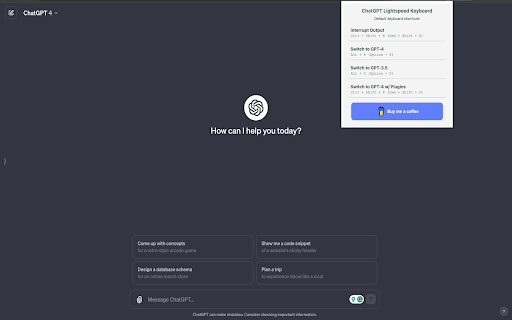
ChatGPT Lightspeed Keyboard is a Chrome extension designed to enhance the user experience with ChatGPT by providing efficient keyboard shortcuts. These shortcuts allow users to quickly interrupt output, switch between different GPT models (GPT-4, GPT-3.5, and GPT-4 with Plugins), streamlining their interaction with the AI.
How to use ChatGPT Lightspeed Keyboard ai chrome extension?
Install the Chrome extension. Use the specified keyboard shortcuts (Ctrl+Shift+K/Cmd+Shift+K, Alt+4/Option+4, Alt+3/Option+3, Ctrl+Shift+P/Cmd+Shift+P) to control ChatGPT.
ChatGPT Lightspeed Keyboard ai chrome extension's Core Features
Keyboard shortcuts for ChatGPT
ChatGPT Lightspeed Keyboard ai chrome extension's Use Cases
#1
Quickly interrupt ChatGPT output.
#2
Easily switch between GPT-4, GPT-3.5, and GPT-4 with Plugins.
FAQ from ChatGPT Lightspeed Keyboard
What keyboard shortcuts are available?
ChatHawk
Find the Best Answer Across the Top AI Models
Try Now
AD
Nextbrowser
Automate logins, scraping, outreach, and more — just by chatting with AI.
Try Now
AD
Analytic of ChatGPT Lightspeed Keyboard AI Chrome Extension
ChatGPT Lightspeed Keyboard Active Users
Total Installed User
13 (3)
Alternative of ChatGPT Lightspeed Keyboard AI Chrome Extension
Website
Free
AI Productivity ToolsAI Developer ToolsAI Email AssistantAI Search EngineAI Inspirational Quotes
Open site
 63.44%
--
63.44%Mail (0.00%)
GenAi (0.00%)
Direct (0.00%)
Website
Free Trial
Contact for Pricing
AI Productivity ToolsAI Project ManagementAI Task ManagementAI AgentAI WorkflowAI SummarizerAI Writing AssistantsAI ChatbotAI MarketingAI RecruitingAI FormsAI Documents GeneratorAI For Data AnalyticsAI Email GeneratorAI Report GeneratorAI Grammar CheckerAI ParaphraserAI TranslateAI Search EngineAI Developer Tools
Open site
 19.55%
79.6K
19.55%Direct (51.21%)
SearchOrganic (42.28%)
Referrals (3.15%)