



ChatGPT Prompt Plus - Chrome Extension


What is ChatGPT Prompt Plus ai chrome extension?
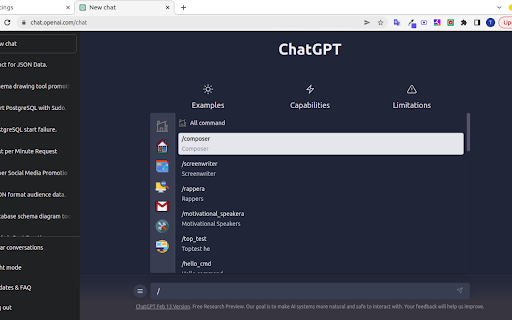
ChatGPT Prompt Plus is a Chrome extension designed to enhance the ChatGPT experience by allowing users to save, manage, and reuse prompts easily. It enables the creation of a prompt library with flexible templates, including parameters with customizable details like default values and input types. This facilitates the creation of high-quality and adaptable prompts for various use cases.
How to use ChatGPT Prompt Plus ai chrome extension?
1. Access the prompt setting page via the hamburger icon in ChatGPT. 2. Add and detail your prompt in the prompt setting. 3. Type a forward slash (/) in the chat input to open the prompts list. 4. Select a prompt and fill in any required parameter data. 5. Click the 'Send icon' to proceed.
ChatGPT Prompt Plus ai chrome extension's Core Features
Manage and reuse prompt library
Set hotkeys for prompts
Prebuilt prompt templates
Organize prompts with categories and custom icons
Popup search for easy prompt finding
Bind parameters with prompts
Variant parameter types
Simple and easy-to-use interface
ChatGPT Prompt Plus ai chrome extension's Use Cases
Quickly access and use frequently used commands and phrases in ChatGPT
Create adaptable prompts with parameters for different scenarios
FAQ from ChatGPT Prompt Plus
How do I access the prompt settings?
How do I use a saved prompt?
Why can't I send prompts with parameters?
Analytic of ChatGPT Prompt Plus AI Chrome Extension
ChatGPT Prompt Plus Active Users
Total Installed User
Alternative of ChatGPT Prompt Plus AI Chrome Extension
 41.09%
More Content About ChatGPT Prompt Plus
14 Ways an AI Typing Assistant Can Boost Your Productivity
By Elijah on June 20 2024
Unlock Your Efficiency: 14 Ways AI Typing Assistant Enhances Productivity!