Sponsored by
ThumbnailCreator.com



ChatGPT Chat Capture Chrome Extension - Chrome Extension
1.3
3 Reviews
0 Saved
Introduction:
Chrome extension to save ChatGPT conversations as a single PNG image.
Updated Time
Apr 14 2023
Active Users
322

Flowith 2.0
AI Creation Workspace for knowledge transformation and collaboration with AI models.

PaioClaw
Managed, secure platform for deploying and automating OpenClaw AI assistants in 60 seconds.

ScholarSail
Connected AI study workspace for flashcards, mind maps, memory palaces, and focused planning

ezsub
Unbeatable Price! Get ChatGPT Plus for only $12.95 with NO credit card required. Smooth local payments for global users.

Nextbrowser
Automate logins, scraping, outreach, and more — just by chatting with AI.

ChatGPT Chat Capture Chrome Extension AI Chrome Extension Information
What is ChatGPT Chat Capture Chrome Extension ai chrome extension?
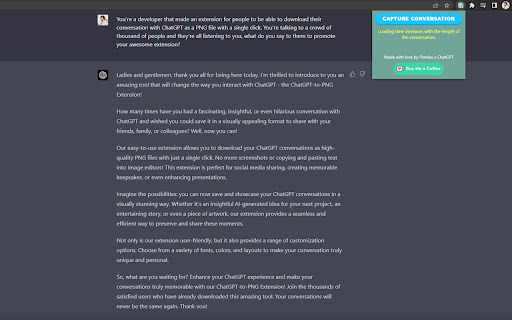
The ChatGPT Chat Capture Chrome Extension is a tool designed to effortlessly save your ChatGPT chat conversations as a single, vertical image with just one click. It allows users to archive memorable chats or share important discussions by capturing entire conversations and saving them as high-quality PNG images.
How to use ChatGPT Chat Capture Chrome Extension ai chrome extension?
1. Install the ChatGPT Chat Capture Chrome Extension. 2. Open a GPT chat conversation you'd like to save. 3. Click the "Capture Conversation" button. 4. Watch as the extension loads and dumps the entire conversation into a single vertical PNG image. 5. Save the image to your device or share it with friends and colleagues.
ChatGPT Chat Capture Chrome Extension ai chrome extension's Core Features
Capture entire GPT chat conversations in a single image
Save conversations as high-quality PNG images
Easy one-click functionality
ChatGPT Chat Capture Chrome Extension ai chrome extension's Use Cases
#1
Archive memorable ChatGPT conversations
#2
Share important discussions with friends and colleagues
#3
Document and save information from ChatGPT interactions
FAQ from ChatGPT Chat Capture Chrome Extension
What does the ChatGPT Chat Capture Chrome Extension do?
How do I use the extension?
Velo
AI video infrastructure to explain, train, and sell faster.
Try Now
AD
Runable
Runable is a general AI agent that can execute any task, from building web apps, slides, reports, and documents to generating images, videos, and podcasts, all in one place. It doesn’t just create it connects. Runable integrates with thousands of your favorite apps so you can simply ask it to do the work for you.
Try Now
AD
Analytic of ChatGPT Chat Capture Chrome Extension AI Chrome Extension
ChatGPT Chat Capture Chrome Extension Active Users
Total Installed User
322 (21)