



GPT4-Requests-Counter - Chrome Extension




What is GPT4-Requests-Counter ai chrome extension?
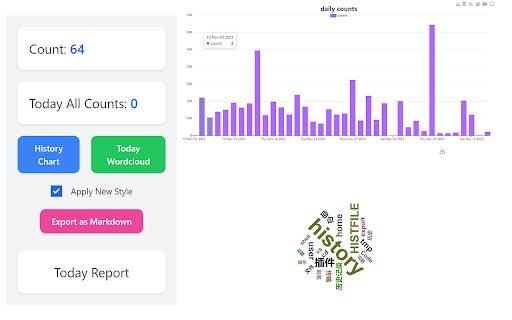
GPT4-Requests-Counter is a Chrome extension designed to help users track their ChatGPT usage, specifically the number of questions asked within a three-hour period. It displays the remaining time until the end of the three-hour window. The extension also includes features like historical interaction data charts, daily conversation word clouds, and options to export conversations. It aims to provide users with a comprehensive overview of their ChatGPT activity.
How to use GPT4-Requests-Counter ai chrome extension?
After installing the extension, it automatically tracks your ChatGPT requests. The number of questions sent and the time remaining in the three-hour period are displayed in the input box placeholder. Clicking the extension icon also shows this information. Historical data, word clouds, and export options are accessible through the extension's interface.
GPT4-Requests-Counter ai chrome extension's Core Features
Tracks the number of ChatGPT questions asked.
Displays remaining time in the three-hour period.
Provides historical interaction data charts.
Generates daily conversation word clouds.
Offers options to export conversations.
Generates daily reports.
GPT4-Requests-Counter ai chrome extension's Use Cases
Monitoring ChatGPT usage to stay within limits.
Analyzing conversation history for insights.
Exporting conversations for record-keeping or further analysis.
Visualizing conversation topics with word clouds.
FAQ from GPT4-Requests-Counter
What does the GPT4-Requests-Counter extension do?
Is the GPT4-Requests-Counter extension open source?
Does the extension collect my data?
Analytic of GPT4-Requests-Counter AI Chrome Extension
GPT4-Requests-Counter Active Users
Total Installed User
Alternative of GPT4-Requests-Counter AI Chrome Extension
 87.46%