Sponsored by
Crazyrouter



HtmlToClaude - Chrome Extension
5
1 Reviews
0 Saved
Introduction:
Browser extension to streamline Claude AI conversations with HTML content capture.
Updated Time
Dec 18 2025
Active Users
60

iMean AI Trip Planner
AI trip planner that creates personalized itineraries, finds cheap flights and hotels, and helps you plan an entire trip in one chat.

Free
Maxworker.ai
Max is an AI coworker for your team inside Slack. He connects to 25+ essential work tools today, with 3,000+ tools coming soon, and turns your team’s context into ready-to-review work. Fixed price, no surprise.

Demi AI
Proactive AI assistant for sales professionals to automate emails, scheduling, and deal prioritization.

iDox.ai Guardrail
Real-time AI guardrails that prevent sensitive data exposure in AI tools, copilots, and autonomous AI agents.

Runable
Runable is a general AI agent that can execute any task, from building web apps, slides, reports, and documents to generating images, videos, and podcasts, all in one place. It doesn’t just create it connects. Runable integrates with thousands of your favorite apps so you can simply ask it to do the work for you.

HtmlToClaude AI Chrome Extension Information
What is HtmlToClaude ai chrome extension?
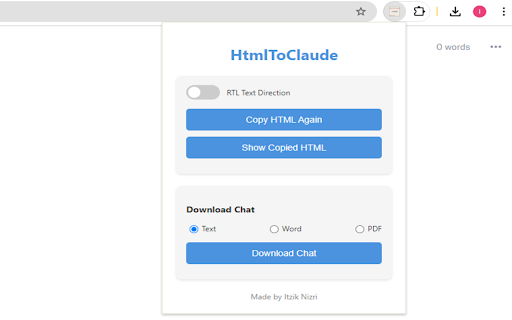
HtmlToClaude is a browser extension designed to streamline conversations with Claude AI by allowing users to easily capture HTML content from any webpage and seamlessly paste it into their Claude AI conversations. It enhances interaction with Claude AI by enabling users to extract and copy relevant HTML content, paste it directly into Claude AI's input field, download conversations in various formats, and toggle text direction for better language support.
How to use HtmlToClaude ai chrome extension?
Install the HtmlToClaude extension. Browse to a webpage, extract and copy the desired HTML content. Paste the copied content into Claude AI's input field. Download your Claude AI conversations in text, Word, or PDF format. Toggle between LTR and RTL text direction as needed.
HtmlToClaude ai chrome extension's Core Features
Extract and copy HTML content from web pages
Paste copied content directly into Claude AI's input field
Download Claude AI conversations in various formats (text, Word, PDF)
Toggle between LTR and RTL text direction
HtmlToClaude ai chrome extension's Use Cases
#1
Researchers can easily share web content with Claude AI for analysis.
#2
Writers can quickly incorporate web-based information into their writing process using Claude AI.
FAQ from HtmlToClaude
What does HtmlToClaude do?
What formats can I download my Claude AI conversations in?
Does HtmlToClaude support different languages?
Auditfyy
AI-powered white-label SEO audit software with Google integrations for digital agencies.
Try Now
AD
Nextbrowser
Automate logins, scraping, outreach, and more — just by chatting with AI.
Try Now
AD
Analytic of HtmlToClaude AI Chrome Extension
HtmlToClaude Active Users
Total Installed User
60 (-8)
Alternative of HtmlToClaude AI Chrome Extension
Website
Free
AI AssistantAI ChatbotAI Mental HealthAI CoachingAI Productivity ToolsAI Knowledge ManagementAI Note Taker
Open site
 40.64%
13.4K
40.64%Direct (39.66%)
SearchOrganic (31.54%)
Referrals (10.38%)